

The lowest-cost prospecting process isn’t always the one with the smallest software bill. The cost of manual prospecting vs automation is harder to assess because salaries, research time, contact preparation, and workflow overhead may sit in different budget lines. A platform subscription is visible; the hours spent finding and validating prospects often aren’t.
If your team spends sales capacity assembling lists and preparing outreach, it makes sense to ask whether automation could cost less. But a vendor’s ROI claim won’t answer that for your process. A useful comparison starts with consistent assumptions: what work changes, what still needs human review, and what each approach costs to run.
This guide gives you a practical model for calculating those costs from your team’s data, estimating whether automation may be operationally worthwhile, and identifying where human judgment should stay in the loop. We’ll account for software, oversight, and workflow changes, then map common prospecting tasks to the right approach. Seasely combines company discovery and qualification, verified decision-maker emails, personalized sending, and campaign optimization in one outbound workflow. The goal is a decision you can explain to finance, not a savings claim built on someone else’s assumptions.
Key Takeaways
- Choose a consistent unit, such as cost per qualified account, so manual and automated prospecting can be compared fairly.
- Map research, qualification, contact verification, outreach, and review to see where automation can support the workflow and where human judgment matters.
- Include labor, software, data, and oversight in your comparison, using the same prospect criteria and time period for both approaches.
- Use the cost of manual prospecting vs automation to build an ROI model from tracked hours, loaded labor costs, and expected operating expenses.
- Assess how Seasely’s prospect discovery, verified contacts, personalized sending, and optimization fit your workflow without assuming a specific saving or outcome.
What the Cost of Manual Prospecting vs Automation Really Includes
Manual prospecting and automation are two ways to run the same basic workflow: identify target companies, assess fit, find relevant decision-makers, verify contact details, prepare outreach, and maintain records. The comparison is useful only when both approaches are measured against the same tasks and quality standard.
Choose an output unit before comparing costs. Cost per qualified account works when the goal is to identify companies that meet defined criteria. Cost per sales-ready contact may be more useful when the team needs a verified decision-maker and usable outreach details. Define “qualified” in operational terms, such as required company attributes and role relevance, then apply the same definition to both methods.
A CRM can be part of either workflow, but it doesn’t create an automatic cost advantage. Customer Relationship Management (CRM) systems organize customer and prospect information, but people still spend time entering, checking, and acting on that data. Include the CRM-related work prospecting actually requires.
Which manual prospecting costs are easy to overlook?
Count the time spent researching companies, assessing fit, finding contacts, verifying details, and updating lists. Then apply your organization’s chosen loaded labor rate, including the compensation components it normally uses for internal cost analysis. Use actual time records where possible. If work is shared across roles, track each role separately rather than assigning all the effort to an SDR.
Management, onboarding, training, and rework can also affect the total. Include them when you can measure the portion tied to prospecting. For example, log time spent correcting unsuitable accounts or replacing outdated contacts instead of adding a broad overhead estimate without evidence.
What belongs in the automation cost baseline?
Start with the subscription expenses for tools used in the workflow. Add implementation effort, data handling, and human review. If staff maintain workflows, resolve exceptions, or correct output, track those hours too. Include only costs and labor that belong to prospecting, and use the same measurement period as the manual baseline.
Total workflow cost includes software, labor, data, and oversight. This definition keeps the comparison grounded in operations rather than license price alone. It also makes clear that automation changes how work is done; it doesn’t necessarily remove every task or the need for review.
For a fair calculation, divide each approach’s total cost over the measurement period by the number of outputs that meet the shared qualification standard. If one method produces more records but fewer that meet the criteria, raw volume can hide the real unit cost. Track both total qualified output and the effort required to produce it.
The cost of manual prospecting vs automation depends on your team’s workload, labor assumptions, data requirements, and review process. Vendor claims can suggest what to examine, but they can’t establish your result unless they match your workflow and measurement rules. Build the baseline from your own inputs, then test whether the automated process produces comparable qualified output at an operating cost your team can justify.
How Automation Changes Prospecting Work Without Removing Human Oversight
Prospecting is a sequence of linked tasks and decisions: research companies, assess fit, find and verify decision-makers, personalize outreach, send it, and review the results. Automation can handle repeatable steps based on defined rules. It changes where staff time goes, not whether people matter. Instead of compiling every record manually, the team can spend more time setting targeting rules, reviewing exceptions, improving messages, and interpreting campaign results.
That distinction is central to the cost of manual prospecting vs automation. A shorter task list doesn’t automatically mean a lower operating cost if review, correction, or workflow maintenance increases. IBM’s overview of sales automation provides useful context: automation supports sales processes, while teams remain responsible for designing and managing those processes.
Task automation can execute defined steps; it can’t guarantee autonomous sales outcomes. Treat software output as a workflow input that needs suitable criteria and oversight.
Which prospecting tasks are candidates for automation?
Start with repeatable work. Company discovery can follow account criteria such as industry, location, or company profile. Qualification can apply agreed rules to organize candidates for review. Contact discovery and verification can also run as data workflows, but teams should check a sample and monitor exceptions rather than assume every record is correct.
Personalized email sequences can reduce the repeated effort of preparing and sending messages. Automation can use approved inputs to tailor outreach, while people define the audience, review message quality, and assess whether the personalization is relevant. Seasely supports company discovery and qualification, verified decision-maker contacts, personalized email sending, and campaign optimization as parts of an outbound workflow.
Where does human review still matter?
People should own target-market choices and decide whether a prospect’s context makes outreach appropriate. They can also catch cases that rules miss, such as a company that technically fits a profile but has a reason the message would be poorly timed or irrelevant. Human judgment is especially useful when the available information is incomplete or contradictory.
Set checkpoints for data quality, message relevance, and campaign performance. Review exceptions and buyer responses as signals for refining criteria and outreach, not as automatic proof that a workflow is succeeding.
- Before launch: Confirm the target definition and review sample records and messages.
- During execution: Check exceptions, contact accuracy, and personalization quality.
- After a campaign: Use response patterns and performance data to adjust the process.
This division keeps automation focused on repeatable execution and gives people control over judgment calls. Teams assessing an end-to-end automated prospecting workflow can map each supported task to its review point, then include both in the cost model.
Manual Prospecting vs Automation: Compare Total Cost and Useful Output
A useful comparison tracks both operating inputs and qualified output. Use the same target-account criteria, qualification definition, and measurement period for each approach. If the manual process covers one quarter and the automated process covers a short pilot, or if one uses broader account criteria, the results won’t be comparable.
Compare cost per qualified account or verified decision-maker contact, rather than raw records gathered or emails sent. More activity doesn’t necessarily mean more useful output. Track relevance, contact accuracy, deliverability, and sales acceptance separately so volume doesn’t stand in for quality.
| Cost or output area | Manual prospecting | Automated prospecting |
|---|---|---|
| Labor | Staff hours for research, qualification, contact finding, list upkeep, and outreach preparation. | Staff hours for setup, review, exception handling, and workflow maintenance. |
| Software | Existing systems used to record accounts and manage work. | Subscription expense for the platform and any connected tools used in the workflow. |
| Data | Time and any direct costs tied to sourcing, checking, and refreshing prospect information. | Data-related expenses and staff time to assess accuracy, coverage, and exceptions. |
| Oversight | Manager review, training, and quality checks where measured. | Human review of target fit, contact details, personalization, and campaign output. |
| Workflow speed | Measure elapsed time and staff effort across the defined steps. | Measure the same steps, including setup and review, rather than relying on a stated output multiplier. |
| Qualification quality | Track how many researched accounts meet the agreed criteria. | Apply the same criteria and check how many automated results pass human review. |
How do the approaches differ across the workflow?
With manual prospecting, a person typically finds companies, assesses fit, locates decision-makers, and prepares outreach record by record. Automation can support discovery and qualification against defined criteria, surface verified contacts, and assist with personalized sending. In both cases, measure how many results meet the same standard. Keep throughput distinct from relevance, deliverability, and sales acceptance for follow-up.
For example, count qualified accounts that pass review, not every company surfaced by a search or every email sent. Record the effort required to reach that output. This gives you a basis for comparing workflow costs instead of headline activity.
When can manual prospecting remain the better fit?
Manual research may fit a small, tightly defined list, an unusual account context, or a relationship-led introduction where personal judgment shapes qualification. It can also make sense when the process is infrequent or changes too much to justify a repeatable workflow. Automation isn’t a default; use it where repeatable work outweighs setup and oversight effort.
The cost of manual prospecting vs automation should be decided using your team’s evidence. Use a matched period, identical criteria, and the same definition of useful output. Generic productivity multipliers and case studies can prompt questions, but they can’t replace your own time, quality, and cost records.
Calculate Sales Automation ROI With a Practical, Measurable Model
A useful ROI model starts with comparable work, not a generic productivity claim. Set the same measurement period, prospect definition, and team scope for both scenarios. Then separate observable workflow costs from downstream outcomes such as opportunities or revenue, which require their own attribution assumptions.
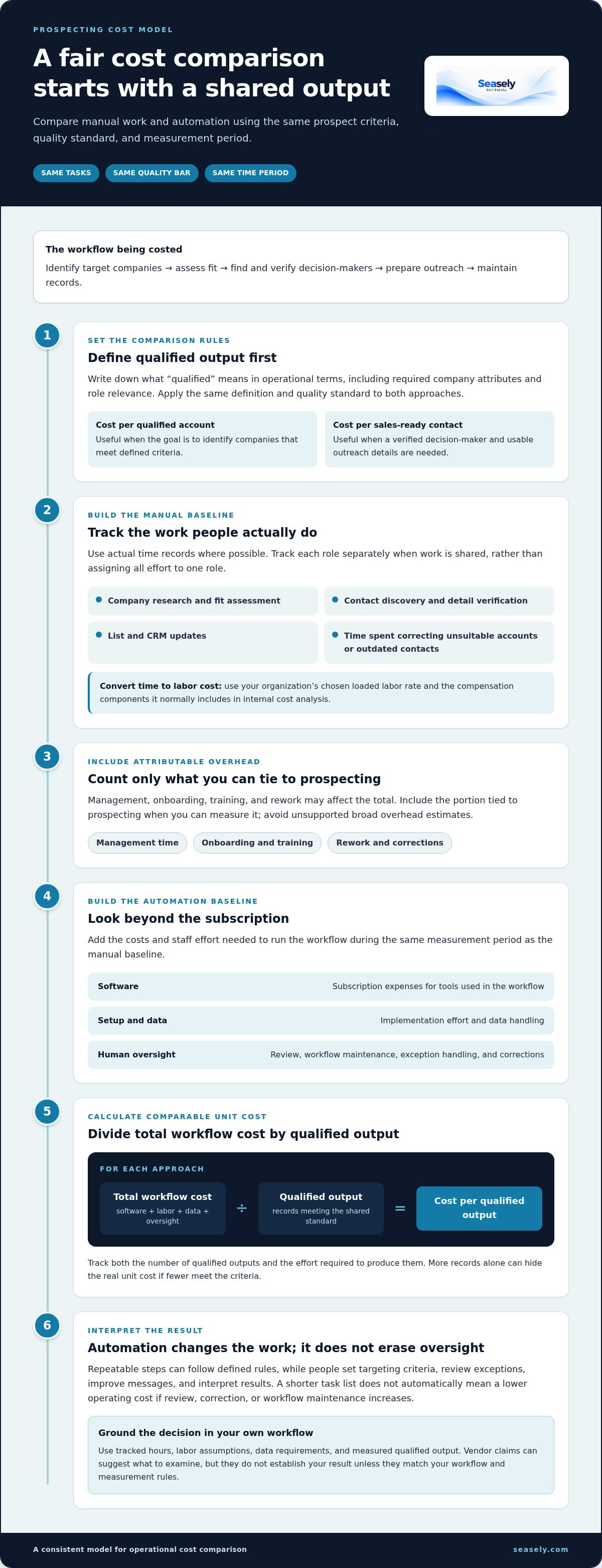
Cost per qualified prospect equals total workflow cost divided by qualified prospects. Use your team’s definition of “qualified” and count only prospects that meet it.
- Set the boundaries. Choose a period and define the team, target criteria, and qualified prospect standard. Keep these consistent across the manual baseline and automation test.
- Calculate the manual baseline. Track hours for research, qualification, contact verification, personalization, sending, and review. Multiply each role’s hours by your organization’s loaded labor assumption, then add attributable data or software expenses. Don’t allocate shared costs twice.
- Calculate the automated workflow. Add the subscription, implementation effort, data expenses, oversight hours, and remaining manual work for the same period. Include workflow maintenance and exception handling when they consume measurable staff time.
- Compare useful output. Divide each scenario’s total workflow cost by the number of qualified prospects produced under the same criteria. Record verified contacts separately if they are a distinct output your team tracks.
What inputs should a prospecting ROI model use?
Build the model from time records and cost inputs your team can explain. Track time by task, not just total hours, so you can see which steps change. Record qualified accounts and verified contacts using consistent internal definitions. Document subscription, data, setup, and maintenance costs, and allocate existing expenses only where they apply to prospecting.
How can a team test the estimate before scaling?
Run a limited pilot alongside a comparable manual cohort. Apply the same target criteria and qualification rules, then compare process time, data quality, qualified output, and sales-team acceptance. Keep early workflow indicators separate from longer-term outcomes. Opportunities and revenue may depend on additional steps and timing, so state what the pilot can and can’t attribute.
How should the team interpret the result?
Use break-even analysis to identify the assumptions that matter most. For example, test how the cost per qualified prospect changes if review time rises or the number of accepted accounts falls. Build conservative, expected, and optimistic scenarios from internal observations, and label each assumption clearly. Don’t fill gaps with industry-average prices, savings, or conversion rates.
This method makes the cost of manual prospecting vs automation auditable and easier to discuss with finance. For a closer look at mapping platform capabilities to workflow steps, use this AI outbound sales platform workflow evaluation. To put the model into practice, evaluate Seasely’s outbound workflow against your team’s measured inputs and review requirements.
Where Seasely Fits in a Cost-Conscious Prospecting Workflow
Once you’ve established a baseline and chosen a qualified-prospect measure, you can assess whether a platform fits the work your team actually performs. Seasely brings several B2B outbound stages into one workflow: company discovery and qualification, verified decision-maker contacts, personalized email sending, and campaign optimization. This can bring prospecting steps together, but it doesn’t remove subscription expense, human oversight, or the need to validate results.
For teams running repeatable outbound across several prospecting stages, the practical evaluation is straightforward: which tasks can the platform support, how much staff time remains, and does the resulting output meet your qualification standard? Answer those questions with pilot data, not an assumed saving.
Which workflow costs can Seasely help teams assess?
Map each capability to a current task and its tracked cost. Company discovery and qualification relate to time spent building target lists and checking account fit. Verified decision-maker emails relate to contact sourcing and data checks. Personalized sending and optimization relate to preparing campaigns, executing outreach, and refining it based on performance.
- Discovery and qualification: Compare list-building effort and qualified account output.
- Contact data: Track sourcing and checking time alongside verified-contact quality.
- Sending and optimization: Measure execution and refinement effort, including human review.
This mapping makes consolidation measurable: count the steps supported, then record setup, oversight, and remaining manual work in the same comparison.
What should a buyer decide before changing the workflow?
Agree on target-account criteria and define what qualifies as a prospect before a pilot begins. Assign people to review data quality, message relevance, and campaign decisions. Then select measurable criteria, such as time per qualified account, verified-contact accuracy, and sales-team acceptance, and compare them with current operations using equivalent cohorts.
Keep the test bounded and record exceptions as well as typical results. If the process needs substantial correction or the output misses the team’s criteria, include that work in the assessment. The cost of manual prospecting vs automation depends on those actual inputs and on the output your team accepts as useful.
Explore the platform after building your baseline
A product review is most useful after you know which stages consume time and how your team defines qualified output. Use your workflow map to assess where Seasely’s capabilities align, what human checks remain, and which measures will determine whether a pilot is operationally worthwhile.
With that baseline in hand, explore Seasely and compare its outbound workflow with your team’s measured requirements.
Turn Your Cost Model Into a Practical Next Step
Use your cost of manual prospecting vs automation analysis to choose one repeatable part of the workflow for closer evaluation. A focused test gives your team a clearer signal than changing several processes at once. Set a baseline, assign review ownership, and agree on what evidence would justify keeping, adjusting, or stopping the new workflow.
Keep the decision connected to the work itself. Compare how a platform’s capabilities fit your target criteria, team capacity, and standards for qualified prospects. Seasely brings prospecting and outbound execution into a workflow your team can assess against those requirements, without assuming a particular financial or sales result.
When you’re ready to compare your mapped process with the platform, explore Seasely’s B2B outbound platform. Start with a clear measure, learn from the workflow, and use evidence your team can stand behind to guide the next decision.
Frequently Asked Questions
Can a small B2B team justify prospecting automation before hiring an SDR?
Yes, if the team can identify repeatable prospecting work that limits its current capacity. Compare platform and oversight costs with the staff time spent on those tasks, then check whether the workflow produces prospects that meet your sales criteria. For example, a founder handling list research could test whether automating account discovery frees time for customer conversations. A pilot can inform the decision without assuming automation replaces an SDR.
Does automating prospecting guarantee more meetings or revenue?
No. Automation can support research, qualification, and outreach execution, but it can’t guarantee buyer interest, meetings, or revenue. Results still depend on factors such as target fit, message relevance, offer, timing, and how the team handles responses. Assess process indicators first, such as data quality and accepted prospects. Treat downstream sales outcomes separately, with clear attribution limits, rather than crediting the platform for every change in pipeline.
How long should a team track prospecting work before comparing costs?
Track long enough to capture a representative cycle of the work, including routine tasks and less frequent exceptions. A brief snapshot may miss list refreshes, campaign preparation, or correction work. There’s no universal tracking period: choose one that reflects your team’s cadence and use the same dates for both methods. If activity varies by month or campaign, note that variation and avoid comparing unlike periods.
Can automation reduce the number of poor-fit prospects in an outbound list?
It can help apply consistent account criteria during discovery and qualification, which may filter out obvious mismatches before outreach. The result depends on how clearly the team defines fit and how reliably the available data represents each company. For example, if a required company attribute is missing or outdated, the system may not classify the account as intended. Review accepted and rejected samples, then refine the criteria.
Is manual prospecting still useful for enterprise account research?
Yes. Enterprise accounts can involve complex structures, multiple buying roles, and context that doesn’t fit neatly into a standard profile. Manual research helps a seller interpret relationships, priorities, or account changes that require judgment. One practical approach is to use automation to surface candidate companies or contacts, then have a rep validate strategic accounts and tailor the research. That keeps human attention focused where context can change the decision.
What happens to the cost comparison when reply handling stays manual?
Include reply handling in the workflow cost if it is part of the process being evaluated. Track time spent sorting responses, identifying follow-up needs, routing conversations, and updating records. If reply handling stays unchanged between the manual and automated scenarios, hold its cost constant or show it separately. That makes clear whether a difference comes from prospecting tasks or from the work that happens after outreach.
Do prospecting automation tools replace a CRM?
Not necessarily. A prospecting platform may handle discovery, qualification, contact data, and outreach tasks, while a CRM remains the team’s system for managing account records and sales activity. The exact division depends on the tools and process in use. Map where prospect data is stored, how updates reach the CRM, and whether staff must enter the same information twice. Include duplicate entry or reconciliation effort in the workflow assessment.


