

What if effective cold email automation focused less on sending more messages and more on making each step deliberate? Manual research and sending take time, but automating everything without review can make outreach feel generic and raise deliverability concerns. The useful middle ground is to automate repeatable work while keeping relevance under human control.
This guide explains how to build that process. You’ll learn the main parts of a cold email automation workflow, from finding and qualifying prospects to verifying contact details, personalizing messages, sending, and measuring campaign performance. You’ll also see where human review matters, so efficiency doesn’t come at the expense of fit or trust.
We’ll cover practical ways to monitor results and refine your workflow without assuming that any tool can guarantee replies or sales. Seasely brings prospect discovery, company qualification, contact verification, personalized outreach, automated sending, and campaign analysis into one outbound workflow. The goal is not to put outreach on autopilot. It’s to reduce operational repetition while keeping targeting purposeful and decisions accountable.
Key Takeaways
- Use cold email automation to coordinate repeatable outreach tasks while keeping audience fit and message relevance in view.
- Build your workflow in sequence: define target accounts, qualify companies, verify decision-maker details, then prepare outreach.
- Automate routine execution, but review targeting and message context before sending to help protect relevance and sender reputation.
- Set a clear objective, validate your data, review your drafts, and monitor campaign outcomes so you can refine the process.
- Connect prospect discovery, verification, personalization, sending, and performance analysis into one workflow to reduce operational friction.
What Is Cold Email Automation, and What Does It Actually Automate?
Cold email automation is software that coordinates repeatable steps in targeted business email outreach. It can help a team move from identifying suitable companies to preparing and sending relevant messages, then reviewing the results. The aim is to make routine work more consistent, not to remove judgment from the process. Teams define the audience and purpose; software can help organize and execute the steps that follow.
Cold outreach differs from a newsletter. A newsletter goes to people who have opted in to receive ongoing updates. Cold outreach starts a business conversation with a professional who hasn’t subscribed to that communication. The distinction affects both the message and the process: outreach should connect to the recipient’s role and business context, while a newsletter serves an existing audience. For a broader overview of the category, see What is Marketing Automation?
A typical workflow connects several stages:
- Identify companies that fit defined account criteria.
- Qualify those companies against the campaign’s purpose.
- Find and verify relevant decision-maker contact details.
- Prepare personalized messages based on appropriate context.
- Schedule and send outreach, then review campaign activity and outcomes.
Keeping these stages connected can reduce manual handoffs and scattered records. Seasely connects company discovery and qualification with verified decision-maker contacts, personalized sending, and campaign analysis.
Which steps in B2B outreach can be automated?
Cold email automation can assist with repeatable research, contact validation, scheduling, sending, and performance tracking. For example, a workflow can keep company and contact details together, flag an address for verification, and record whether a message was sent or received a response. This reduces duplicate data entry and makes it easier to see where each prospect sits in the process.
- Research and organization: Gather company details and sort accounts against defined criteria.
- Contact validation: Check that decision-maker details are usable before outreach.
- Execution and tracking: Coordinate scheduled sending and record campaign outcomes.
When these steps are connected, the workflow is easier to inspect. The important question is whether the system supports the stages your team needs, from qualifying companies to reviewing campaign results.
What cold email automation does not do
Automation can apply rules, use available data, and carry out a sequence. It can’t establish genuine relevance if the audience is poorly chosen or the message lacks useful context. A message that mentions a company detail without connecting it to the recipient’s work can still feel generic. Review the targeting and message purpose before treating personalization as complete.
Automated sending cannot guarantee inbox placement, replies, or sales. Results depend on factors beyond the act of sending, including the quality of the audience and the usefulness of the outreach. Software supports sales judgment; it doesn’t replace the decision to contact someone, the reason for doing so, or the review needed to keep communication purposeful and responsible.
How a Cold Email Automation Workflow Moves from Target to Outreach
A reliable workflow doesn’t begin with a message template. It starts with a clear account profile, then moves through qualification, contact verification, message preparation, sending, and review. Each stage should pass useful information to the next, with a quality check before outreach goes out. That structure helps teams spot weak-fit accounts early instead of polishing messages for the wrong audience.
Start with a defined audience and qualified accounts
Translate your ideal-customer profile into practical filters. These might include industry, company size, location, or a business need your offer addresses. Add exclusion rules too, such as existing customers or companies outside your focus. Qualify the company against those criteria before choosing a contact. A verified decision-maker address helps you reach someone, but it doesn’t prove that the company or person is a good fit.
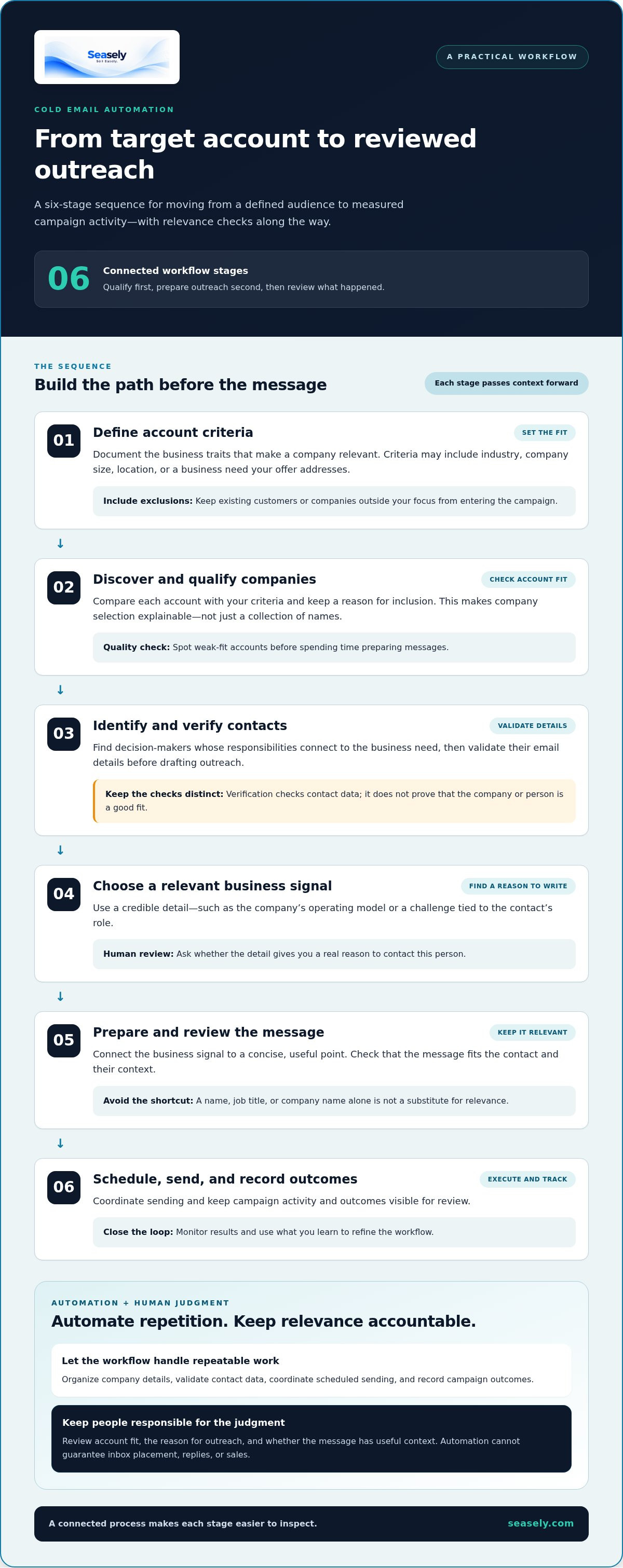
From there, move through the workflow in order:
- Define account criteria. Document the business traits that make a company relevant, along with exclusions that prevent unsuitable records from entering the campaign.
- Discover and qualify companies. Compare each account with your criteria. Keep a reason for inclusion so the selection is explainable, not just a collection of names.
- Identify and verify contacts. Find decision-makers whose responsibilities connect to the business need. Validate their email details before drafting outreach; treat verification as a data check, not a qualification decision.
- Choose a relevant business signal. Use a credible detail, such as the company’s operating model or a challenge tied to the contact’s role. Ask whether that detail gives you a real reason to write.
- Prepare and review the message. Connect the signal to a concise, useful point. Check that the message fits the contact and doesn’t rely on a name, job title, or company name as a substitute for relevance.
- Schedule, send, and record outcomes. Coordinate execution and keep campaign records together. Review replies and other meaningful outcomes to identify what may need adjustment.
Connect personalization, sending, and campaign feedback
Personalization works best when context changes the substance of the message. If a company has a distributed sales team and the recipient leads sales operations, for example, that combination may support a focused note about coordinating outbound workflows. Simply inserting the company name into a generic pitch adds little. Scheduled sending and consistent records help a team execute the reviewed message and trace results back to its audience and context.
A cold email automation workflow is a sequence of connected stages, each with a quality check before information moves to the next. That principle can also help you assess whether a platform supports the full process or only selected steps. For a closer look at what to evaluate, see this guide to an AI outbound sales platform. Seasely connects discovery, qualification, personalization, and sending in one workflow. Explore Seasely’s outbound platform.
Cold Email Automation vs. Human Review: Protect Relevance and Reputation
Automation can make outreach more consistent, but consistency alone isn’t enough. Software can apply checks and carry out defined actions. People still need to decide whether a prospect belongs in the campaign, whether the message makes sense for that person, and whether the outreach should proceed. Cold email automation works best when routine execution is automated and consequential choices stay open to review.
Automate repeatable checks; review consequential decisions
Use automation for tasks that follow stable rules, such as checking required fields, flagging invalid or duplicate records, handing data between workflow stages, and logging campaign activity. These checks reduce preventable errors and make records easier to trace. Review decisions that depend on context, judgment, or the accuracy of assumptions.
| Suitable for automation | Keep under contextual review |
|---|---|
| Checking contact records for missing fields or duplicate entries | Deciding whether the account and contact genuinely fit the campaign |
| Flagging addresses that need validation and recording validation status | Assessing whether a verified address belongs to the right decision-maker |
| Applying approved scheduling rules and logging send activity | Reviewing message relevance, unusual claims, or sensitive personalization |
| Recording replies, opt-outs, and other campaign outcomes | Interpreting feedback and deciding what changes are appropriate |
Human review can catch stale company information, role changes, and assumptions that don’t hold for a specific prospect. For example, a message may refer to a business initiative that has ended, or infer a problem from an industry trend without evidence about that company. Pause and review records when information conflicts, personalization feels intrusive, or a claim needs support. Automation should make those checks easier to apply, not silently turn uncertainty into fact.
Treat deliverability and compliance as operating constraints
Sending depends on more than campaign settings. SPF, DKIM, and DMARC are domain-authentication standards that help receiving systems assess whether email is authorized and aligned with the sending domain. Their configuration and requirements can change, so use current technical guidance from the relevant email providers and your domain administrator rather than assuming one setup fits every system.
Also check the laws that apply to your audience and the policies of the email providers you use. Requirements differ by jurisdiction and platform, so treat this as an operating check, not a universal rule or legal conclusion. Keep recipient details accurate, identify the sender transparently, and maintain an opt-out process that stops further outreach to people who ask not to be contacted. Monitor list quality and address problems before continuing a campaign.
Accurate targeting, transparent identification, and reputation-conscious sending belong in the same workflow. They help keep outreach aligned with its purpose and make issues easier to spot before they spread across a campaign. Seasely connects prospect discovery, personalization, and sending in one outbound workflow. Explore Seasely’s outbound workflow.
How to Set Up and Improve Cold Email Automation Step by Step
A controlled first campaign gives you a useful baseline. Keep the audience focused, make the objective clear, and record why you expect the outreach to matter to those recipients. Cold email automation can coordinate the operational steps, but a measured setup still depends on sound inputs and regular review.
Build a controlled first campaign
Start with one audience segment and one business problem. Decide what a useful next step looks like, such as a relevant reply or a qualified conversation, before choosing what to track. Check contact accuracy and message relevance before enabling automated execution. Record the assumptions behind your targeting and message so later results can inform a specific change instead of a broad guess.
Use this setup checklist:
- Define the objective. State what the campaign is meant to learn or achieve, and identify a meaningful next step.
- Set audience criteria. Specify which accounts and roles belong, plus exclusions that keep poor-fit records out.
- Validate the data. Review contact details, remove duplicates, and resolve records that appear incomplete or inconsistent.
- Draft the message. Connect a relevant business context to a concise point for the intended recipient.
- Review before sending. Check fit, accuracy, tone, sender details, and the opt-out process before activating the workflow.
- Monitor and record. Track delivery, replies, unsubscribes, and whether a response leads to a qualified next step.
Keep sequence design simple at first. Plan a clear initial message and a limited, purposeful follow-up approach, with enough context for each touch to make sense. Detailed timing and sequence mechanics deserve their own testing; avoid adding steps simply to increase activity. Set sending pace according to current provider policies and observed campaign performance, not a universal daily-volume prescription.
Use campaign signals to refine the workflow
Review delivery and responses together. Delivery problems can point to data or sending issues, while a pattern of negative replies may indicate that the audience or message misses the mark. Unsubscribes deserve attention too. Treat them as feedback to review targeting, message expectations, and how clearly the outreach is identified. Don’t judge performance from a single signal in isolation.
Look at the path from delivery to meaningful outcome: Did the right people receive the message? Were replies positive, negative, or requests to stop? Did a positive response become a qualified next step? Record the segment, message version, and key assumptions alongside these results. Change one meaningful element at a time where possible, then compare the next run. If bounce patterns or complaints raise concern, pause and inspect list quality and sending practices before continuing.
Campaign optimization is a repeating test-and-review process, not a one-time setup. Use each review to decide what to retain, revise, or stop, and document the reason. Seasely analyzes campaign performance to help teams review their outbound workflow and messaging. Explore Seasely’s outbound platform.
Where Seasely Fits in a Cold Email Automation System
Seasely brings several stages of B2B outbound into a connected workflow. For teams evaluating cold email automation, that connection can make it easier to move from company research to outreach without stitching together every handoff manually. Seasely discovers and qualifies target companies, identifies and verifies decision-maker email addresses, personalizes outreach, automates sending, and analyzes campaign performance.
Bring prospect discovery and outreach into one workflow
The workflow starts with target-company discovery. Qualification helps narrow the list to companies that fit the campaign’s criteria before the team moves to individual contacts. This order matters: a valid contact detail is useful only when the company and role are relevant to the outreach objective. Verified decision-maker addresses provide a stronger data input for preparing a message, but they don’t replace review of the recipient’s fit.
Once suitable companies and contacts are identified, personalization can use relevant information to shape the message. The intent is to connect the outreach to a business context, not just insert a name or company field. Automated sending then connects message preparation to execution. Bringing these steps together can reduce repeated data handling and manual transfers between prospecting and sending tasks.
That connection doesn’t remove the need for oversight. Teams still need to define account criteria, review whether contacts make sense for the campaign, and assess the message before outreach proceeds. A connected workflow can make the sequence of work clearer, while human judgment keeps the targeting purposeful.
Use automation to support a repeatable operating rhythm
Personalized outreach and automated sending help teams execute a campaign through a consistent process. Campaign performance analysis adds a feedback point: teams can review outcomes, look for patterns across their targeting and messages, then decide what to adjust. For example, a response pattern may prompt a closer look at role selection or the context used in the message. Analysis informs the next decision; it doesn’t establish that a change will produce a particular result.
Evaluate a platform by how well its workflow matches your needs: which prospecting steps it connects, where people can review decisions, and what campaign information it provides for ongoing optimization. A useful system supports repeatable work while leaving room to inspect targeting and refine the process. It should help teams manage operations, not imply that sending alone creates relevance or guarantees revenue.
Seasely connects discovery, qualification, contact verification, personalization, sending, and performance analysis in one outbound workflow. Explore Seasely’s AI outbound platform.
Make Your Next Outreach Process More Deliberate
Choose one part of your outbound process to make more consistent, then define how you’ll review it. A focused test can show whether your targeting, message context, or execution needs attention before you expand the workflow. Keep human review in place for decisions that depend on judgment, and use campaign results to guide the next adjustment.
Cold email automation is most useful when it supports a clear operating process rather than becoming a goal on its own. Seasely connects target discovery and qualification with verified decision-maker contacts, personalized automated sending, and ongoing workflow optimization. That gives B2B teams a way to coordinate key steps while continuing to assess relevance and performance.
Ready to bring prospect discovery, verified contacts, personalized outreach, and sending into one workflow? Explore Seasely’s AI outbound platform and start building a more deliberate outbound process.
Frequently Asked Questions
Is cold email automation legal?
It can be lawful, but the rules depend on where the sender and recipient are located and how the outreach is conducted. Check current requirements for the recipient’s jurisdiction, including rules on commercial messages, personal data, sender identification, and opt-outs. A contact address being publicly available doesn’t automatically settle whether using it is appropriate. For campaigns across multiple regions, map the audience by location and review the relevant requirements before sending.
Can cold email automation work with Gmail or Outlook?
Yes, if the platform supports a compatible connection and the intended use follows the email provider’s current terms and technical limits. Compatibility can depend on the platform’s integration options and the account configuration. Before connecting an account, check the provider’s policies, authentication setup, and any restrictions that apply to automated sending. A connection working technically doesn’t by itself mean a campaign complies with provider rules.
How many cold emails should I send per day?
There isn’t one daily number that’s suitable for every sender. Check the current limits and policies for your email provider and sending setup, then use delivery results and recipient feedback to guide the pace. For example, if bounce rates rise or complaints appear after expanding a campaign, stop increasing volume and investigate the cause. Don’t treat a tool’s capacity as a recommended sending target.
Does cold email automation make emails less personal?
Not necessarily. The key is whether the message reflects a real reason to contact that person, rather than whether software helped prepare it. For example, a role-specific message can be relevant if it addresses a responsibility the recipient actually holds. Use sensible fallbacks when data is missing, and review messages that include uncertain or sensitive details. Automation can support personalization, but it can’t validate every assumption.
What happens if automated cold emails bounce or receive complaints?
Pause the affected segment and investigate before sending more. Remove bounced addresses from further outreach, check for outdated records or data-entry errors, and review the source and validation process for the list. For complaints, examine the message, audience selection, sender identity, and opt-out handling. Track the issue by segment or campaign so you can distinguish a list problem from a broader sending or targeting concern.
Do I need a separate domain for cold email automation?
Not in every case. Domain strategy depends on your organization’s setup, provider guidance, and risk tolerance. A separate sending domain isn’t a substitute for accurate lists, responsible messaging, or provider compliance, and it adds configuration and monitoring work. Before deciding, discuss authentication and domain impact with the person responsible for your email infrastructure. Confirm that any chosen setup aligns with current provider requirements.
Can cold email automation guarantee sales or replies?
No. Automation can coordinate prospecting, message preparation, sending, and campaign analysis, but it can’t guarantee that a recipient will respond or buy. Outcomes depend on factors such as audience fit, timing, the offer, and the recipient’s needs. Treat campaign results as evidence for what to test next, not as a promise of future performance. A well-run process improves visibility and consistency, not certainty.


