

What if the best outbound sales software for small teams isn’t the one with the longest feature list, but the one that removes the most handoffs? When seller time is limited, separate tools can turn account research, contact checks, and follow-up into recurring setup work. Automation can reduce that effort, but data quality and sending controls still matter. Your team needs to understand what goes out and why.
The trade-off is straightforward: reduce manual work without adding a system that takes more effort to manage. The right fit depends on how well software supports your actual workflow, how much upkeep it requires, and whether your team can review targeting and outreach before and during campaigns.
This guide compares outbound sales software by workflow coverage, operating effort, and safeguards, not by feature count alone. You’ll see when an integrated platform or a modular stack makes more sense, plus a practical way to evaluate options before rolling one out across the team. Automation can handle repeatable tasks while your team retains judgment over account fit and messaging. Seasely, for example, combines company discovery and qualification, verified decision-maker contacts, personalized email outreach, and campaign optimization in one workflow.
Key Takeaways
- Assess outbound sales software for small teams by how it supports your workflow, not by how many features it lists.
- Map handoffs and recurring setup tasks to decide whether an integrated platform or modular stack better fits your team.
- Review contact quality, verification, and sending controls before relying on automated outreach.
- Test one audience segment and workflow first, then compare results with baseline measures such as seller time and replies.
- See how Seasely combines company discovery, qualification, verified decision-maker contacts, and personalized email outreach in one workflow.
Why outbound sales software for small teams must reduce operational load
Outbound sales software supports repeatable prospecting and outreach, from identifying potential companies to sending messages and managing follow-up. A useful definition is simple: Outbound sales software organizes the recurring steps that help a team identify, qualify, and contact prospective buyers. The aim isn’t to automate every sales decision. It’s to make routine work easier to execute and review.
For a small team, operating effort matters as much as workflow coverage. A platform may offer many features, but if each step requires separate setup, data transfers, or maintenance, it may shift work rather than remove it. Compare how tools affect seller time, handoffs, and the attention needed to keep records and campaigns on track.
What makes outbound operations different for a small team?
Outbound work rarely happens in isolation. Sellers may research companies, prepare outreach, follow up, and move active deals forward in the same workday. A tool that saves time on one task but adds administration elsewhere can disrupt that flow.
Fragmented systems create small but repeated costs. A seller might find a company in one tool, copy its details into another, search separately for a decision-maker, then move to a third tool to send an email. Every handoff creates another chance for duplicate entry, stale information, or lost context. The Sales Development Process provides useful context for how prospecting and outreach fit into a broader sales workflow.
This burden can arise regardless of team structure. A dedicated administrator may not be available to maintain integrations or resolve data issues, so the software should be manageable by the people using it. Look for fewer repeated steps, clear ownership of records, and a workflow that doesn’t depend on constant manual repair.
Which parts of outbound work can software support?
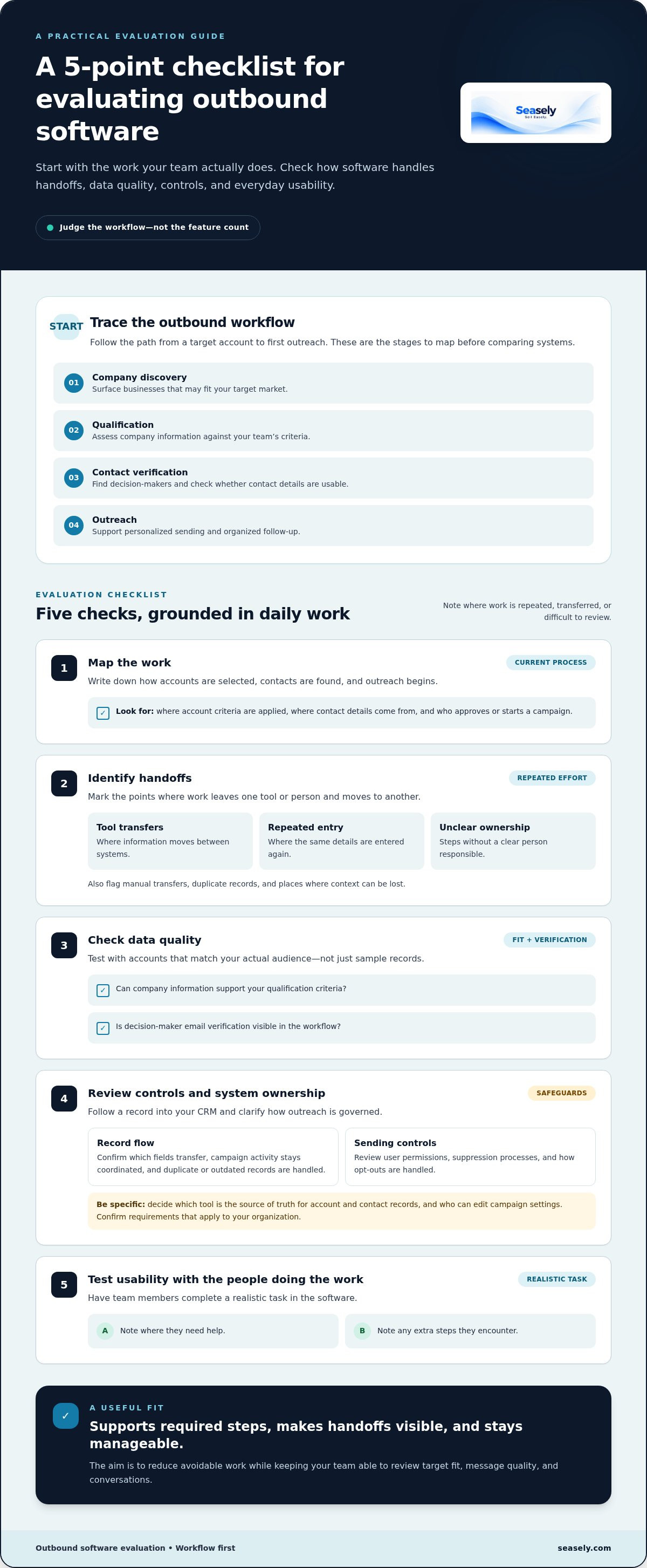
Break the workflow into stages before judging automation. Each stage has a distinct purpose, and the software should make its role clear:
- Company discovery: surface businesses that may fit the team’s target market.
- Qualification: assess available company information against the team’s criteria.
- Contact verification: identify decision-makers and check whether their contact details are usable.
- Outreach: support personalized sending and organized follow-up.
Software can handle repeatable tasks across these stages, but people still need to define a good-fit account, review messaging, and respond thoughtfully when prospects engage. Automation can make execution more consistent, but it can’t guarantee replies or revenue. Keep human review where relevance and judgment matter.
For a deeper look at how these stages connect, the companion article AI Outbound Sales Platform: How to Evaluate the Complete Workflow examines the end-to-end process. The practical test is whether the software reduces avoidable work while leaving sellers in control of audience fit, message quality, and conversations.
How to evaluate outbound sales software for small teams
Start with the work your team needs to complete, then assess how each system handles it. This keeps the evaluation grounded in daily operations instead of a long feature checklist. A good fit for outbound sales software for small teams should support the required steps, make handoffs visible, and remain manageable without constant configuration.
Use this sequence to compare options:
- Map the work: record how accounts are selected, contacts are found, and outreach begins.
- Identify handoffs: mark transfers between tools, repeated data entry, and steps without a clear owner.
- Check data quality: review how the software supports target fit and verifies decision-maker email addresses.
- Review controls: examine user permissions, suppression processes, and how opt-outs are handled. Confirm requirements that apply to your organization before relying on a workflow.
- Test usability: have the people doing the work complete a realistic task and note where they need help or encounter extra steps.
Map the workflow before comparing features
Write down the current path from target account to first outreach. Note where account criteria are applied, where contact details come from, and who approves or starts a campaign. Flag manual transfers, duplicate records, and unclear ownership. These details show whether a feature addresses a real bottleneck. For process context, Zendesk’s Outbound Sales Best Practices outlines core outbound activities. The related article “Sales Outreach Software vs. Email Automation: What B2B Teams Need” can also help distinguish workflow needs from sending features.
Check data quality, controls, and integration
Test the software with accounts that match your actual audience. Check whether company information supports your qualification criteria and whether decision-maker email verification is visible in the workflow. Then follow a record into your CRM: confirm which fields transfer, whether campaign activity stays coordinated, and how duplicate or outdated records are handled.
Be specific about system ownership. Decide which tool is the source of truth for account and contact records, who can edit campaign settings, and how data can be exported if the workflow changes. A sync that looks convenient in a demo may still require cleanup if updates move in only one direction or ownership is unclear.
Score each capability against the process you mapped. Use a simple scale, such as low, adequate, or strong, and record one reason for each rating. Give a feature a strong score only when it removes a real step without weakening oversight.
Scorecard dimensions
Workflow coverage: Does it support the steps your team actually uses?
Setup effort: How much configuration and upkeep will the workflow require?
Control: Can the team review fit, messaging, permissions, and suppression?
Reporting: Can users see workflow progress and identify where records stall?
Compare the completed scorecards, not feature counts. To see how an integrated workflow can bring discovery, qualification, verified contacts, and email outreach together, explore Seasely’s outbound sales platform.
Integrated platform or modular stack: which fits a lean sales team?
An integrated platform connects several outbound stages in one system. A modular stack combines separate tools, such as a prospecting tool, a contact-data source, and an outreach platform. Neither setup is automatically better. The choice depends on which workflows need to connect and how much time the team can devote to configuration, maintenance, and record ownership.
Decision rule: Choose the setup that supports your real workflow with the least operating effort your team can sustain, while preserving the controls it needs.
| Consideration | Integrated platform | Modular stack |
|---|---|---|
| Workflow continuity | Can connect discovery, qualification, contact verification, and outreach in one workflow. | Moves work across tools, with handoffs shaped by integrations and process design. |
| Configuration effort | May reduce the number of connections to configure, though workflows still need setup. | Offers component choice, but each connection may require setup and upkeep. |
| Flexibility | Convenient when its combined workflow matches the team’s needs. | Allows teams to select separate tools for specific requirements. |
| System ownership | Can keep more activity together, but CRM responsibilities still need to be clear. | Requires clear rules for which system owns records and updates. |
When an integrated outbound platform may fit
An integrated platform can suit a team that wants company discovery, qualification, decision-maker contact verification, and email outreach connected without repeated transfers. This can simplify daily execution when fewer handoffs are a priority. It doesn’t automatically replace an existing CRM. Check how records and campaign activity coordinate with it, and make sure the team can review audience fit, messaging, and sending controls.
When a modular stack may fit
A modular stack can work well when established tools already support important parts of the process or a specific requirement calls for a separate component. That flexibility comes with coordination work. Integrations may need maintenance, records can become duplicated, and the team must decide which system owns updates. More tools don’t necessarily mean better coverage. Each component should serve a defined workflow need.
When comparing outbound sales software for small teams, weigh the time saved across the complete process against the effort required to operate the stack. For example, separate prospecting and outreach tools may provide useful flexibility, but assess whether moving account details between systems adds manual steps. Seasely brings company discovery and qualification, verified decision-maker contacts, and personalized email outreach together. The right fit still depends on CRM coordination, operating capacity, and the oversight your team requires.
How a small team can test outbound software before committing
A focused pilot shows whether a tool works in your team’s actual process before you build broader adoption around it. Keep the test narrow: use one defined audience segment and one complete workflow, from selecting companies through outreach and follow-up. The article Outbound Campaign Software: Build a B2B Workflow in 2026 offers related context for planning that process.
Set a focused pilot with clear ownership
Choose an audience the team can assess consistently, such as companies in a particular market that meet defined qualification criteria. Set one campaign objective and name a workflow owner to coordinate setup, collect feedback, and flag issues. Before sending, document review points for audience fit, contact accuracy, and message personalization. Agree in advance on what would justify continuing, adjusting, or stopping the pilot.
Set a baseline before the test begins. Record how the current process performs, even if some measures require simple manual tracking. Then compare like with like. Useful measures include:
- Qualified contacts: how many records meet the team’s stated account and role criteria.
- Verification outcomes: what the verification process reports for sampled decision-maker addresses.
- Replies: whether responses are relevant to the campaign objective, not just how many arrive.
- Seller time: how much time goes to research, data handling, campaign setup, and follow-up.
Review a sample of records and messages by hand. Check whether company details support the qualification decision, the contact is the right person, and personalization reflects accurate information. Manual review can reveal issues a dashboard may miss, such as repeated data entry, weak-fit accounts, or messages that sound tailored but rely on generic details. Activity volume alone doesn’t show whether the workflow is useful.
Monitor performance without relying on one metric
Read outcome and process measures together. Replies matter, but so do verified contacts, time spent, and the quality of the accounts entering the workflow. Review bounce, reply, and opt-out patterns in context rather than treating any single figure as a universal benchmark. If deliverability signals change unexpectedly, pause expansion and investigate the audience, contact data, and sending process before resuming.
At the pilot review, ask where work became easier and where new effort appeared. Did records remain coordinated with the CRM? Could the owner review campaign activity and opt-outs? Did sellers spend less time on repetitive tasks without losing control over fit and messaging? These observations help distinguish a workflow improvement from a temporary increase in activity.
A measured pilot gives your team evidence to guide the next step: refine the process, extend the test, or hold off on wider use. If you’re assessing a workflow that combines company discovery, qualification, verified contacts, and personalized outreach, explore Seasely’s outbound sales platform.
Where Seasely fits in an outbound workflow for small teams
Seasely is an AI-powered B2B outbound sales platform for teams that want prospecting and email outreach connected in one workflow. It brings company discovery and qualification, decision-maker email identification and verification, personalized automated sending, and campaign optimization together. This connected process can reduce the number of separate steps a team needs to coordinate, while leaving decisions about audience fit and messaging with the people who know the market.
How Seasely supports prospecting through outreach
The workflow starts with discovering target companies and assessing them against the team’s criteria. Seasely then identifies decision-makers and verifies their email addresses, helping the team move from account research toward outreach with fewer manual transfers between stages. Sellers still define what qualifies as a relevant company and review whether selected contacts match the intended audience.
For execution, personalized automated email sending supports outreach, while campaign optimization helps teams refine how campaigns run. These functions support repeatable work; they don’t make a message relevant on their own or guarantee a response. Keep human review in the process. Sellers can check whether personalization is accurate, whether the message fits the recipient, and how to handle a reply or follow-up conversation.
This division of work matters. Automation can carry out defined steps consistently, while people provide context and judgment. A team might use company criteria to guide discovery, then review a sample of accounts and messages before expanding a campaign. That ties efficiency to relevance rather than sending volume alone.
Decide whether Seasely matches your team’s workflow
Use the scorecard and pilot approach from earlier sections to assess fit. Consider whether bringing discovery, qualification, verification, and sending together would remove handoffs in your current process. Then review the practical details: how the workflow fits with your CRM, who owns records and campaign review, and whether the team can oversee audience selection and messaging.
During a focused test, compare the workflow with your baseline. Review contact accuracy, qualification decisions, replies, and seller time, and note where work becomes easier or new coordination is needed. Campaign optimization can inform refinements, but judge progress using the measures that matter to your team, not activity volume alone.
Seasely gives teams a connected path from target companies to personalized email outreach, which can be useful when reducing tool handoffs is a priority. Assess the workflow against your audience, existing systems, and operating process. If it aligns with your needs, explore Seasely as an option for outbound sales software for small teams.
Choose a workflow your team can sustain
Turn your buying criteria into a small, observable decision. Identify the workflow that costs your team the most effort, then assess whether a platform can simplify it without reducing oversight. That keeps the choice of outbound sales software for small teams tied to how your sellers actually work, rather than to promises of effortless growth.
Seasely brings automated target-company discovery and qualification together with verified decision-maker email addresses, personalized email sending, and campaign optimization. Assess those capabilities against your process, including where people need to review account fit and messaging. The goal is a system that supports consistent execution while leaving important decisions in human hands.
If a connected outbound workflow matches what your team needs, explore Seasely’s outbound sales platform. Use a clear, measured evaluation to choose a process your team can manage.
Frequently Asked Questions
What is outbound sales software for small teams?
Outbound sales software for small teams helps organize recurring B2B prospecting and outreach tasks. Depending on the platform, it may support company discovery, contact identification, email campaign execution, and activity review. For example, a seller could use it to identify potential accounts, check relevant contacts, and coordinate follow-up. Compare how well a product supports your actual process, works with existing systems, and can be operated by the people responsible for sales.
Can outbound sales software replace a CRM?
Not necessarily. Outbound software may handle prospecting or campaign tasks, while a CRM remains the main record of accounts, contacts, and deal progress. Before connecting tools, identify where sellers update each type of information. For example, decide whether campaign responses should create CRM activity automatically or be logged manually. Clear rules for record ownership and duplicate handling help prevent conflicting contact details and give sellers a consistent pipeline view.
How much does outbound sales software cost for a small team?
The cost depends on the product’s plan, billing model, usage limits, and included capabilities. Compare the full operating cost, not only the advertised seat price. Account for separate tools that may still be needed, plus the time required to configure integrations, maintain records, and manage campaigns. For a fair comparison, review current vendor pricing and match plans against your team’s workflow, including any limits that could affect routine use.
Is outbound sales software useful without a sales operations manager?
Yes, if the process is clear and the software is manageable by the people running it. Assign an owner for target criteria, campaign review, and basic data checks, even if that person has another role. For example, document who approves a new audience and who reviews contact records before outreach. Start with a contained workflow, then assess whether the team can maintain it without adding more administrative work.
How can a small team protect email deliverability when using outbound software?
Use relevant business contacts, accurate information, and messages written for the intended audience. Maintain clear opt-out handling, and review delivery, bounce, and response patterns rather than assuming more sends mean better performance. Technical setup, including domain authentication, can affect sending, so follow current email-provider guidance and verify requirements for the markets you serve. If delivery changes unexpectedly, pause expansion and investigate the data and sending process before continuing.
What should a small team measure during an outbound software pilot?
Track both workflow effort and campaign outcomes. Useful measures include time spent preparing outreach, the proportion of sampled contacts that pass verification, delivery patterns, replies, and whether the audience matches your criteria. For example, compare time spent researching accounts before and during the pilot, while reviewing a sample of records for accuracy. Set measures before launch, interpret results in context, and treat one campaign as evidence for a decision, not a forecast.


