

What if your outbound bottleneck isn’t the email itself, but the handoffs leading up to it? Outbound campaign software works best as a connected workflow, not just a way to send more messages. When prospecting, contact verification, writing, and sending happen in separate tools, teams can lose context, repeat work, and send outreach that misses the mark.
That’s a familiar challenge for B2B teams. Manual steps make it harder to keep campaigns relevant and consistent, while increasing sending volume can raise deliverability and domain-reputation concerns. A more controlled process connects each stage and keeps people involved where judgment matters.
This guide explains the core functions of outbound campaign software and how discovery, qualification, verified decision-maker contacts, personalized email, and campaign improvement fit together. You’ll find practical checks for reducing unnecessary tool overlap and reviewing outreach before it goes out. Seasely brings these stages into an AI-powered outbound platform, helping teams reduce manual handoffs while keeping campaign execution measured and focused.
Key Takeaways
- Use outbound campaign software to connect prospect discovery, contact validation, personalized messaging, and sending in a coordinated workflow.
- Set clear sales criteria first, then qualify target companies and verify decision-maker details before building outreach.
- Map each campaign function to a specific job so your stack supports the process without adding unnecessary tool overlap.
- Keep automation relevant and controlled with audience context, workflow visibility, and review steps before messages go out.
- See how Seasely connects company discovery and qualification with verified contacts, automated personalized email, and workflow optimization.
What outbound campaign software does in a B2B sales workflow
Outbound campaign software coordinates repeatable B2B prospecting and outreach, from finding and qualifying target companies to preparing, sending, and reviewing campaign messages. It gives teams a defined process for moving prospects through campaign stages. It supports execution, but it can’t guarantee replies, revenue, or pipeline.
The distinction matters because outbound work often spans several tools and owners. A prospect list may be built in one place, contact details checked elsewhere, and messages sent from a separate platform. A connected workflow carries useful context between steps, so teams can act on sales criteria instead of treating every stage as an isolated task. It shares some principles with Marketing automation, but the focus here is coordinated B2B prospecting and sales outreach.
Which campaign tasks can the software coordinate?
A campaign starts with a target profile: the types of companies that fit the team’s sales criteria. Software can help discover and qualify those companies, then identify and verify decision-maker email addresses. This creates a more relevant starting point than an unreviewed list. For example, a team can first define the company attributes that indicate a fit, then assess each account against those criteria before adding contacts.
From there, the workflow can support personalized messaging, scheduled email sending, and performance review. Teams can examine campaign activity and refine targeting or messaging for the next run. A team selling to a specific company segment, for instance, can apply its criteria before identifying contacts, then tailor outreach to each recipient’s role and company context.
How is it different from a CRM or email platform?
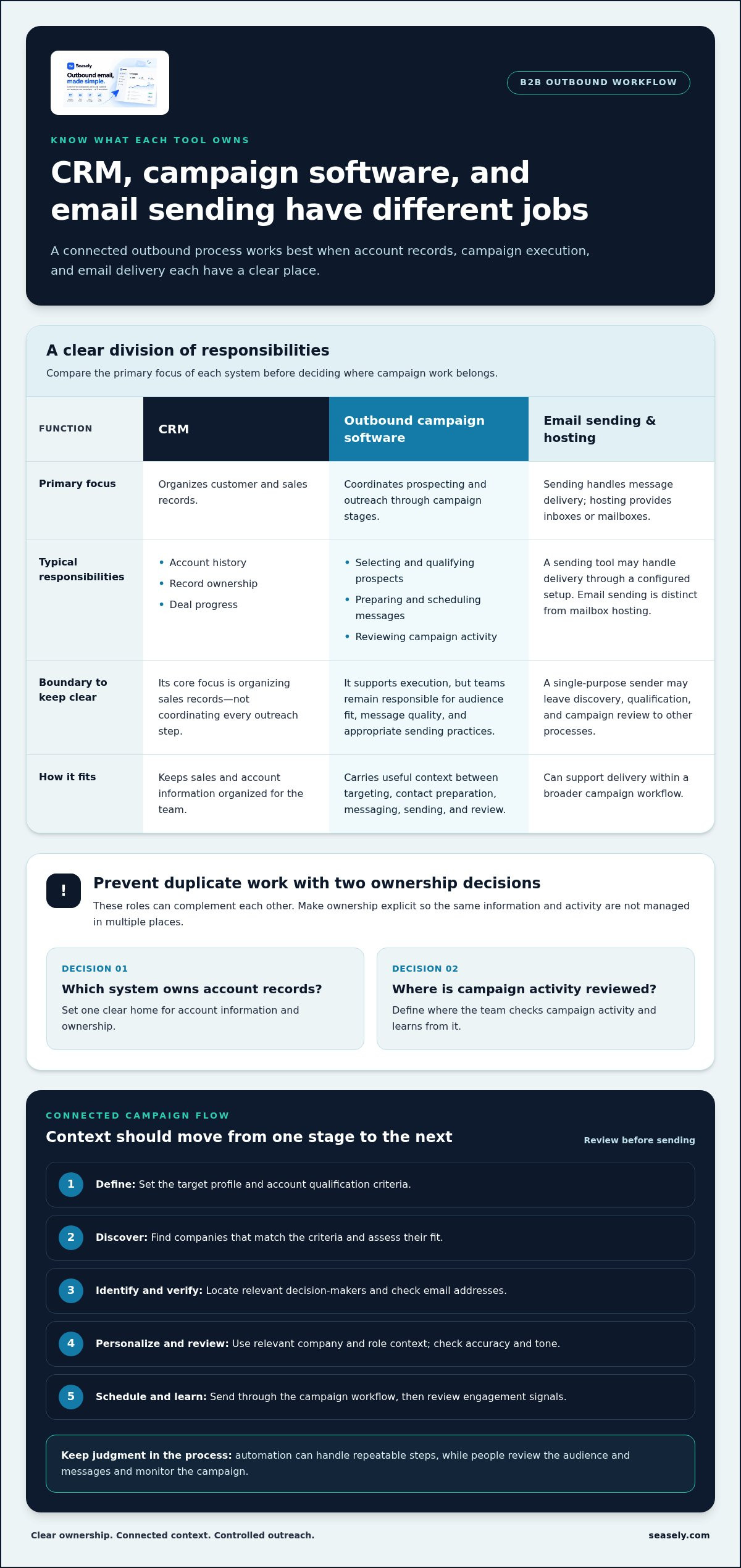
A CRM organizes customer and sales records, such as account history, ownership, and deal progress. Campaign software focuses on executing outreach workflows: selecting prospects, preparing messages, scheduling sends, and reviewing campaign activity. These roles can complement each other. To avoid duplicate work, decide which system owns account records and where campaign activity is reviewed.
Email sending is also distinct from email hosting. A campaign tool may send messages through a configured sending setup, but that doesn’t mean it provides inboxes or mailbox hosting. A single-purpose sending tool may handle delivery while leaving prospect discovery, qualification, and campaign review to other processes. Outbound campaign software aims to coordinate more of that sequence, while teams remain responsible for audience fit, message quality, and appropriate sending practices.
How outbound campaign software connects targeting, data, messaging, and sending
A controlled campaign moves through clear stages. Each stage should produce the information needed for the next, rather than passing an unreviewed list from one tool or owner to another. A simple way to check the process is to ask what decision is made at each stage and what information supports it.
What happens before an outbound campaign sends?
Start with the audience, not the message. Define the ideal customer profile and set practical account qualification criteria, such as company attributes that indicate a likely fit. Use those criteria to discover and qualify target companies before identifying the decision-makers relevant to your offer. If the team cannot explain why an account belongs in the campaign, tighten the criteria before building the contact list.
Next, verify contact details before adding them to an outreach sequence. This is a data-quality checkpoint, not a substitute for reviewing whether the person and company belong in the campaign. A useful end-to-end sequence looks like this:
- 1. Define: Set the target profile and account qualification criteria.
- 2. Discover: Find companies that match those criteria and assess their fit.
- 3. Identify and verify: Locate relevant decision-makers and check their email addresses before outreach.
- 4. Personalize and review: Use relevant company and role context to draft messages, then check them for accuracy and tone.
- 5. Schedule and learn: Send according to the campaign workflow, then review engagement signals to guide the next iteration.
How do messaging and campaign learning fit together?
Personalization should explain why this recipient is relevant, not just insert a first name or company name. For example, a message to an operations leader should connect the offer to a business issue that fits that role and the target company. Keep the message concise, specific, and grounded in information the team can stand behind. A B2B Marketing Automation Guide offers broader context on how automation can support qualification and connected workflows.
Once reviewed, messages can be scheduled and follow-up logic set as part of the campaign. Automation handles repeatable steps, but it shouldn’t remove human judgment. Review the audience and message before launch, and assign someone to monitor the campaign as it runs. Sending should remain controlled, not simply maximize volume.
Afterward, examine available engagement signals and look for patterns. If a segment draws little engagement, revisit its fit or the message’s relevance before repeating the approach. If a particular role responds more meaningfully, use that observation to refine future targeting. These signals inform decisions; they don’t guarantee a result. Teams can use Seasely’s outbound workflow to connect company discovery, contact verification, personalized email sending, and optimization in one process.
What belongs in an outbound campaign software stack?
A useful stack covers the steps required to select an audience, prepare outreach, send it, and learn from campaign activity. Those capabilities may sit in one platform or across separate tools. Before adding software, map each function to a clear job and note where the team currently handles it.
| Campaign function | Job it performs | What to check |
|---|---|---|
| Prospect discovery | Finds potential target companies based on the team’s sales criteria. | Can the team define and adjust its target profile? |
| Company qualification | Assesses whether discovered companies fit the campaign’s account criteria. | Are qualification criteria visible and consistently applied? |
| Contact verification | Identifies relevant decision-makers and checks email data before outreach. | Can users review contact relevance and data quality? |
| Personalization | Uses relevant company or role context to shape campaign messages. | Can the team review content instead of relying on generic fields alone? |
| Sending and scheduling | Executes approved email campaigns according to the configured workflow. | Are sending steps and campaign status clear to the team? |
| Performance review | Surfaces campaign activity that can inform future targeting or messaging. | Does reporting support practical decisions, not just more metrics? |
These are distinct capabilities, even when one platform handles several. Personalization and scheduling help execute a campaign; neither guarantees a response. Reporting is useful when it helps the team decide what to adjust, such as revisiting audience criteria or improving message relevance. Don’t assume a platform covers every function just because it sends email. Check which steps it handles and where your team still needs a defined process.
When should a team consolidate or keep tools separate?
Consolidation can reduce repeated data entry and manual transfers. It may also make it easier to see how a company moved from discovery to outreach. Combining functions helps when it removes unnecessary handoffs without making data ownership or campaign review harder.
Keep tools separate when they serve distinct operational needs. A CRM remains the system for customer, account, and sales records. Email infrastructure supports the sending setup and domain-level operations; it isn’t the same as campaign execution or mailbox hosting. Deliverability tools may add checks or monitoring that a campaign platform doesn’t provide.
Before adding a tool, trace a prospect’s path through the current process. Note where records are copied, qualification is repeated, or campaign status becomes unclear. If a separate capability solves a defined gap, assign responsibility for its data. If two tools duplicate the same step, simplify the workflow where practical. A well-designed outbound campaign software stack is not the one with the most components. It’s the one that covers required campaign jobs with clear handoffs, visibility, and control.
How to assess outbound campaign software without losing relevance or control
Automation should make a sound campaign easier to run, not make an irrelevant one faster. Assess outbound campaign software by checking whether it helps your team preserve audience fit, message quality, and oversight from setup through review.
How can teams check campaign relevance and data quality?
Start with the criteria behind the campaign. A target profile should be specific enough to guide company selection and aligned with the reason for outreach. If the team can’t explain why an account fits, adding more accounts won’t solve the problem. Write down the criteria in terms the team can apply consistently, then use them to review a sample of selected companies.
Check how the workflow handles contact data before messages are prepared. Verified business email details help teams catch data issues before outreach, but verification alone doesn’t establish that someone is the right person to contact. Review selected decision-makers against the campaign criteria, including whether their role is relevant to the offer.
Then read sample messages as a recipient would. Look for a clear reason for contact, accurate company and role context, and a useful connection between that context and the offer. A name or company field is not meaningful personalization on its own. If the message could be sent unchanged to a different audience, it needs more relevant context.
What safeguards keep automated outreach manageable?
Keep review points at the stages where mistakes can spread. Before sending, assign clear responsibility for checking the audience, message content, and scheduled campaign. Make sure the team can see what is queued, what has been sent, and who owns the next review. Automation can handle repeatable steps while people retain control over decisions that depend on judgment.
- Data: Review whether account criteria are applied and contact details are checked.
- Content: Confirm that each message is accurate, relevant, and appropriate for its audience.
- Schedule: Review sending plans and follow-up logic before a campaign runs.
- Monitoring: Track campaign activity and sender health, then investigate changes rather than responding by simply increasing volume.
Domain reputation is an operational consideration, not a result any platform can promise. SPF, DKIM, and DMARC are technical email authentication entities; teams should verify setup and troubleshooting guidance with current documentation from their email provider. Legal requirements and provider policies can vary by jurisdiction, audience, and sending setup, so check current guidance that applies to your campaign before launch.
Use these checks to assess how well a platform supports a controlled workflow, not to predict replies or revenue. To see how discovery, verified contacts, personalized sending, and ongoing optimization fit together, explore Seasely’s outbound platform.
How Seasely brings outbound campaign steps into one operating workflow
Seasely connects the core stages of outbound campaign software in an AI-powered platform for B2B teams. It moves from target-company discovery and qualification to verified decision-maker email addresses, personalized outreach, scheduled sending, and workflow optimization. This connected process helps teams reduce manual handoffs between campaign stages while keeping criteria and review points clear.
Where does Seasely fit in a campaign workflow?
Start with targeting. Seasely discovers and qualifies companies against sales criteria, helping teams build a prospect pool around their defined audience. Next comes contact preparation: the platform identifies decision-makers and verifies their email addresses, so teams can review contact data before outreach.
Those verified contacts then inform personalized email outreach. Teams can prepare messages using relevant prospect context and schedule sending as part of the workflow. The sequence keeps company selection, contact details, and outreach connected, rather than relying on disconnected transfers. Seasely also optimizes outbound workflows, helping teams refine how campaign steps operate over time. Automation supports execution, but it doesn’t guarantee replies, revenue, or pipeline. Human review still matters for audience fit, message accuracy, and campaign decisions.
What is a practical next step for a B2B team?
Before increasing automation, map how a prospect currently moves from selection to outreach. Note who owns each step, where data is checked, and where information is copied or re-entered. These handoffs often reveal straightforward opportunities to make the process more consistent.
- Set criteria: Define the target-company attributes that qualify an account for outreach.
- Mark review points: Decide who checks company fit, contact accuracy, and message relevance.
- Trace handoffs: Identify duplicated work and places where campaign context gets lost.
- Automate deliberately: Start with repeatable tasks, then review the workflow before expanding its scope.
This gives the team a practical basis for evaluating whether a connected platform fits its process. Seasely brings discovery, qualification, verified contacts, personalized email sending, and workflow optimization into one operating workflow. Teams can use that structure to reduce manual transfers while retaining oversight of the decisions that shape each campaign.
If you’re mapping a more connected outbound process, explore Seasely’s outbound platform.
Build a More Connected Outbound Workflow
A reliable B2B campaign depends on how its stages work together. Define who you want to reach, qualify target companies against clear criteria, verify decision-maker details, and use relevant context to shape outreach. Then review campaign activity and refine the process instead of treating higher sending volume as the goal.
That’s the practical role of outbound campaign software: coordinate repeatable work while keeping teams in control of audience fit, message quality, and review. The right stack should make handoffs clearer, not add tools without a defined purpose. Automation can support consistent execution, but it can’t guarantee replies, revenue, or pipeline.
Seasely connects company discovery and qualification with verified decision-maker email addresses, personalized outreach, and scheduled sending. A connected workflow can help reduce manual transfers while giving the team clear points to review audience fit and message quality.
Start with clear criteria and deliberate checkpoints. A well-managed workflow gives your team a practical foundation for improving outbound campaigns. To explore a connected approach to B2B prospecting and outreach, visit Seasely’s AI-powered outbound platform.
Frequently Asked Questions
What is outbound campaign software?
Outbound campaign software coordinates repeatable B2B prospecting and outreach tasks, from identifying target companies to preparing and sending messages. It can bring audience selection, contact data, personalization, scheduling, and campaign review into a connected workflow. The software supports campaign execution, but it doesn’t guarantee replies, revenue, or pipeline. Teams still need clear targeting criteria and review processes to keep outreach relevant and controlled.
How does outbound campaign software work?
Outbound campaign software typically starts with a target profile and criteria for qualifying companies. It helps find suitable accounts and relevant decision-makers, then prepares contact data and supports personalized messages and scheduled sending. Teams can review campaign activity and use available signals to refine targeting or messaging. For example, a team can narrow its audience to qualified companies before preparing role-relevant outreach to their decision-makers.
What features should outbound campaign software include?
Look for capabilities that support the stages your team needs: prospect discovery, company qualification, decision-maker identification, email verification, message personalization, scheduled sending, and performance review. Workflow visibility and human review controls also matter, so the team can check its audience and messages before sending. Some platforms cover several stages; others focus on one. Choose capabilities based on your process rather than assuming every tool covers the full workflow.
Can outbound campaign software find and verify B2B email addresses?
Some outbound platforms identify decision-makers at target companies and verify their business email addresses as part of campaign preparation. Seasely supports both steps, connecting contact discovery to personalized outreach. Verification helps teams check contact data before sending, but it doesn’t determine whether the person fits the campaign or whether the message is appropriate. Review the contact’s role and company against your targeting criteria before outreach begins.
Is outbound campaign software the same as a CRM?
No. A CRM organizes customer, account, and sales records, while outbound campaign software coordinates prospecting and outreach activities. A team may use both for different jobs: the CRM maintains sales context, and campaign software supports audience selection, message preparation, sending, and campaign review. Define where records are owned and updated to avoid duplicate work or inconsistent information.
How can teams use outbound campaign software without harming domain reputation?
Keep sending controlled and focused on qualified, relevant contacts. Verify business email data, review audience selection and message content, and monitor campaign activity and sender health instead of chasing volume. Email authentication and provider requirements also matter, but setup guidance can change and depends on the sending environment. Check current documentation from your email provider and applicable requirements. No campaign platform can promise inbox placement or protect a domain under every condition.
Can outbound campaign software personalize emails automatically?
Yes. Some platforms use prospect and company context to help personalize outreach, then support scheduled automated sending. Useful personalization goes beyond inserting a name: it gives a relevant reason for contacting that person and connects the message to their role or company. Review automated content for accuracy, tone, and fit before sending. Automation can make repeatable preparation easier, but human judgment helps prevent generic or unsupported messages.


