

More automated emails don’t necessarily mean a more complete sales workflow. The difference between sales outreach software versus email automation comes down to what happens before a message goes out and what your team needs to coordinate afterward. Email automation can schedule and send communications to an audience. Sales outreach software can connect prospect discovery, qualification, contact verification, and personalized follow-up in one process.
If you’re weighing the two, the choice isn’t simply about sending more messages. It’s about whether your team needs to nurture a broad audience or build targeted conversations with prospective buyers. The right fit should automate the work you need without adding capabilities your team won’t use.
This guide explains where email automation typically ends, what a broader outreach platform adds, and how to match each workflow to your team’s needs. You’ll see how research, contact validation, sequencing, and optimization fit together, and where manual handoffs can slow execution. Seasely connects target-company discovery and qualification with verified decision-maker emails and personalized automated outreach, bringing these steps into a coordinated outbound workflow.
Key Takeaways
- Compare workflow coverage, not software labels. Capabilities vary, so map what each tool handles from prospect sourcing through campaign review.
- Use sales outreach software versus email automation as a workflow decision: choose email automation for sending tasks, and consider broader outreach software when prospecting and follow-up also need coordination.
- Trace your current handoffs to find recurring manual work, such as moving prospect details between research, validation, and sending tools.
- Assess data quality, personalization, reporting, and integrations against your team’s needs before paying for capabilities you may not use.
- Seasely connects target-company discovery and qualification with verified decision-maker emails and personalized automated outreach.
Sales outreach software vs. email automation: what is the difference?
Email automation executes email tasks. Sales outreach software can coordinate more of the outbound workflow, including finding and qualifying prospects before sending begins. The distinction in sales outreach software versus email automation is less about a product’s label and more about which stages it supports.
Capabilities vary, and categories overlap. One platform may schedule emails but depend on a contact list your team imports. Another may connect target selection, contact verification, personalized messaging, sending, and campaign review. Compare the stages each tool covers, rather than relying on its category name. The broader category relates to a sales force management system, which supports the automation of sales functions.
Email automation: Email automation schedules and triggers messages to contacts already in a team’s system.
Sales outreach software: Sales outreach software coordinates prospect selection and contact data with personalized outbound messaging and follow-up.
What does email automation typically handle?
Email automation manages the mechanics of communication. A team can schedule a campaign, trigger a message after a defined action, or set follow-ups to send at planned intervals. This reduces repetitive work and helps maintain consistent timing across an existing contact list.
For example, a team might import known contacts and automate a sequence of introductory emails. The system handles the sends, while staff still decide who belongs on the list and whether those contacts fit the target market. Email automation alone may not discover or qualify new accounts.
What does sales outreach software add?
Sales outreach software can connect more steps: selecting target companies, qualifying them against sales criteria, identifying and verifying decision-maker contact details, personalizing messages, scheduling outreach, and reviewing campaign activity. These functions don’t come as a fixed package across every platform, so compare the stages each one actually covers.
Seasely connects these stages in a broader workflow. It discovers and qualifies target companies, identifies verified decision-maker email addresses, and supports personalized, scheduled email sequences and campaign optimization. Coordinating the work can reduce copying between research and sending tools and give teams more context for relevant outreach.
A useful test is to trace one prospect from first identification to first follow-up. If the process involves repeated exports, manual contact checks, or separate tools for each handoff, broader coordination may address a real workflow gap. If the list is already defined and the main need is reliable timing, email automation may cover the work without adding stages your team won’t use.
How sales outreach software connects prospecting, verification, and email
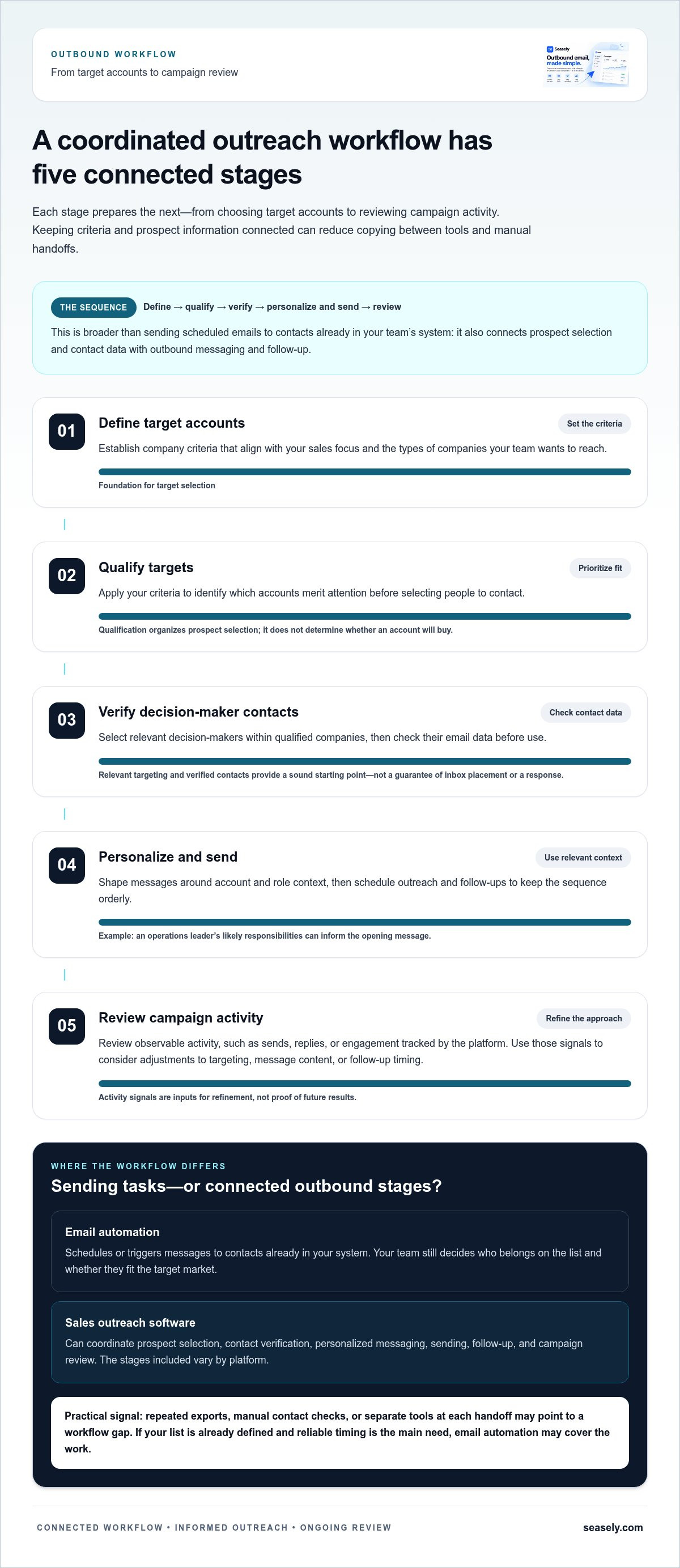
A coordinated outbound workflow follows a clear sequence: define target accounts, qualify them, verify decision-maker contacts, personalize messages, send follow-ups, then review campaign activity. Each stage prepares the next. Keeping criteria and prospect information connected can reduce copying between tools and manual handoffs as prospects move through the process.
- Define accounts: Set company criteria that align with your sales focus.
- Qualify targets: Prioritize accounts that meet those criteria.
- Verify contacts: Check decision-maker email data before use.
- Personalize and send: Use relevant account context to shape scheduled outreach.
- Review: Use campaign activity to refine targeting and messaging.
From target account criteria to a verified decision-maker
Start with your team’s sales criteria, such as the types of companies it wants to reach. Apply those criteria to identify which accounts merit attention, then select relevant decision-makers within those companies. This order helps prevent a common mismatch: accurate contact details for people who aren’t appropriate prospects.
Verified contacts and relevant targeting give outreach a sound starting point, but they don’t guarantee inbox placement or a response. Verification is a data-quality step that can help teams catch contact issues before sending. It doesn’t promise that a message will reach an inbox. Qualification helps organize prospect selection, but it doesn’t determine whether an account will buy.
From personalized sequence to campaign refinement
Once a contact is selected, account and role context can guide the message. For example, a team reaching out to an operations leader can shape its opening around that person’s likely responsibilities rather than rely on a generic introduction. Scheduled follow-ups keep the sequence orderly, while personalization helps connect the message to the recipient’s professional context.
After sending, campaign analysis can help teams review observable activity, such as sends, replies, or engagement tracked by the platform. Use those signals to consider adjustments to targeting, message content, or follow-up timing. They are inputs for refinement, not proof of future meetings or revenue. In the broader sales outreach software versus email automation decision, connected stages can make work easier to manage, but targeting and execution still matter.
Seasely connects target-company discovery and qualification with verified decision-maker emails, personalized scheduled sequences, and campaign optimization. Teams mapping their own prospect-to-email workflow can explore the Seasely outbound workflow as an example of this connected approach.
Is email automation enough, or does your team need sales outreach software?
A broader platform isn’t necessary for every team. If your contacts are already identified and your main need is to schedule messages or follow-ups, email automation may cover the workflow. If your team also needs to find target companies, qualify accounts, validate contacts, and coordinate outreach, broader sales outreach software may be a better fit.
Use this comparison as a guide, not a fixed rule. Features vary, so assess what each tool actually does at every stage.
| Workflow stage | Email automation | Sales outreach software |
|---|---|---|
| Prospect sourcing | Typically sends to an existing contact list | May discover target companies and prospects |
| Contact validation | May rely on contact data supplied by the team | May include contact verification |
| Sequencing | Schedules sends, triggers, and follow-ups | Can coordinate scheduled outbound sequences |
| Personalization | May apply rules or fields to messages | Can connect prospect context to outreach |
| Optimization | May report on email activity | May support review and refinement across more workflow stages |
When email automation may be sufficient
A focused email tool can suit a stable, limited-scope process. Your team already has a suitable contact list, knows who should receive each message, and needs consistent timing for scheduled emails or follow-ups. Manual research may remain manageable when staff can source and check contacts without recurring delays or repeated transfers between systems.
In this setup, adding prospecting and qualification features could mean paying for capabilities the team won’t use. Keep the workflow simple when sending is the main task and the list remains reliable.
When broader outreach software may fit better
Consider broader software if your team needs to discover and qualify target companies as well as execute email outreach. Repeatedly exporting prospect lists, checking contact details elsewhere, then importing them into a sending tool signals operational fragmentation. A connected process can reduce those handoffs and keep prospect information close to the outreach it informs.
Team size alone isn’t the deciding factor. A small team can have a complex workflow, while a larger team may run a straightforward one. For sales outreach software versus email automation, use this rule: choose email automation when the process starts with a ready-to-use contact list and ends with scheduled sends; consider broader outreach software when prospect discovery, qualification, validation, and sending create recurring handoffs. This is a workflow choice, not a promise of more replies, meetings, or revenue.
How to compare sales outreach software and email automation for your workflow
Start with the work your team needs to complete, not a feature list. For sales outreach software versus email automation, compare how well each option fits your process, where it removes recurring friction, and whether it adds capabilities your team will actually use.
Map the workflow before comparing feature lists
Write down the steps from choosing target accounts to reviewing campaign activity. Mark every point where someone switches tools, copies data, checks contacts manually, or waits for a handoff. These gaps help show whether the problem is email scheduling or a wider outbound workflow.
- Workflow scope: Which stages must the system support now, from account selection through campaign review?
- Data quality: How are prospect details checked, updated, and kept usable?
- Personalization: Can the team use relevant company and contact context in its messages?
- Reporting: Can staff review scheduled outreach and the activity signals they need to refine campaigns?
- Integrations: Does the workflow fit existing systems, or will it create more transfers and duplicate records?
Separate essential requirements from future possibilities. If email is the only recurring bottleneck, prioritize sending and sequencing. If research and validation also consume time, assess those stages before considering optional channels or features that may rarely be used.
Evaluate workflow fit, data quality, and control
Compare how each option supports contact verification and message personalization. Review what your team can see about scheduled activity and campaign signals, and whether that visibility helps staff decide what to adjust. Include security and data handling in the evaluation: understand how prospect information moves through the workflow and who on the team can access it.
Responsible sending deserves the same practical review. Consider how the workflow helps staff control schedules, review recipient data, and protect domain reputation through careful campaign practices. Don’t treat a verification label or automation feature as a guarantee of inbox placement.
A focused evaluation keeps the decision grounded. Choose the smallest toolset that covers essential stages without leaving repeated manual work between systems. A broader platform may be useful when prospect discovery, qualification, verification, and outreach are connected needs. To assess that model, explore Seasely’s coordinated outbound workflow, which brings target-company discovery and qualification together with verified decision-maker emails and personalized automated outreach.
How Seasely brings prospect discovery and email outreach into one workflow
For B2B teams assessing sales outreach software versus email automation, Seasely fits the broader outbound category: it connects target-company discovery and qualification with contact verification and email outreach. The platform is designed for teams that need more than scheduled sending, especially when prospect research and campaign execution currently happen in separate steps.
Where Seasely fits in the sales outreach software category
The workflow starts with sales criteria. Seasely discovers and qualifies target companies against those criteria, then identifies verified decision-maker email addresses. Teams can use that prospect context to support personalized, scheduled email sequences and review campaign activity for optimization.
This sequence covers common evaluation needs: prospect sourcing, qualification, data quality, personalization, sending, and refinement. Bringing these functions into a coordinated process can reduce repeated transfers between research and outreach tasks. Seasely supports outbound workflow operations; it isn’t an email inbox provider or standalone email hosting service.
Fit depends on where your current process breaks down. A team with an established contact list and a narrow need for scheduled sends may not need discovery features. A team that repeatedly moves company and contact details between tools may benefit from connecting those stages.
A practical next step for evaluating fit
Before selecting software, document how your team moves from target selection to campaign review. Note where staff research companies, qualify accounts, verify decision-makers, prepare messages, schedule follow-ups, and assess activity. Then mark each manual handoff, repeated data entry, or recurring delay.
Use that map to separate capabilities you need now from features that are only possible future requirements. If prospect discovery, qualification, verified contact data, and personalized email execution are all part of the current workflow, a coordinated platform may align better than a sending tool alone. It can organize the process, but it can’t guarantee inbox placement, replies, meetings, or revenue.
If your team wants to connect prospect discovery with email outreach, explore Seasely’s outbound sales platform and compare its workflow with the handoffs you’ve mapped.
Choose the workflow that removes the right friction
The right choice in sales outreach software versus email automation depends on where your outbound process begins and ends. If your team already has suitable contacts and mainly needs scheduled sends, email automation may be enough. If prospect discovery, qualification, contact verification, and campaign execution create repeated handoffs, a broader platform can connect more of the workflow.
Start by mapping the steps your team handles today. Identify which tasks need automation, where contact data needs attention, and which campaign signals help you refine messaging. Focus on capabilities that solve current workflow gaps rather than features you may not use.
Seasely supports B2B teams with automated target-company discovery and qualification, verified decision-maker email addresses, and personalized scheduled outreach with campaign optimization. These tools coordinate outbound work, while results still depend on the fit of your targeting and messaging.
Ready to assess a connected approach? Explore Seasely’s AI outbound sales platform and see how its workflow aligns with your prospecting and outreach needs. A clear process is a practical place to start.
Frequently Asked Questions
What is the difference between sales outreach software and email automation?
Sales outreach software can coordinate a broader outbound process, while email automation usually handles email tasks such as scheduled sends and follow-ups. Some platforms include both, so the categories can overlap. For sales outreach software versus email automation, compare the workflow each product supports: does it only send to an existing list, or does it also help discover target companies, qualify prospects, verify contact details, personalize outreach, and review campaign activity?
Is email automation the same as sales outreach software?
No. Email automation describes actions that automate sending and follow-ups. Sales outreach software may include those actions and support other stages, such as prospecting, contact data management, personalization, and campaign review. Capabilities differ across products. If your team already has a suitable contact list and needs scheduled emails, automation may be enough. If staff coordinate several outbound stages, broader workflow coverage may help reduce manual transfers.
Can email automation support B2B outbound sales?
Yes. Email automation can schedule personalized messages and follow-ups for a suitable contact list. It doesn’t necessarily discover target companies, qualify accounts, or verify contacts, so those steps may need to happen elsewhere. For example, a team could prepare and check its prospect list, then use automation to send a planned sequence. Manage sending practices and domain reputation carefully. Automation executes a defined process, but doesn’t ensure engagement or sales.
When should a B2B team move from email automation to sales outreach software?
Consider broader software when prospect research, contact validation, and sending require repeated manual transfers between tools. A shared view of campaign activity or a more consistent process may also help. First map the current workflow and identify recurring handoffs. If your team already has a stable contact list and email automation handles a narrow sequence without much manual work, adding more software may not solve a meaningful problem.
Does sales outreach software include lead generation?
Some sales outreach platforms include lead discovery or qualification, while others focus mainly on email sending and sequencing. Check whether the workflow helps identify target companies, qualify them against sales criteria, and find verified decision-maker email addresses. Seasely supports automated B2B target-company discovery and qualification, along with verified decision-maker email addresses, as part of its outbound platform. This connects prospecting with email outreach in one workflow.
Can sales outreach software personalize automated emails?
Many platforms support personalized outreach, but the available inputs and controls vary. Relevant company or prospect context can help make a message more specific than a generic template. Teams should review the accuracy and relevance of messages before sending, especially when personalization is automated. Seasely supports personalized, scheduled email outreach. These capabilities help structure campaign execution, but personalization alone doesn’t guarantee replies, meetings, or sales.
Does sales outreach software guarantee email deliverability or sales results?
No. Software can’t guarantee that every message reaches an inbox or generates a sale. Deliverability can depend on factors such as contact data quality, sending practices, and domain reputation. Sales outcomes also depend on audience fit, the offer, timing, and execution. Use software to coordinate and refine the workflow, then monitor campaign activity and adjust responsibly. Treat performance signals as inputs for improvement, not as promised business results.
