

An email marked valid can still be a risky choice for outreach. Effective b2b sales email verification techniques help assess whether an address appears usable, but they can’t confirm that a message will reach the inbox or that the contact is still the right person.
If you’ve dealt with avoidable bounces or unclear “catch-all” results, the challenge isn’t just finding a verifier. It’s knowing what each check tells you and applying the same decision process to new leads and existing records. This guide explains the main verification checks, how to interpret valid, invalid, risky, and catch-all results, and when to pause or recheck an address.
You’ll also learn how to make verification a repeatable part of prospecting rather than a one-time list-cleaning task. The workflow covers checking contacts as they enter your system and before outreach, while showing why verification supports data quality but doesn’t guarantee deliverability. That’s one operational link between discovering decision-makers and preparing personalized outreach.
Key Takeaways
- Use b2b sales email verification techniques as layered checks, not as a guarantee that an address will reach the inbox.
- Interpret valid, invalid, risky, and catch-all results according to their confidence limits, then set a cautious next step for each.
- Build a repeatable workflow that checks new contacts as they enter your system and batch-verifies existing records before outreach.
- Suppress addresses that fail your criteria and review campaign results to spot data-quality issues.
- See how Seasely connects target-company discovery and qualification with verified decision-maker data and personalized outreach.
Why B2B Sales Email Verification Matters Before You Send
A contact record can look complete and still contain an address that no longer accepts mail. B2B sales email verification techniques assess whether an address appears technically capable of receiving email before it enters an outreach sequence. This check can help reduce avoidable sends to addresses that are malformed, inactive, or otherwise unlikely to accept a message.
Verification is a data-quality control, not a deliverability guarantee. A bounce caused by an invalid address is useful evidence about the record. Repeated preventable bounces can make campaign results harder to interpret and may contribute to sender-reputation risk. Reducing that source of noise helps teams assess other factors, such as message relevance, audience fit, and sending practices, more clearly.
What email verification can and cannot tell you
Verification combines technical signals to estimate whether an address may accept email. It can assess an address’s apparent ability to receive mail, but it cannot prove who uses it, whether they’ll read or reply, or whether a message will reach the inbox. Treat the result as an informed signal, not confirmation of a successful conversation.
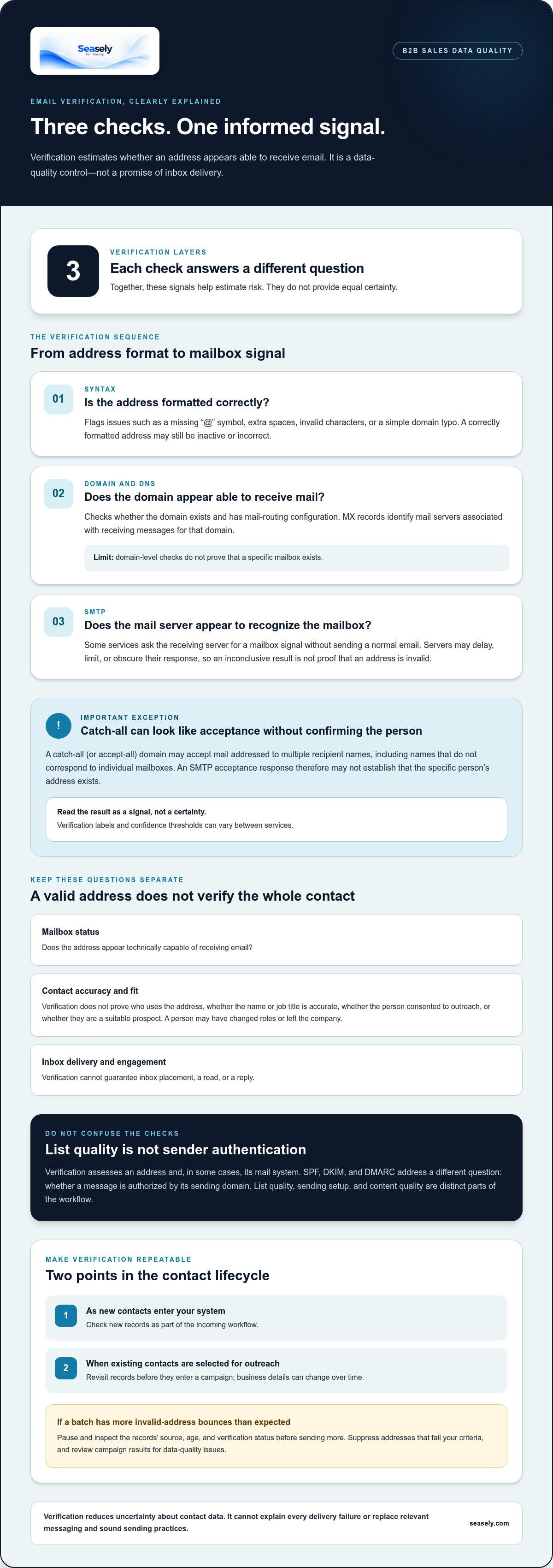
Keep the checks separate. Mailbox validity concerns the address’s technical status. It doesn’t establish that the person’s name or job title is accurate, that the contact has consented to outreach, or that they’re a suitable prospect. Those questions require current account and contact context, plus a separate review of the basis for outreach. Even a technically valid address can belong to someone who has changed roles or left the company.
Verification also differs from authentication. Authentication helps receiving systems assess whether a message is authorized by its sending domain. Email authentication protocols like SPF, DKIM, and DMARC address that sender-side question. Checking them doesn’t establish that a particular prospect’s mailbox is active. Treat list quality, sending setup, and content quality as distinct parts of the workflow.
Why B2B contact data needs ongoing attention
Business records change as people move roles, companies reorganize, and domains are updated. A contact that was accurate when it entered the CRM can become stale before the next campaign. Make verification a lifecycle control: check new records as they enter the workflow, then revisit existing contacts when they’re selected for outreach.
There isn’t one decay rate that applies to every B2B list. Data age, industry, company size, and how contacts were sourced all affect how quickly records become unreliable. Use your own bounce history and record-change patterns to set a review cadence. If a batch produces more invalid-address bounces than expected, pause and inspect the source, age, and verification status of those records before sending more.
This distinction makes campaign review more useful. A bounce points to a delivery failure, but the cause may be a bad address, a domain issue, or another technical condition. Verification can reduce uncertainty about contact data; it can’t explain every failure or replace sound sending practices and relevant messaging.
How B2B Email Verification Techniques Check an Address
Email verification works in layers. Each check answers a different question: Is the address formatted correctly? Does the domain appear set up to receive email? Does the mail server provide a useful response about the specific mailbox? Together, these signals help estimate risk, but they don’t all offer the same level of certainty.
This distinction matters because verification is often confused with warm-up or inbox-placement testing. Verification assesses an address and, in some cases, its mail system. It doesn’t build a sender reputation, test how a particular message performs in a recipient’s inbox, or confirm engagement. Methods also vary between services, so labels such as “valid” or “risky” may reflect different checks and confidence thresholds.
Syntax, domain, and MX record checks
A syntax check looks for formatting problems, such as a missing “@” symbol, an extra space, or an invalid character. It can also catch a simple typing error, like a missing letter in the domain. This is a fast first filter, but a correctly formatted address may still be inactive or incorrect.
Domain and DNS checks look for signs that the domain exists and has mail-routing configuration. MX records identify mail servers associated with receiving messages for a domain. If those records are missing or the domain cannot be resolved, the address may not be usable as written.
These checks stop at the domain level. An address such as [email protected] can pass formatting and domain checks without proving that a mailbox for “j.smith” exists. Treat each result as evidence about one layer, not a complete validation of the contact.
SMTP checks, catch-all domains, and disposable addresses
Some services use SMTP checks to ask a receiving server whether it appears to recognize a particular mailbox, without sending a normal email. The server’s response can offer a useful signal, but not every server responds clearly. It may delay, limit, or obscure the result, so an inconclusive response should not automatically be treated as proof that the address is invalid.
Catch-all, or accept-all, domains create another limit. They may accept mail addressed to multiple recipient names, including names that don’t correspond to individual mailboxes. An SMTP check can therefore receive an acceptance response without establishing that the specific person’s address exists. Verification services may classify this result as catch-all, risky, or unknown based on their own methods.
Disposable-address detection can flag domains commonly associated with temporary email use. Coverage depends on the service’s detection methods, and a flag is a data-quality signal rather than proof of a person’s intent. None of these checks confirms that the named contact currently works at the company or has buying authority. The next section explains how to handle these different confidence levels in practice.
For teams connecting contact discovery with outreach execution, Seasely’s outbound sales platform brings lead qualification and decision-maker email verification into a broader prospecting workflow.
How to Interpret Valid, Invalid, Risky, and Catch-All Results
A verification label is a decision signal, not a complete verdict on a contact. Services can use different checks and confidence thresholds, so “risky” from one tool may not mean exactly the same thing as “risky” from another. Use the result to guide the next action, and keep ambiguous records out of automated sending until someone reviews or rechecks them.
The table below provides a cautious baseline. Adapt it to your campaign’s tolerance for data risk, and record the reason for each decision so the team handles similar contacts consistently.
| Result | What it signals | Confidence limit | Practical next action |
|---|---|---|---|
| Valid | Available checks suggest the address can accept email. | Doesn’t prove the person, role, consent, or inbox placement. | Allow it to proceed only if the contact and outreach basis also meet your criteria. |
| Invalid | A check indicates the address is malformed, inactive, or unable to accept mail. | The result may reflect a temporary or technical issue, depending on the signal. | Suppress it from the campaign, retain the status, and correct or replace the record if reliable data is available. |
| Risky or unknown | The service lacks a clear response or finds a signal that warrants caution. | Uncertainty is not the same as confirmed failure. | Hold it from automated sending; review the record or recheck later. |
| Catch-all | The domain may accept mail for multiple recipient addresses. | Acceptance at the domain level doesn’t confirm this specific mailbox. | Review the contact, seek an alternate address, or exclude it based on campaign risk. |
What to do with valid and invalid addresses
A valid result is useful, but it answers a narrow technical question. A valid result suggests an address may accept email; it doesn’t confirm the contact’s identity, permission, relevance, or successful inbox delivery. Before sending, check that the record still matches the intended person and account, and that your outreach process permits the contact.
For a clearly invalid result, suppress the address rather than repeatedly testing it through campaigns. Keep the verification outcome and date in the CRM. That history helps prevent the same record from re-entering a sequence and gives the team context if the contact is later updated.
How to handle risky and catch-all results
Risky or unknown results often indicate incomplete evidence, not a definite failure. A catch-all result is more specific: the domain may accept messages without confirming individual mailboxes. Neither label should automatically make an address eligible to send or justify a permanent rejection.
Choose a controlled next step. Confirm the person and role using current account information, look for an alternate business contact, or recheck the address if circumstances change. If the campaign has low tolerance for uncertain data, exclude the record until confidence improves. These b2b sales email verification techniques work best when each result leads to a documented action, not an automatic assumption.
A Repeatable B2B Email Verification Workflow for Sales Teams
Make verification part of the contact lifecycle, not a separate cleanup task that happens only before a large campaign. A consistent process helps sales teams apply the same rules to new leads and older records, while keeping address checks distinct from campaign performance. This workflow gives each record a clear path from entry to review or outreach.
- Capture the source and context. Save where the contact came from and when the record entered your system. Keep the company, role, and address together so the team can assess relevance as well as technical status.
- Check new records before outreach eligibility. Use a real-time check at data entry where available. If the system can’t check immediately, hold the record until verification is complete.
- Batch-check existing lists. Before using older CRM records, verify the selected batch. Prioritize records with older source dates, recent company or role changes, prior bounces, or elevated campaign risk.
- Apply result-based rules. Suppress invalid addresses. Route risky, unknown, and catch-all results to review rather than automated sending. Deduplicate records so the same contact doesn’t enter multiple sequences.
- Recheck when context changes. Set cadence according to source reliability, elapsed time, record activity, and the consequences of a bad address. A recently verified record from a reliable source may need a different review schedule from a stale or previously bounced contact.
- Review after the campaign. Compare verification status with bounces and complaints. Use those signals to refine your source rules and review cadence, then update the record before it can be selected again.
Verify contacts at entry and before campaign launch
Entry checks prevent questionable records from moving straight into a sequence. Store the result, check date, and source alongside the address. Before launch, recheck older contacts if their source is unclear, their details have changed, or past activity raises a freshness concern. This gives reviewers useful context without treating a previous result as permanently current.
Maintain records and separate verification from deliverability
Define what happens to invalid, risky, bounced, and duplicate records, and record a reason for each suppression or review decision. Track bounce and complaint signals separately from verification results: one describes campaign outcomes, while the other estimates address status. For sequence planning, see this cold email automation guide. For broader prospecting context, use the B2B prospecting automation guide.
Seasely connects target-company discovery and qualification with verified decision-maker data and personalized outreach through its outbound sales platform.
How Verified Decision-Maker Data Fits Into Seasely’s Outbound Workflow
Email verification is most useful when it supports a wider prospecting process. A technically plausible address has limited value if it belongs to someone outside the target account or no longer matches the role you’re trying to reach. Target selection, contact research, verification, and outreach each answer a different question. Keeping those stages connected helps teams use contact data with more context.
Seasely’s AI-powered B2B outbound sales platform discovers and qualifies target companies, identifies and verifies decision-maker email addresses, and supports personalized automated outreach. Verification sits between finding an appropriate account and preparing an outreach message. It adds a data-quality signal to the workflow, while account fit and message relevance still depend on the wider prospecting context.
From target-account discovery to verified contact data
Company targeting and qualification establish which accounts belong in a prospecting workflow. Once an account meets the team’s criteria, the next task is to identify the relevant decision-maker and associate an email address with that person. This gives the address context: the company it relates to, the role it should reach, and the reason the account is being considered.
Verification then supports confidence in the contact record. It doesn’t determine whether the account is a good fit, whether the person has buying authority, or whether outreach is appropriate. Those decisions rely on account and role information, as well as the team’s own outreach criteria. The practical lesson from b2b sales email verification techniques is to use a verification result as one input, not as a substitute for qualification.
This structure also makes review more useful. If an address is uncertain, the team can consider it alongside the target account and decision-maker details rather than treating the result in isolation. If the company or role is no longer relevant, a technically valid address doesn’t make the record suitable for a campaign.
Move from verified data to controlled outreach
Once the contact record is appropriate for use, its verified address can support a personalized message based on the target company and decision-maker. That moves the record from prospecting into execution. Keep the handoff clear: verification concerns contact data, while sending introduces separate considerations such as message relevance, sequence rules, and campaign monitoring.
Teams can use this separation to diagnose issues more accurately. A verification status doesn’t promise inbox placement or engagement, and a campaign result shouldn’t overwrite the original verification record. Preserve both the address-check outcome and the later sending signals. That creates a clearer record of what was known before outreach and what happened after it.
For a connected workflow from qualified target accounts to verified decision-maker contacts and personalized outreach, Seasely’s B2B outbound platform brings these steps together.
Make Verification Part of Your Next Prospecting Cycle
Put your b2b sales email verification techniques into a process your team can maintain. Decide who owns record review, how status is recorded, and what should happen when contact details change. Clear ownership turns verification from an occasional cleanup task into an operational habit. It also gives sales and marketing a shared reference point for assessing contact quality and refining how prospects move into outreach.
Next, connect contact checks to the wider prospecting workflow. Seasely discovers and qualifies target companies, then identifies and verifies decision-maker email addresses for B2B outreach. This creates a practical route from account selection to personalized communication, with each stage contributing a distinct signal to the process.
Build your next prospecting cycle around relevant accounts, considered contact data, and a consistent handoff into outreach. Explore Seasely’s B2B outbound platform to bring those steps into one workflow.
Frequently Asked Questions
What are B2B sales email verification techniques?
B2B sales email verification techniques are technical checks that assess whether business email addresses are correctly formatted and may be able to receive messages. They can include syntax, domain and MX record, SMTP, disposable-address, and catch-all checks. Each offers a different signal. A result doesn’t prove who uses the address, whether the person has consented to contact, or whether a message will reach their inbox.
How do you verify a B2B email address before sending?
Start by checking the address format, then confirm that its domain and mail-routing records appear configured. Use a verification service to gather mailbox-level signals, and interpret the result before the contact enters a sequence. Suppress clearly invalid records and send uncertain ones for review. Don’t treat a “valid” label as a reason to skip campaign monitoring. Verification can’t guarantee delivery, so track bounces and other sending outcomes separately.
Is SMTP email verification safe, and does it send an email?
SMTP verification generally checks how a mail server responds without sending a normal email to the prospect. It isn’t the same as sending a test message, which would contact the recipient. Responses can still be limited, delayed, or obscured by the server, leaving the result inconclusive. Services may use different methods, so review the verifier’s documented process to understand what its SMTP check does and how to handle uncertain outcomes.
Can email verification confirm that a contact still works at a company?
No, an address check can’t reliably establish that someone still works at a company or remains the right decision-maker. A mailbox may appear able to receive messages even after the person has changed roles, left the organization, or lost purchasing responsibility. Check current company and role information separately. For example, before contacting a former champion about a renewal, confirm they still own that area rather than relying on an old CRM title.
How often should B2B email lists be re-verified?
There’s no single re-verification interval that suits every list. Set a cadence based on source quality, how long records have been stored, changes in the CRM, previous bounce signals, and campaign risk. Check new contacts before using them. Revisit older records when they show signs of staleness or are selected for a campaign. A schedule from another team may not fit your list’s sources or activity.
What should you do with a catch-all email address?
Keep a catch-all address out of automated sending until you’ve weighed its uncertainty and the campaign context. The domain may accept messages for addresses that don’t correspond to individual mailboxes, so the result alone can’t establish that the specific contact exists. Don’t automatically label every catch-all address usable or unusable. Review the prospect’s relevance, check available contact evidence, and consider an alternate contact or cautious exclusion if the campaign has low tolerance for uncertainty.
Does a verified email guarantee that a cold email reaches the inbox?
No. Verification assesses address-related signals, while inbox placement can also depend on sending behavior, message content, domain reputation, and mailbox-provider filtering. A verified address may still bounce or have its message filtered. Treat verification as one contact-data control, not a forecast of inbox visibility. Monitor campaign outcomes separately, then investigate whether a problem points to address quality, sending setup, or the message itself before changing the workflow.


