

The best Clay alternative may not be the one with the longest feature list. It’s the one that fits how your team builds and runs outbound. Clay can support flexible data workflows, while teams that need to execute campaigns may also need tools for email sending and sequencing.
That gap often prompts the search: you want to discover prospects, find verified decision-maker contacts, personalize outreach, and launch campaigns without adding unnecessary workflow overhead. The right choice depends on whether you need more control over data operations or a more direct path from prospect discovery to outreach.
This guide compares Clay alternatives by workflow fit, not feature count. You’ll see how data-focused tools differ from outbound execution platforms, what to consider beyond subscription price, and when an end-to-end workflow may suit your team. We’ll also look at Seasely, which combines target-company discovery and qualification, verified decision-maker emails, personalized outreach, and automated email sending in one platform.
Key Takeaways
- Decide whether you need to replace Clay, complement it, or move to a different category of tool before comparing options.
- Choose a Clay alternative by workflow fit: assess data relevance, contact verification, personalization, email execution, and performance feedback.
- Compare the full workflow your team must operate, not just a platform’s feature list or subscription price.
- Test one target segment against clear requirements, then track qualified contacts, verified email coverage, and campaign activity.
- Seasely is built for B2B teams seeking discovery, qualification, verified decision-maker contacts, personalization, and email sending in one workflow.
Why teams search for a Clay alternative: start with the workflow gap
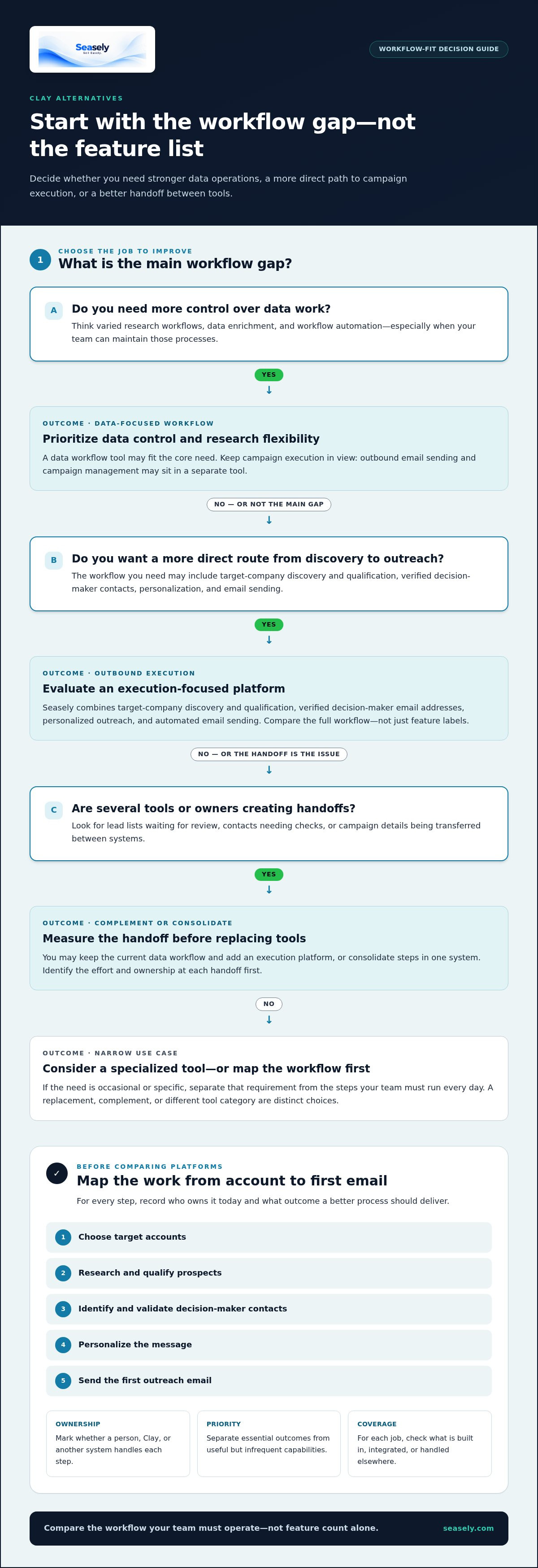
Searching for a different outbound tool doesn’t necessarily mean the current platform has failed. Your team may want a simpler route from prospect research to campaign activity, broader coverage across the workflow, or a tool focused on one step. The useful question isn’t whether another platform has more features. It’s whether its core job matches the work your team needs to complete.
“Alternative” can mean three things: a replacement for an existing tool, a complementary product that fills a gap, or a different software category. Your team might keep its current data workflow and add an execution platform. It might consolidate steps into one system, or choose a specialized tool for a narrow use case. These are different decisions, so identify the change you want before comparing options.
Workflow fit is the match between a tool’s core job and your team’s process. For outbound, that process can span target-account selection, prospect research, decision-maker contact validation, personalization, and the first email. Data preparation and campaign execution are related, but they solve distinct operational needs. A platform that supports one part of the chain may not cover the full process your team wants to run.
What does a Clay alternative need to replace?
Map the steps from choosing target accounts through sending the first outreach. For each step, record whether a person handles it manually, Clay supports it, or another system owns it. Then mark each requirement as essential or occasional. This separates daily operating needs, such as finding and validating contacts, from capabilities used only for a special segment or experiment.
- List each handoff, file transfer, and manual check.
- Note which steps must remain in place, even if the tool changes.
- Separate must-have outcomes from features that are useful but infrequent.
Base the comparison on this workflow map. For each step, specify the outcome you need, who owns it today, and what would count as a better process. That keeps the evaluation focused on operational fit rather than assumptions about a product’s scope.
When is a different outbound workflow worth evaluating?
Consider an evaluation when prospect discovery, contact validation, personalization, and sending are spread across several tools or owners. Each handoff can add coordination: a lead list waits for review, a contact needs checking, or campaign details must be transferred. That doesn’t automatically mean the stack should be replaced. It signals that your team should measure the effort and identify where consolidation or a focused tool could help.
Broader flexibility may matter when your team builds varied research workflows and has people to maintain them. A focused execution workflow may suit teams that prioritize moving qualified prospects into personalized campaigns with fewer operational steps. Neither approach is universally better. The right choice depends on who maintains the process, how often it changes, and which outcomes your team needs to control.
Use that distinction to frame the comparison: are you optimizing data work, outbound execution, or the handoff between them? Your answer clarifies whether to replace a tool, add one, or assess a different category altogether.
Clay alternative comparison: data workflows versus outbound execution
A useful comparison separates preparing prospect data from acting on it. Clay centers on data enrichment and workflow automation, while outbound email sending and campaign management typically sit in a separate tool. Seasely combines target-company discovery and qualification, verified decision-maker email addresses, personalized outreach, and automated email sending. These different roles mean the platforms aren’t one-to-one substitutes, and some teams may use tools together.
Which workflow jobs should the comparison cover?
Compare the steps your team actually runs: finding accounts, qualifying them, identifying decision-makers, verifying email addresses, personalizing messages, and sending campaigns. For each step, distinguish a built-in function from an integration or a task handled elsewhere. Make the comparison around the complete outcome your team needs, not a feature label alone.
| Workflow job | Clay | Seasely |
|---|---|---|
| Workflow focus | Data enrichment and workflow automation | B2B outbound discovery through email execution |
| Prospect discovery | Assess the data sources and workflow steps needed for your use case | Discovers and qualifies target companies against sales criteria |
| Contact verification | Assess the contact identification and validation steps your workflow needs | Provides verified decision-maker email addresses |
| Personalization | Consider how your message-personalization process fits the workflow | Personalizes outreach |
| Email sending | Sending and campaign management typically use a separate tool | Supports personalized automated email sending and sequences |
The table maps workflow roles, not feature parity. Your team may use a data workflow tool to shape prospect records, then pass those records to a separate execution platform. That can be a deliberate setup, especially when you need flexible data handling and already operate an outreach system.
How does an outbound platform differ from a data workflow tool?
Follow a record through the process. A data workflow organizes and enriches prospect information. An outbound platform takes qualified companies and verified contacts into message personalization and campaign execution. The handoff between them matters: note where data moves, who reviews it, and which system owns each action. For a broader evaluation framework, see this AI outbound sales platform evaluation guide.
A Clay alternative may therefore mean a replacement, an addition, or a move to an execution-focused category. If you want discovery, qualification, verified contacts, personalization, and sending in one outbound workflow, Seasely’s outbound platform brings those steps together. If your team values custom data workflows and already has execution covered, a complementary setup may fit better. Compare ownership of each step, not just the number of features.
How to evaluate Clay alternatives without choosing by feature count
Start with the outcome your team needs, then test whether each platform supports the steps that produce it. A long feature list can hide gaps in the daily workflow. Define the process, the people responsible for it, and your existing constraints before comparing options.
- Set the required outcome. Specify what should be ready at the end of the workflow, such as qualified target accounts, verified decision-maker contacts, or personalized outreach prepared for sending. Separate the essential result from features that would simply be convenient.
- Map existing constraints. Record the systems your team already uses, who maintains them, and where people manually move or review data. A tool that requires a new handoff may not simplify the process, even if it adds capabilities.
- Assess data relevance. Check whether account criteria can be defined and applied consistently. A prospect list is useful only if the companies match your target profile and the information supports the decision your team needs to make.
- Review contact identification and verification. Determine how decision-makers are identified and how their email addresses are verified. Consider whether the process gives your team enough confidence to move contacts into outreach, and how it handles records that need review.
- Test personalization control. See whether messages can reflect relevant account or role context without making claims the available data doesn’t support. Review how much control a person has to inspect and refine automated copy.
- Evaluate sending and feedback. Consider how sequences are scheduled and sent, what campaign activity your team can observe, and how those signals inform the next iteration. Mark each need as essential, optional, or unnecessary for your workflow.
Which evaluation criteria matter for B2B prospecting teams?
Use the same target-account criteria and sample records for every option under consideration. Check whether the workflow consistently surfaces suitable companies, identifies the relevant decision-maker, and provides a verified contact. Then inspect the message context: personalization should be grounded in information the workflow actually has, not generic details presented as specific research.
How should teams assess outbound execution and control?
Trace a contact from selection to campaign activity. Note who reviews the message, where scheduling happens, and which performance signals are visible afterward. A review step can help your team catch weak or unsupported personalization before sending. This cold email automation practical guide offers additional context on structuring the execution process.
Evaluate whether a tool completes the workflow your team requires, not how many features it lists. For teams looking to combine B2B lead discovery, qualification, verified decision-maker contacts, personalization, and automated email sending, Seasely’s outbound platform brings those steps into one workflow. Use your required outcomes and review criteria to judge whether that model fits.
How to plan a Clay alternative evaluation and transition
A focused evaluation shows whether a Clay alternative fits your team’s real process without changing the whole outbound operation at once. Start with one target segment and a defined workflow, such as qualifying companies, identifying decision-makers, checking email addresses, personalizing messages, and preparing or sending a campaign. Keep the test narrow enough to review each step, but representative of the work you expect the platform to handle.
What should a focused evaluation test?
Choose an audience that reflects your usual targeting conditions, then agree on qualification criteria before testing. Use the same criteria throughout so results remain comparable. Review the quality of the companies and contacts first. Only then assess personalization and sending. Weak or mismatched contact data can make later campaign observations difficult to interpret.
Record a baseline from your current process. Useful measures include the number of companies that meet your criteria, how many identified decision-makers have verified email addresses, and what campaign activity your team can observe. Track manual work, too. Note where someone must correct a record, transfer data, approve a message, or perform a step the platform doesn’t cover. That remaining work is part of the workflow’s actual fit.
Keep the test conditions consistent. Use agreed definitions for a qualified company and a verified contact, and document exceptions rather than silently excluding them. If the sample reveals a mismatch, trace it to the criteria, contact data, review process, or execution step instead of relying on a general impression.
How can teams reduce disruption during a switch?
Before changing tools, document the current workflow, its owners, and its dependencies. Include how records are created, updated, reviewed, and used in existing CRM processes. Identify which information must remain available to salespeople and which activities should continue unchanged during the evaluation. Retain access to existing records and workflows until the test is complete.
Plan data transfer, CRM connections, and migration steps around how each platform handles them. Keep the evaluation separate from broader changes until you understand how each system supports the process.
Agree on decision criteria in advance. For example, define acceptable contact relevance and verified email coverage, identify which manual steps you want to reduce, and specify the campaign activity you’ll review. Treat one campaign as evidence, not a verdict. Results can reflect audience selection, message quality, or execution as well as the tool.
Once the evaluation is complete, compare the recorded workflow with your baseline and decide whether to replace a step, add a complementary tool, or keep the current process. If you want to test discovery, qualification, verified contacts, personalization, and email sending in one outbound workflow, evaluate Seasely for your outbound process.
When Seasely makes sense as a Clay alternative for outbound teams
Seasely serves B2B teams that want one connected process for discovering and qualifying target companies, finding verified decision-maker email addresses, personalizing outreach, and sending email sequences. It fits teams that run these steps as a recurring outbound operation and want to manage them within an execution-focused platform, rather than assemble a workflow around separate data and sending tools.
A data workflow tool and an outbound platform don’t serve identical purposes. Teams that depend on specialized research processes, custom data operations, or an existing tool stack may prefer a different setup. The useful comparison is whether Seasely’s workflow covers the steps your team needs and how it aligns with the systems and review practices already in place.
Which outbound teams may benefit from Seasely’s workflow?
Seasely’s workflow is designed for teams that start with defined sales criteria and want to move from suitable companies to verified decision-maker contacts, then into personalized email outreach. Connecting these stages can reduce the need to coordinate separate prospecting and execution steps. Automated sending and campaign optimization support the workflow, while your team remains responsible for deciding which audiences and messages are appropriate for its goals.
Seasely is outbound sales software, not an email inbox, mailbox rental, or standalone email hosting service. That distinction matters when mapping the full setup: the platform supports outreach execution, while email accounts and other parts of a team’s sales stack are separate considerations.
What should buyers expect from an evaluation?
Begin with your targeting rules. Translate them into clear company qualification criteria, then assess how the platform’s discovery and qualification workflow maps to those requirements. Review the decision-maker email details provided and assess verified contact coverage against the needs of your chosen segment. Next, inspect how personalization and automated sending fit your review process and campaign practices.
Keep the evaluation grounded in the work your team expects to run. Identify which steps the platform handles, where people still make decisions, and whether campaign activity and optimization support the feedback loop you need. If a requirement depends on a particular integration or data-transfer process, include that requirement in your evaluation instead of assuming it is part of the workflow. Teams with a different operating model can use the same criteria to compare options.
In practical terms, Seasely is a Clay alternative for teams prioritizing a connected path from lead discovery to email execution. It brings defined stages into one outbound workflow, but it doesn’t guarantee pipeline, sales, or revenue outcomes. Use your own targeting criteria and workflow requirements to assess fit, then explore Seasely’s outbound sales platform.
Choose the workflow you want to run next
Let the evaluation shape your next operating model. Decide which steps your team wants to own, which should run together, and where human review belongs. Then choose a Clay alternative that supports the process you intend to maintain, not just the one that’s easiest to compare on a feature list.
For teams considering a more connected outbound workflow, Seasely automates target-company discovery and qualification, provides verified decision-maker email addresses, and supports personalized email sending. These capabilities help organize execution; results still depend on your targeting, messaging, and ongoing decisions.
Explore Seasely’s outbound sales platform to see how its workflow aligns with your team’s requirements. A clear process gives you a stronger basis for choosing what to change, what to keep, and how to move forward with confidence.
Frequently Asked Questions
Is Clay a CRM?
No. Clay is primarily used for data enrichment and workflow automation, rather than as the system that manages customer relationships and sales opportunities. A team may use a CRM to track accounts, deals, and sales activity while using Clay to prepare prospect data. Before connecting tools, identify which system should own each record and how updates should be handled.
Can I use a Clay alternative without replacing my CRM?
Yes. A Clay alternative can support prospecting or outreach while your CRM remains the place where your team manages account and opportunity records. Test the flow with a small group of records first. Check how fields map, how duplicates are treated, and whether updates reach the system your team relies on.
How much does a Clay alternative cost?
Pricing varies by platform and plan structure. As of March 2026, Clay’s Free plan costs $0 per month, Launch costs $185 monthly or $167 per month when billed annually, and Growth costs $495 monthly or $446 per month annually. These plans use Data Credits and Actions. Compare what’s included and account for any separate tools needed to complete your workflow.
What happens to my existing prospect data if I switch from Clay?
Your prospect records don’t automatically move just because you change platforms. Before switching, identify how you’ll transfer records into the new workflow. Preserve a copy of important records, including qualification fields and notes, and map those fields before transferring data. Keep your existing workflow accessible until you’ve checked record accuracy and continuity.
Is a Clay alternative useful for a small B2B sales team?
It can be, if the tool fits the team’s actual process and reduces work the team struggles to maintain. For example, a small team without a dedicated workflow operator may value a simpler way to move from target-account research into outreach. A team with specialized data needs may prefer a more configurable setup. Compare the ongoing tasks each option leaves for your staff.
Can an outbound platform both find leads and send emails?
Yes. Some platforms combine lead discovery and qualification with contact identification, email personalization, and sending. For example, Seasely’s workflow discovers and qualifies target companies, provides verified decision-maker email addresses, and supports personalized automated email sending. This can connect prospecting and campaign activity within one platform. Evaluate the workflow against your team’s targeting and message-review needs before adopting it.
Does switching tools guarantee more sales or replies?
No. Changing software can alter how a team finds prospects or runs outreach, but it can’t guarantee sales, replies, or revenue. Results also depend on factors such as account fit, contact relevance, message quality, and how the team follows up. Set practical measures before a change, then review campaign activity and prospect quality over time instead of judging the tool by one isolated result.


