

The best Instantly alternative may not be the platform with the longest feature list. Choose one based on how well it supports your team’s outbound workflow, from finding prospects to improving campaigns. A tool built mainly for sending may suit a team with an established data process, while an all-in-one platform can connect more of the steps between prospecting and outreach.
It’s also worth weighing the practical side of switching. Campaign continuity, setup, and domain health matter alongside features, especially when outbound is already running. The useful comparison is not simply which platform can send more email. It’s which one gives your team the right balance of workflow coverage and control.
This guide compares Instantly with other outbound options across the same workflow: prospecting, email verification, personalized outreach, and campaign optimization. You’ll see how specialized sending tools differ from platforms that cover more of the process, including Seasely’s approach to discovering and qualifying companies, identifying decision-maker emails, and automating outreach. Use the framework to identify what your team needs and choose a practical next step, without treating a platform switch as a promise of sales results.
Key Takeaways
- Separate a platform-fit issue from problems rooted in campaign strategy or prospect data before switching tools.
- Compare each Instantly alternative across prospect discovery, verification, personalization, sending, and campaign optimization.
- Match the platform to your operating model: decide whether you need a specialized sending tool or a more connected outbound workflow.
- Use a staged evaluation to document requirements and review sending practices, authentication, suppression rules, and domain safeguards before changing campaigns.
- See how Seasely connects company discovery and qualification, verified decision-maker emails, personalized outreach, scheduled sending, and campaign optimization.
Why B2B teams look for an Instantly alternative
Searching for an Instantly alternative doesn’t necessarily mean a team has outgrown its current platform. Teams may be assessing whether the workflow suits their needs, whether prospecting and sending work well together, or whether fewer tools could reduce manual handoffs. Others may be addressing a specific gap, such as limited prospect discovery or difficulty tracking what happens between building a list and reviewing a campaign.
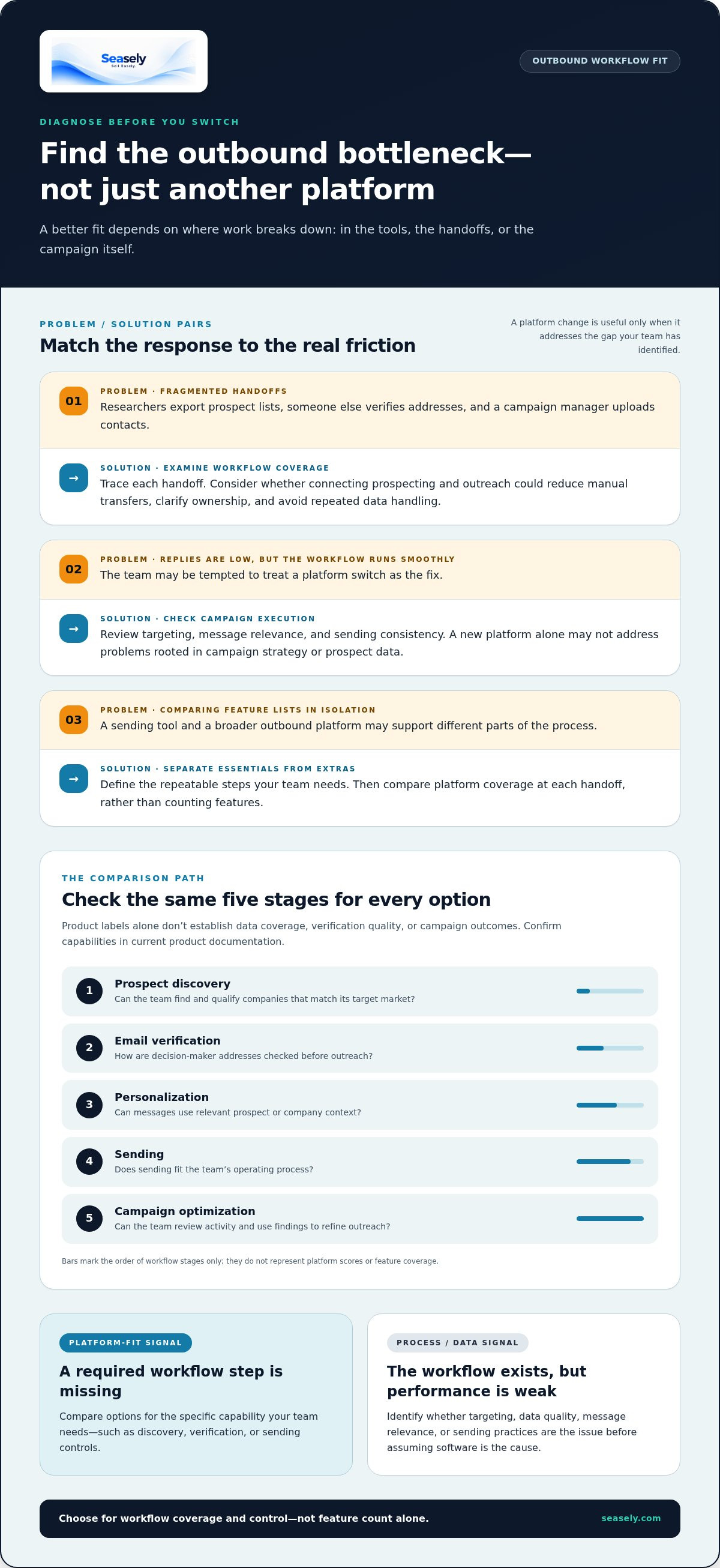
Start by identifying where work slows down. If researchers export prospect lists, another person verifies addresses, and a campaign manager uploads contacts, the issue may be a fragmented workflow. If that process runs smoothly but replies are low, switching platforms alone may not address the cause. The fundamentals of Outbound Marketing Explained help put the work in context: outreach depends on reaching relevant audiences with a clear message, not simply operating a sending tool.
Common reasons teams compare platforms include whether they can:
- Discover and qualify companies that match their target market.
- Verify decision-maker email addresses before outreach.
- Personalize messages with relevant prospect or company context.
- Schedule and manage email sending as part of their operating process.
- Review campaign activity and use the findings to refine future outreach.
These are comparison criteria, not requirements every team needs in one product. A team with a reliable prospecting process may prioritize sending controls and reporting. A lean team handling research, validation, and outreach with limited staff may value fewer handoffs. Team size shapes who owns each step, but it doesn’t determine a universal platform choice.
What teams usually want from an Instantly alternative
Teams often want a clear path from prospect research to verified contacts and personalized outreach. Fewer manual transfers can clarify ownership and reduce repeated data handling. First separate essential requirements, such as a dependable way to build and send campaigns, from additional capabilities, such as broader prospect discovery or more workflow automation. The right fit covers the repeatable steps your team needs to run.
When a new platform may not solve the real problem
Campaign results also depend on execution. Weak targeting can put a relevant offer in front of the wrong audience. Generic messaging can give the right prospect little reason to respond. Inconsistent sending practices can make campaign performance harder to interpret. These are process or data issues, not automatically missing software features.
A platform can support prospecting, verification, personalization, sending, and reporting, but it can’t guarantee inbox placement, replies, or revenue. Before switching, identify the step that breaks down and determine whether the cause is capability, data quality, targeting, or campaign execution. If the workflow already covers your team’s needs, improving those inputs may be the more useful next move.
Compare Instantly alternatives by the outbound workflow they cover
Compare platforms at each handoff rather than counting features. One tool may support high-volume sending while relying on a separate product for lead data. Another may combine discovery and outreach but use a different operating model. The matrix below summarizes the available product information and points to details to review in current plans or documentation. Feature names alone don’t establish data coverage, verification quality, or campaign outcomes.
| Platform | Prospect discovery | Verification | Personalization | Sending | Optimization |
|---|---|---|---|---|---|
| Instantly | Lead database is a separate product from outreach plans. | Check current product documentation for verification process and coverage. | Check current plan and product documentation. | Email outreach plans support sending. | Check current analytics and optimization capabilities. |
| Seasely | Discovers and qualifies target companies. | Identifies and verifies decision-maker email addresses. | Personalized outreach. | Automates scheduled email sending. | Campaign analysis and workflow optimization. |
| Smartlead | Lead data is a paid add-on on specified plans. | Verified Emails is a paid add-on on Base and Pro; confirm its methods and coverage. | Check current plan and product documentation. | Email outreach platform. | Check current analytics and optimization capabilities. |
| Apollo | Large contact database. | Contact information uses a credit system; check current verification details. | Check current plan and product documentation. | Includes sequencing and dialing features. | Check current analytics and optimization capabilities. |
| Woodpecker | Check current product documentation. | Check current product documentation. | Check current product documentation. | Email outreach tool; confirm current sending functions. | Check current analytics and optimization capabilities. |
For a broader framework, the AI outbound sales platform evaluation guide can help structure a review across the full process. Compare product details against current official documentation. A blank or unverified cell isn’t evidence that a feature is absent; it means there isn’t enough information here to make a firm comparison.
Lead discovery and email verification
Assess account fit separately from contact accuracy. Discovery is about whether a company matches your target criteria. Verification is about whether the selected decision-maker address is usable and current. Seasely combines company discovery and qualification with decision-maker email identification and verification. When product details vary by platform or plan, review data sources, verification methods, and coverage before treating capabilities as equivalent.
Personalization, sending, and campaign optimization
Next, trace what happens after a contact is selected. Can the workflow personalize a message, schedule outreach, and use campaign analysis to refine the process? Seasely supports personalized outreach, automated scheduled sending, and campaign optimization. Other tools may cover some of these steps, so compare the relevant features and plan limits rather than assuming they’re equivalent. The Seasely outbound workflow connects these stages for teams assessing a more integrated process. Platform capabilities can support execution, but they don’t guarantee opens, replies, or revenue.
Which Instantly alternative fits your team's operating model?
The right choice depends on who runs outbound and where work slows down. A compact team may need prospect research, contact verification, and outreach in one workflow. A team with established data operations may need a focused sending platform that fits its existing process. Neither model is automatically better. Compare tools against three operating conditions: clear ownership, manageable process complexity, and reporting that helps the team decide what to adjust.
- Ownership: Identify who selects accounts, validates contacts, writes messages, manages sending, and reviews results. A tool can consolidate steps, but someone still needs to own the decisions.
- Process complexity: Map handoffs, spreadsheets, and repeated data entry. These reveal where broader workflow coverage could help and where a narrower tool may be enough.
- Reporting needs: Decide which activity and campaign insights your team uses to refine targeting, messaging, and follow-up. Focus on metrics that inform a next action.
For teams that need prospecting and outreach together
When the same small team handles list building and campaign execution, multiple handoffs can add coordination work. Seasely combines target-company discovery and qualification, decision-maker email identification and verification, personalized outreach, scheduled email sending, and campaign analysis. Teams can assess this connected workflow without assuming that consolidation will automatically raise conversion or lower operating costs.
Review how each step fits your actual responsibilities. For example, if one person defines the target market and another approves messaging, the workflow should make those handoffs clear. Teams comparing sequence structure can use this automated email sequences guide to consider how messages and follow-ups fit together.
For teams optimizing an existing cold email process
If prospecting and sending already work reliably, focus the comparison on the specific bottleneck. A team may need better sequencing, more dependable contact data, or stronger campaign learning. Keep roles in view: if a sales operations lead owns list quality and reps own messaging, the platform should support that division of work. Replacing a tool without changing a broken process can carry the same problem forward.
Map the current process before evaluating alternatives. Note who approves contacts, who launches campaigns, and who acts on performance data. Then prioritize the capability that addresses the clearest gap. The cold email automation guide offers broader workflow context. A useful Instantly alternative is one that fits these repeatable responsibilities, whether that means connecting several stages or strengthening one existing part of the system.
How to evaluate an alternative without disrupting outbound operations
A platform change can affect more than campaign setup. It can alter how your team handles contacts, sequences, exclusions, and sending practices. Evaluate the workflow before moving live activity. A structured comparison helps you determine whether an Instantly alternative addresses a real operational gap while keeping transition risks visible.
Build a requirements checklist before comparing platforms
Start with the process you run now. Record target-account criteria, how contacts are verified, what each sequence needs to do, who approves messages, and how the team reviews campaign activity. Mark each requirement as essential, useful, or unnecessary for the current workflow. Assign an owner to each stage and identify the reporting that informs decisions. This keeps feature comparisons grounded in actual responsibilities.
- Document the workflow. Map each step from account selection through campaign review. Note tools, manual transfers, approvals, and recurring delays.
- Define requirements. Set essential capabilities first, then separate useful additions from features that won’t solve a current problem. Include data quality, personalization, sending controls, and reporting needs.
- Compare evidence. Match requirements against current product documentation and applicable plan details. Mark unclear or plan-dependent capabilities for review instead of assuming they’re included.
- Test with control. Run a limited, clearly defined evaluation before moving core campaigns. Keep the audience and measurement period consistent enough to make observations useful.
Protect campaign continuity during evaluation
Before a transition, preserve operating details that are easy to overlook: active sequences, campaign status, suppression lists, and domain-authentication practices. Confirm how opt-outs and other exclusions will remain applied, and review the sending setup that supports current campaigns. These records help prevent accidental re-enrollment or gaps in the process.
Where practical, change one major variable at a time. For example, don’t simultaneously alter the platform, audience, message, and sending pattern if you need to understand why results shift. Establish a baseline, then record what changes during a controlled test. Review authentication, sending practices, suppression rules, and domain-reputation safeguards as part of the evaluation, not as an afterthought.
Software is one part of email operations. Inbox placement and domain reputation depend on multiple factors, including configuration, contact quality, audience relevance, and sending behavior. No platform alone can guarantee delivery or protect a domain. Treat deliverability claims as something to evaluate, and assess the practices your team can control.
Use this process to compare tools without rushing a live migration. The Seasely outbound workflow shows how prospecting and outreach can connect.
How Seasely fits teams seeking an Instantly alternative
Seasely connects prospecting, contact verification, personalized outreach, sending, and campaign analysis in one B2B outbound platform. The workflow links these stages: identify target companies, qualify them against the team’s criteria, find and verify decision-maker email addresses, then prepare and send personalized messages. Campaign analysis helps teams review activity and refine their process.
This connected approach supports lean teams managing several outbound stages and teams looking to reduce manual transfers between systems. It isn’t the right operating model for every sales organization. A team with established prospecting and data processes may prefer a narrower tool that fits its existing responsibilities. The decision depends on where work currently gets stuck and which steps the team wants a platform to cover.
What Seasely brings to the outbound workflow
Seasely automates discovery and qualification of target companies, then identifies and verifies decision-maker email addresses. This creates a defined path from account selection to contact preparation. The platform also supports personalized, scheduled email outreach and campaign analysis for workflow optimization. Teams can assess how this sequence fits their process, roles, and reporting needs as they plan their operations.
Contact verification is a step in preparing outreach, not a promise of inbox placement or response. Likewise, personalization and campaign optimization support execution, but don’t ensure opens, replies, or sales. Results depend on more than platform functionality, including audience fit, message relevance, and sending practices.
A practical next step for teams comparing options
Return to the requirements checklist from your evaluation. Identify the highest-priority gap: account discovery, contact verification, message personalization, scheduled sending, or campaign learning. Then compare Seasely’s workflow with that need, consider who will own each step, and decide what information the team needs to review. This keeps the decision focused on operational fit rather than a longer feature list.
Seasely is an outbound sales platform, and it doesn’t guarantee business outcomes. Assess its workflow against your team’s requirements and the steps you want to connect.
Make your next outbound decision deliberate
Choosing an Instantly alternative is an opportunity to make the next stage of outbound more intentional. Before changing platforms, decide what an evaluation should clarify: which work should stay with your team, where handoffs create friction, and what evidence would justify a change. Tie the decision to a real operating need, not just a feature checklist.
Then assess whether the platform’s workflow supports that need. Consider how target discovery and qualification, verified contacts, personalized scheduled outreach, and campaign optimization would fit your team’s process. The aim isn’t to assume one system will resolve every campaign issue. It’s to determine whether the workflow matches how your team plans, executes, and learns.
Seasely provides a platform to assess against those priorities. Explore Seasely's AI outbound platform and consider whether it fits the next step your team is ready to take. A clear evaluation keeps the decision manageable and helps your team move forward with a workflow it can run consistently.
Frequently Asked Questions
What is the best alternative to Instantly?
There isn’t one best choice for every team. The right option depends on the work you need the platform to handle. A team with prospect data in place may prioritize sending controls, while a team building lists and campaigns together may value broader workflow coverage. Compare current plan limits, pricing structure, and the steps your team would still manage outside the platform before deciding.
Is Seasely an alternative to Instantly?
Yes. Seasely is an AI-powered B2B outbound platform that teams can assess as an Instantly alternative, particularly when they want prospecting and outreach connected. Its workflow covers target-company discovery and qualification, verified decision-maker email addresses, personalized scheduled outreach, and campaign optimization. Compare that workflow with the way your team currently operates.
How do I choose an Instantly alternative for my team?
Choose based on your team’s biggest operational constraint, not the number of features on a product page. If reps spend time sourcing suitable accounts, evaluate discovery and qualification. If lists are ready but campaign review is difficult, focus on reporting and optimization. Also compare user or volume limits, data-credit rules, and how much work remains outside the platform to understand the full operating fit.
Can I use an outbound platform for lead generation and email sending?
Yes. Some outbound platforms combine lead generation with email sending, while others focus on sending and connect to separate data sources. The key is understanding what “lead generation” covers: company discovery, contact identification, qualification, or verified addresses. For example, a team might generate a target-account list, review decision-maker contacts, then use the platform to run outreach. Compare how each stage works in the product and plan.
Does switching from Instantly guarantee better deliverability?
No. Changing platforms alone can’t guarantee better inbox placement. Deliverability is affected by several operational factors, including domain authentication, contact quality, sending behavior, message relevance, and recipient engagement. Before attributing a change to software, establish a baseline and track the same indicators during a controlled test. Review bounce and complaint signals alongside campaign outcomes, and follow sound sending practices rather than treating a platform’s features as a delivery guarantee.
What should I compare besides email sending?
Look at the operating costs and constraints around sending. Compare contact or email volume allowances, seat limits, credit systems, and whether lead data is included or priced separately. Also account for external requirements such as domains and mailboxes, which may add to the total cost of running outbound. Finally, assess how the platform supports team access, data handling, and campaign review, since those affect day-to-day use.
Does Seasely guarantee sales or revenue results?
No. Seasely doesn’t guarantee sales or revenue. The platform automates parts of the outbound workflow, but business results also depend on factors such as the offer, audience, timing, and sales follow-up. Set expectations around work the team can measure directly, such as whether target accounts match its criteria or whether campaign activity informs useful adjustments. Treat revenue as an outcome to evaluate, not a promised result of using software.


