

What if the best follow-up gives a prospect a new reason to respond, rather than simply reminding them you sent an email? Automated email sequences can keep B2B outreach moving, but a fixed schedule alone won’t make a message relevant. If every email repeats the same pitch, automation just sends the noise more efficiently.
The challenge is deciding what each message should do, when it should arrive, and when the sequence should stop. Personalization also needs to go beyond inserting a first name. Each email should reflect a relevant detail about the audience or its likely priorities, then offer a clear next step.
This guide shows you how to plan a coherent sequence for one audience and outcome, write distinct follow-ups, and set practical timing and stopping rules. You’ll also learn which performance signals can help you refine the flow without overreacting to noisy data. The goal is a measured outreach system that connects relevant prospects with useful messages, then improves based on how they respond.
Key Takeaways
- Build automated email sequences around one audience, a clear objective, and a deliberate progression of messages.
- Choose send timing based on prospect context and message purpose, rather than relying on a universal schedule.
- Give each follow-up a distinct, useful reason to continue the conversation, with a low-friction next step.
- Set exit conditions before launch so outreach stops when a prospect replies, opts out, or moves forward.
- Review delivery, replies, positive responses, and qualified next steps separately to guide responsible improvements.
What automated email sequences do, and what they should not automate
An automated email sequence is a planned series of messages sent on a schedule or in response to a prospect’s action, with each message supporting a defined step in a business conversation. The sequence determines the order and conditions for sending. Its purpose and relevance still need to be designed for the people receiving it.
A sequence is different from other forms of email communication. A one-off campaign sends a single message or coordinated announcement. A newsletter shares ongoing updates with an audience, often without moving each reader through a specific progression. General workflow automation can coordinate many tasks, such as assigning records or updating fields. An email sequence is narrower: it organizes outreach around a particular prospect context and an intended next step.
That structure makes automation useful, but it doesn’t make every message appropriate. The wider practice of marketing automation in email campaigns can include segmentation, personalization, scheduling, and analysis. Those mechanics help carry out a plan. They can’t replace the judgment needed to decide whether the plan fits its audience.
When a B2B email sequence is useful
Use a sequence when there’s a clear reason to start or continue a business conversation. For example, a team might introduce an offer related to a known operational challenge, then follow up with a relevant clarification or useful resource. Each message should connect to the same audience, context, and intended next step. A sequence is not a substitute for a sound reason to contact someone. Scheduling an irrelevant pitch only makes it arrive more predictably.
Before drafting, state the situation in one sentence: “We’re contacting operations leaders at companies facing this specific process issue, and we want to learn whether it’s a current priority.” If the audience, context, or next step is vague, the sequence isn’t ready to automate. This test helps prevent a broad list of contacts from receiving messaging that assumes needs they may not have.
What automation should leave under human control
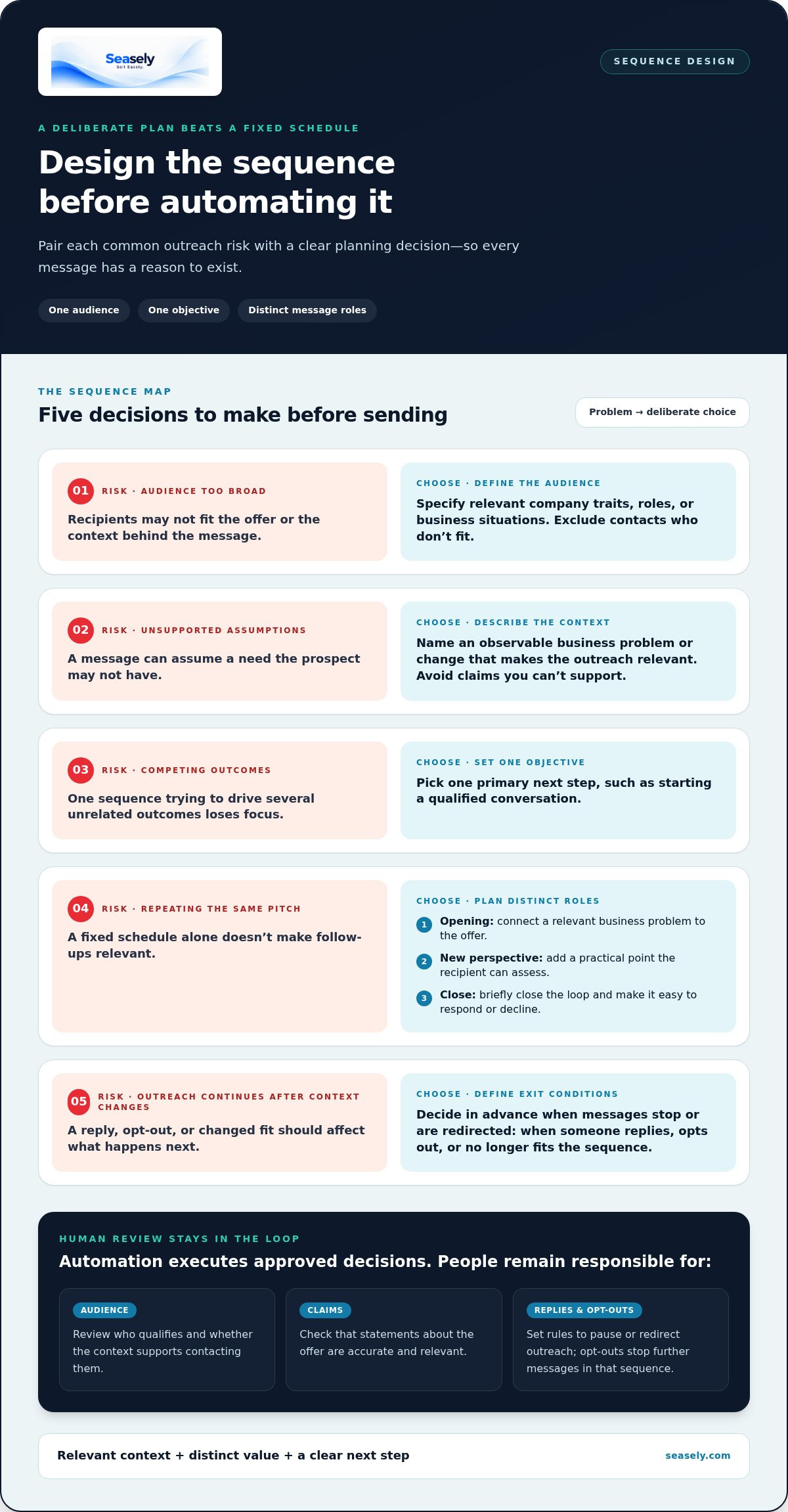
Automation can execute approved decisions. People should remain responsible for the decisions that shape the outreach:
- Audience criteria: Review who qualifies for the sequence and whether the context supports contacting them.
- Message claims: Check that statements about the offer are accurate and relevant to the recipient.
- Replies and opt-outs: Define how a response pauses or redirects outreach, and make opt-outs stop further messages in that sequence.
These controls matter because a prospect’s reply changes the context. A question may call for a tailored response, while a clear decline should not trigger another scheduled pitch. Automation can route or stop messages according to rules, but those rules need to be deliberate and reviewed.
For B2B teams, Seasely connects target discovery and qualification with verified decision-maker email addresses, personalized outreach, and sending. This can reduce manual handoffs while keeping sequence logic grounded in a human-reviewed plan. Automation can make execution consistent, but it can’t guarantee engagement, meetings, or revenue.
Map the sequence around the prospect’s context and decision
A sequence map turns an outreach idea into deliberate steps. Start with the prospect’s situation, then decide what each message should help them understand or do. The same offer may need different framing for different roles, industries, or business conditions. A simple planning framework makes those choices visible before automated email sequences begin sending.
- Define the audience. Specify relevant company traits, roles, or business situations. Exclude contacts who don’t fit the offer or lack the context behind your message.
- Describe the context. Name the observable business problem or change that makes outreach relevant. Avoid assumptions you can’t support.
- Set one objective. Choose a primary next step, such as starting a qualified conversation. Don’t ask one sequence to drive several unrelated outcomes.
- Plan the progression. Assign each message a distinct role, moving from context to a useful perspective and then a clear close.
- Define exit conditions. Decide what happens when someone replies, opts out, or no longer fits the sequence. Those conditions should stop or redirect further messages.
Choose one audience and one sequence objective
Narrow the audience until you can explain why the same problem and offer matter to each recipient. For example, a sequence for operations leaders at firms managing a manual qualification process should focus on that process, not a generic promise to improve sales. Set one objective, such as learning whether the process is a current priority. If a prospect’s role or business situation doesn’t support the message, leave them out.
Give each message a distinct role
Build progression, not repetition. An opening email can connect a relevant business problem to the offer. The next can add a practical perspective the recipient can assess. A final note can briefly close the loop and make it easy to respond or decline. Examples in Automated Email Sequence Examples can help prompt ideas, but the message roles should reflect your audience and context.
Illustrative sequence map, not a guaranteed template:
- Opening: State the observed process challenge and why it may be relevant to this role.
- New perspective: Share one useful consideration for evaluating that challenge, without repeating the initial pitch.
- Close the loop: Ask whether a brief conversation is useful, or whether you should stop reaching out.
Before launch, read the messages in order. Does each one add information? Does the request fit the context? Would a reply or opt-out pause the next send? If not, revise the map before polishing the copy. For broader workflow context, see this cold email automation guide. Seasely’s outbound sales platform connects prospect discovery, qualification, verified contacts, personalization, and sending to put a reviewed sequence into operation.
Set sequence timing and stopping rules without over-contacting
Timing should give a prospect a fair chance to read, consider, and respond before another message arrives. The right spacing depends on the audience, the purpose of each email, and the decision involved. A time-sensitive trigger may justify a prompt first message. A complex purchase decision may call for more room between follow-ups. No single cadence suits every audience or buying situation.
Choose timing that gives each message room to matter
Start by asking what the recipient needs to do after each message. If they need to review a proposal or consult colleagues, a quick follow-up may add pressure without adding value. If a prospect has just taken an action that makes your offer relevant, waiting too long may weaken the context. Test timing with your own audience, then assess replies and other useful responses before adjusting the schedule.
Use these timing patterns as planning options, not fixed rules:
| Send pattern | Useful when | Check before using |
|---|---|---|
| Immediate | A recent action makes the message relevant now. | Confirm the action is a sound reason for outreach and the message reflects it. |
| Spaced | The recipient may need time to consider the topic or respond. | Make sure each follow-up adds value rather than filling time. |
| Event-triggered | A defined change or interaction creates a new reason to reach out. | Verify the trigger is accurate, current, and appropriate for this audience. |
Where practical, change one timing variable at a time. Compare how recipients respond to different spacing while keeping the audience and message purpose consistent. That makes it easier to see whether timing may affect results, rather than changing several parts of the sequence at once.
Define when the sequence must stop
Set stop and pause rules before launch. A reply should pause scheduled messages and route the conversation for human review. An opt-out should suppress further outreach. If a contact no longer fits the audience criteria, remove them from the flow. These rules prevent a sequence from continuing after its original context has changed.
Keep suppression data available wherever contacts enter a sequence. Review records for duplicates, outdated details, prior opt-outs, and contacts already in an active conversation. List hygiene reduces avoidable repeat contact, while clear routing helps the team respond to a prospect’s actual question instead of sending the next prewritten message.
Timing is only one part of reliable sending. Deliverability and domain reputation also require attention, including sender setup and message practices. For more on the broader cold outreach workflow, see this cold email automation guide. Use automated email sequences to manage planned sends, while keeping timing tests and stop conditions under regular review.
Write automated emails that sound specific, useful, and human
A relevant email gives the recipient a clear reason to read and a simple way to respond. Use a compact framework: establish verified context, connect it to a problem the recipient may recognize, offer a useful point, and make a low-friction next step. Keep the problem conditional when you can’t confirm it applies. “If your team is reviewing this process” is more credible than claiming to know the recipient’s priorities.
Build a message around a credible reason to reach out
Start with a business detail that explains why this person fits the conversation, such as their role or a verified company initiative. Link that detail to a plausible challenge without presenting an assumption as fact. Then make one clear ask that suits the email’s purpose. A brief question can invite a reply without asking for a meeting before the recipient has enough context to decide.
Illustrative example with placeholders:
Subject: A question about [verified business initiative]
Hi [Name],
I noticed [Company] is [verified context relevant to the recipient’s role]. Teams working on [related process] may be assessing how they handle [possible challenge]. One useful first step is to identify where [specific process] creates extra work before evaluating changes.
Is that a priority for your team, or should I close the loop?
[Sender]
This example leaves room for the recipient to correct the assumption. Replace every bracket with accurate information, and remove the sentence if you can’t verify its basis. Don’t use superficial observations or invented familiarity to make a message appear personal. Specificity should come from relevant business context, not a detail that has no bearing on the offer.
Make every step earn its place
In automated email sequences, each follow-up should contribute something new while supporting the same overall objective. One message might introduce the problem, another could offer a practical way to assess it, and a closing note can make it easy to reply or decline. If a message only says “checking in,” it probably needs a stronger reason to exist.
- Remove filler: Cut generic praise, repeated openings, and claims that don’t help the recipient assess relevance.
- Vary the value: Add a new consideration, clarification, or useful resource instead of restating the pitch.
- Align subject and body: Make the subject accurately describe the message. Avoid curiosity hooks that promise information the email doesn’t deliver.
Read the sequence as one connected exchange. Check that the tone stays consistent, the claims remain factual, and each ask matches the information already provided. If you use AI to draft or personalize copy, treat its output as a starting point. Review the facts and wording before sending.
To put reviewed, personalized outreach into an operational workflow, explore Seasely’s outbound sales platform.
Launch, monitor, and improve the sequence as a controlled workflow
Before launching automated email sequences, check that the audience, contact data, message content, and exit rules all support the same plan. A final review can catch mismatches that make an otherwise sound sequence irrelevant or difficult to manage.
- Audience criteria: Confirm that each contact fits the intended company, role, and business context.
- Contact details: Verify decision-maker addresses and remove duplicates or records that should not receive outreach.
- Message review: Check that personalization is factual, claims are accurate, and each email has a distinct purpose.
- Stop conditions: Test that replies, opt-outs, and changes in eligibility pause or end the sequence as intended.
Review sequence health before and during sending
Monitor several signals separately. Delivery shows whether messages are reaching their destination. Replies show whether recipients are responding. Positive responses indicate potential interest, while opt-outs can flag a mismatch in audience, message, or contact frequency. Qualified next steps, such as a relevant conversation, help assess whether engagement is progressing toward the sequence’s objective. Don’t rely on opens alone, since they don’t establish intent.
Look for patterns by audience segment and message, not just a single campaign total. If opt-outs rise or replies turn negative, pause and investigate the targeting, context, or copy before sending more. Increasing volume without understanding the cause can magnify the problem. Keep a brief change log that records what the team adjusted, why, and what happened afterward.
Improve through controlled tests. Change one meaningful variable at a time, such as the opening message or a follow-up’s timing, while keeping the audience and objective stable. This won’t prove cause in every case, but it makes results easier to interpret. Use what you learn to refine the next version, then review it against the original purpose.
Use automation to connect the workflow
A well-designed sequence depends on a reliable flow from prospect selection to follow-up. Seasely is an AI-powered outbound sales platform that connects target discovery and qualification with verified decision-maker contacts, personalized outreach, and sending. Campaign optimization helps teams use observed results to inform decisions about audiences and messages. Treat this as an ongoing learning loop, not a promise of sales outcomes.
When evaluating how the pieces fit together, consider whether your workflow connects prospect selection, contact verification, personalization, sending, and campaign review. The practical next step is to test your sequence against the checklist, define the signals that matter, and document your first changes. To connect prospect discovery, verified contacts, and personalized sending in one outbound workflow, explore Seasely’s outbound sales platform.
Turn your next sequence into a useful learning cycle
Treat every launch as a chance to learn, not as a finished system. Choose one audience and one clear question to test. Give the sequence enough structure to produce useful signals, then use those signals to decide what deserves adjustment. That keeps automated email sequences responsive to real prospect behavior instead of letting old assumptions run on autopilot.
Seasely brings target discovery, qualification, and verified decision-maker email identification together with personalized sending and campaign optimization. This creates a connected workflow for putting a considered outreach plan into operation and refining it as you learn.
Explore Seasely’s outbound sales platform to connect prospect discovery, verified contacts, and personalized sending in one outbound workflow. Use what you learn to make your next sequence more relevant and deliberate.
Frequently Asked Questions
What is an automated email sequence?
An automated email sequence is a set of messages sent according to a planned schedule or prospect action. For example, a message might follow a relevant inquiry, with later emails offering additional context if the person hasn’t replied. Unlike a single campaign send, the sequence has conditional steps and an endpoint. Automation executes those steps; the team defines the audience, purpose, and rules that shape them.
How many emails should an automated B2B sequence include?
There’s no fixed number that fits every B2B sequence. A short flow of three to five emails can be a reasonable starting point, provided each message adds a distinct reason to engage. A straightforward offer may need fewer steps than a decision involving several stakeholders. Review whether recipients respond, opt out, or reach a qualified next step, then adjust the sequence length based on what you observe.
How long should you wait between automated emails?
Wait long enough for the recipient to act on or respond to the previous message. A follow-up about a simple question may need less space than one asking someone to consider a change that involves colleagues. For example, if the email asks a prospect to review a process with their team, give that decision room. Test spacing with a consistent audience, and avoid treating any interval as a universal rule.
Can automated emails still feel personal?
Yes. Personalization comes from relevant, accurate context, not just a name in the greeting. Refer to a verified company initiative or a role-specific challenge, then explain why it connects to your message. Keep the wording conditional if you don’t know whether the problem applies. For instance, ask whether a process is a current priority instead of claiming the recipient is struggling with it. Review generated copy for accuracy before sending.
What should happen when a prospect replies to an automated sequence?
Pause the scheduled messages and route the reply to the appropriate person for review. A question, an interested response, and a request to stop require different handling. Set ownership so a reply doesn’t sit unnoticed or trigger another automated pitch. Record the outcome and update the prospect’s sequence status before any future outreach. This keeps the next interaction responsive to what the person actually said.
How do you measure whether an email sequence is working?
Assess delivery, replies, positive responses, opt-outs, and qualified next steps as separate signals. Compare results for similar audience segments and look at how each message contributes to the objective. Opens alone can be misleading because privacy features may register an open without a person reading the email. If a metric changes, document the audience and message conditions before drawing conclusions, then adjust one element and observe the result.
Is it safe to automate cold email outreach?
Automation can support cold outreach, but it doesn’t make an unsuitable audience or noncompliant message safe. Requirements vary by jurisdiction and recipient type, so establish the applicable rules before sending. Use accurate sender information, contact people only under appropriate conditions, provide a clear opt-out where required, and honor suppression requests. Also verify contact data and monitor negative signals. Automation should enforce reviewed safeguards, not bypass them.


