

The best Smartlead alternative is not necessarily the platform with the longest feature list. It is the one that removes the bottleneck slowing your outbound workflow. If Smartlead isn’t meeting your needs, you may be looking for stronger prospecting, a simpler campaign process, or a clearer way to manage outreach. Switching can also disrupt campaigns and data, so the reason for changing matters as much as the tool you choose.
This guide compares alternatives by the work they support, so you can shortlist options against your team’s requirements. You’ll see how platforms differ in email campaign operations, sales engagement, and prospect discovery and qualification, and what those differences mean for your process.
We’ll also cover practical evaluation points, including how to account for connected tools and add-ons, and how to test a new workflow before moving active campaigns. Seasely brings target discovery, qualification, verified decision-maker contacts, personalized email sending, and campaign optimization into one outbound workflow. Use this comparison to choose a next step that fits your team and reduces operational friction.
Key Takeaways
- Pinpoint the outbound bottleneck you need to fix instead of switching tools based on feature counts or general complaints.
- Use a workflow scorecard to assess prospect discovery, qualification, verified contacts, personalization, sending, and campaign optimization separately.
- Compare each Smartlead alternative by the job it supports and how well it fits your team’s prospecting and campaign operations.
- Reduce transition risk by testing a defined audience segment, setting success criteria, and documenting campaign logic, approved copy, and reporting needs.
- Assess how Seasely’s connected B2B workflow supports target-company discovery and qualification, verified decision-maker emails, and personalized outreach.
Why teams look for a Smartlead alternative, and what they need to solve
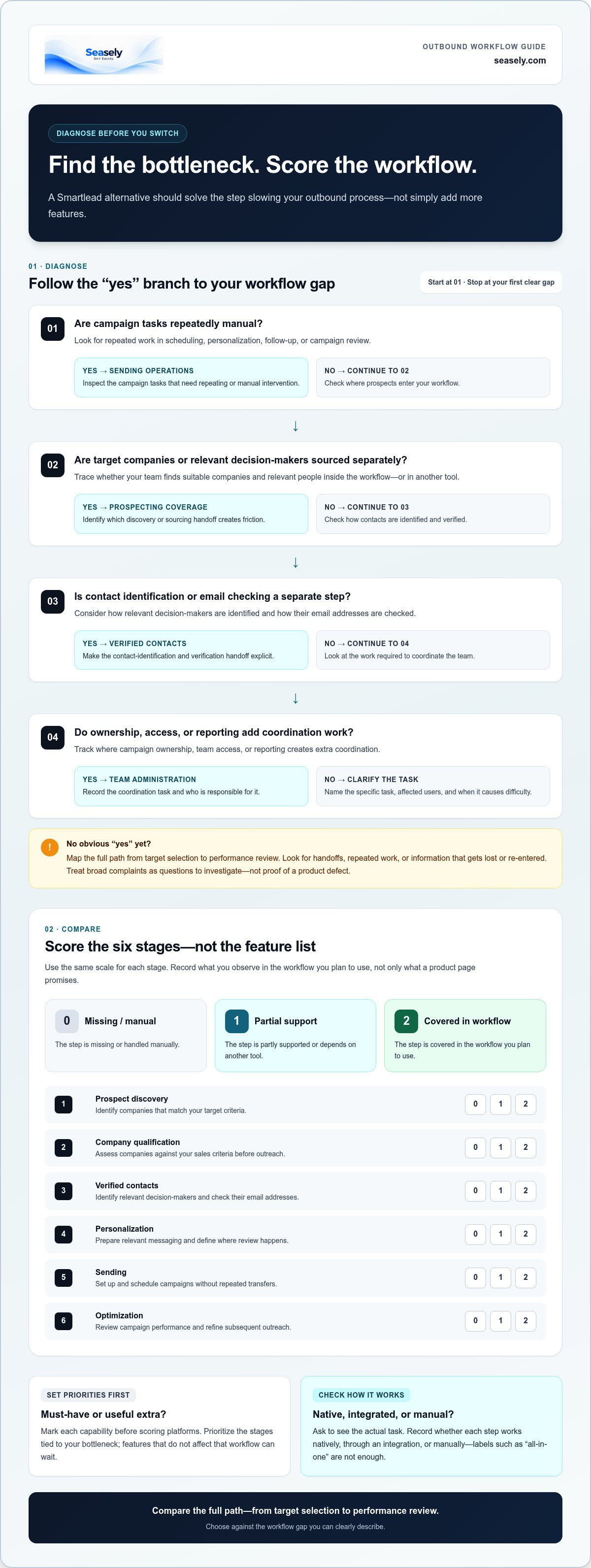
Before shortlisting replacements, find the point where your outbound process slows down. Is the problem sending campaigns, finding suitable companies, verifying contacts, or coordinating work across the team? A tool change helps only when it addresses the step causing delays, repeated manual work, or gaps in campaign visibility.
Define a Smartlead alternative by the workflow gap it needs to close, not by a longer feature list. Outbound marketing reaches potential customers through direct outreach, but the operational setup behind each campaign varies. Map your process from target selection to performance review, then identify the handoffs that create friction.
- Sending operations: Look for repeated manual work in scheduling, personalization, follow-up, or campaign review.
- Prospecting coverage: Note whether your workflow finds target companies and relevant decision-makers or whether you source them separately.
- Usability: Identify the specific tasks users struggle with instead of treating a general interface complaint as proof of a product defect.
- Team administration: Track where campaign ownership, access, or reporting adds coordination work.
Separate measurable requirements from general frustrations. For example, “we spend time moving prospect records between tools” describes an observable process. “The platform is difficult” needs more context: which task, for which users, and how often? As of October 2026, Smartlead’s published monthly pricing lists Base at $39 and Pro at $94. Warm-up and lead data are each listed as $59 monthly add-ons for those plans. Pricing and plan details can change, so treat these as dated facts rather than permanent assumptions.
Which Smartlead pain points justify a closer look?
Start where work stalls: campaign execution, contact sourcing, verification, or team workflow. Review recent campaigns and note when someone had to step in, repeat a task, or pass data to another system. Competitor pages may collect user reports about cost, usability, account connections, agency charges, or warm-up. Use those reports to form questions, not as proof of universal experiences or current product defects.
Turn each concern into a testable requirement. “We need to identify and verify decision-maker emails before campaign setup” is clearer than “we need better lead data.” Record the handoff, the person responsible, and the information that gets lost or re-entered. That gives your comparison a practical baseline.
When is switching more useful than adding another tool?
A specialist tool can make sense when it fills one defined gap and connects cleanly to your existing process. But if every campaign requires repeated exports and imports between prospecting, verification, and sending tools, another separate system may add handoffs rather than remove them. Compare the full path, not just the feature that first caught your attention.
Switching is useful when a different platform can reduce a recurring workflow burden without creating a larger transition cost. It won’t help if the same sourcing gap, unclear ownership, or manual step remains. Use the cold email automation guide for broader context on mapping outreach tasks before choosing what to change.
How to evaluate a Smartlead alternative against your outbound workflow
A useful comparison measures completed workflow steps, not the length of a feature list. Start with the bottleneck your team identified, then score the stages that affect it. A tool can cover more functions overall and still be a poor fit if it leaves your critical handoff untouched.
Use a simple score for each stage: 0 means the step is missing or handled manually, 1 means it’s partially supported or depends on another tool, and 2 means it’s covered in the workflow you plan to use. Record what you observe, not just what a product page promises.
- Prospect discovery: Can the workflow identify companies that match your target criteria, or does your team source them elsewhere?
- Company qualification: Can you assess those companies against your sales criteria before outreach?
- Verified contacts: How are relevant decision-makers identified, and how are their email addresses checked?
- Personalization: Can your team prepare relevant messaging for the audience, and where does review happen?
- Sending: Can you set up and schedule campaigns in the workflow, or are repeated transfers needed?
- Optimization: Can the team review campaign performance and use it to refine subsequent outreach?
Mark each capability as a must-have or a useful extra before scoring platforms. If contact sourcing is the bottleneck, for example, discovery and verification may be must-haves; a secondary feature that doesn’t affect that workflow can wait. Don’t infer capabilities from labels such as “sales engagement” or “all-in-one.” Ask for a walkthrough of the actual task and record whether it works natively, through an integration, or manually.
Which capabilities should a B2B team compare?
Trace one representative campaign from target selection through review. Check how the tool handles company discovery and qualification, how it identifies and verifies decision-maker contacts, and how campaign creation, personalized messaging, scheduled sending, and performance refinement connect. A gap between stages matters: if qualified companies still need to be exported for contact research, record that handoff as a separate operational cost.
Seasely’s workflow automates the discovery and qualification of target companies, identifies and verifies decision-maker email addresses, supports personalized email outreach, and optimizes campaigns. Score these functions against your requirements rather than assuming that a platform’s category or feature count predicts fit.
How should teams weigh usability, oversight, and cost?
Include the people who build, review, and monitor campaigns in the evaluation. Note how clearly each person can see campaign status, where approval or data checks happen, and how much manual coordination routine changes require. A smooth setup matters less if ongoing oversight is unclear.
Review current vendor materials for plan limits, seats, and add-ons, then estimate the full stack your team would use. Keep user reviews and cost complaints in context: one account’s experience is a prompt for investigation, not a general conclusion. Teams assessing a connected prospecting and outreach workflow can also explore Seasely’s outbound sales platform against the same scorecard.
Smartlead alternatives compared by the job each platform does
Not every comparison covers the same part of outbound. Some tools are evaluated mainly for campaign sending; others may also support prospect discovery or sales engagement. Treat those as distinct workflow stages: discover target companies, qualify them, identify and verify contacts, personalize messages, send campaigns, then review performance. A label like “all-in-one” doesn’t show which steps a platform actually completes.
The table is a shortlist, not a feature audit. Product capabilities and plan details can change, so verify current vendor materials before making a purchase. In particular, confirm whether a capability is built in, handled through an integration, or requires a separate tool.
| Platform | Role to assess | Best-fit need to investigate |
|---|---|---|
| Smartlead | Outbound email campaign operations | Teams focused on campaign execution; verify current coverage for the prospecting stages they need. |
| Instantly.ai | Email outreach, with lead database and CRM available as separate products | Teams comparing outreach with optional data and CRM components. Confirm current plan limits and total stack requirements. |
| Saleshandy | Email outreach, with lead data and verification available as credit-metered add-ons | Teams weighing campaign operations against separate contact-data needs. Check current add-on terms. |
| Woodpecker | Email outreach priced by monthly prospect volume | Teams that want to compare volume-based pricing and any required add-ons with their expected activity. |
| Lemlist | Sales engagement option in the alternatives shortlist | Teams should map its current documented capabilities to their required workflow stages. |
| Hunter.io | Prospecting-related option in the alternatives shortlist | Teams should verify how its current offering fits contact research and the rest of their process. |
| SmartReach | Outbound option in the alternatives shortlist | Teams should check current documentation against their sending and prospecting requirements. |
| Sales engagement platforms | Broader category for managing sales outreach | Teams should verify specific capabilities and plan terms against the stages they need to support. |
| Seasely | AI-powered B2B outbound platform | Teams seeking target discovery and qualification, verified decision-maker emails, personalized email sending, and campaign optimization in one workflow. |
How do cold email tools differ from broader outbound platforms?
A sending-focused comparison starts with campaign setup and execution. A broader workflow assessment also asks where prospects come from, how companies are qualified, and how decision-maker contacts are identified and verified. These steps are not interchangeable. If they sit in separate systems, your team may need to move records between them before a campaign is ready.
For teams trying to reduce those handoffs, a platform that covers more of the prospect-to-outreach process is worth assessing. Seasely brings target discovery, qualification, verified decision-maker emails, and automated personalized outreach together. That makes it a Smartlead alternative to consider when prospecting is part of the bottleneck, not just sending. Use an AI outbound sales platform evaluation to structure a deeper workflow review.
Which alternative fits a particular team requirement?
If your need is mainly sending, compare platforms on campaign operations and review their current documented capabilities. If you need to move from target discovery through contact verification and outreach, prioritize platforms that cover those specific stages. Match the tool to the missing steps, then confirm fit using your own campaign workflow. Teams assessing a connected prospecting and outreach process can also explore Seasely’s outbound platform.
How to test and switch from Smartlead without disrupting outbound
Evaluate a Smartlead alternative in stages. Start with one defined audience segment and a campaign that reflects your normal process instead of moving every active campaign at once. Set a review window that gives the team time to configure the workflow, run the test, and inspect the results. A controlled test limits the scope of a mistake, but it can’t guarantee uninterrupted delivery or better campaign performance. Outcomes depend on setup and execution.
What should a team prepare before a platform trial?
Capture the current process before building anything in a new tool. Record who owns each campaign, where data comes from, what gets reviewed, and which tasks still require manual handoffs. Set a baseline using measures your team already tracks, such as time spent preparing a campaign, contact data quality, operator effort, and the performance indicators used in routine reviews. Keep the comparison consistent across platforms.
Define a limited test scope. Select an audience segment with clear qualification rules and choose a campaign you can evaluate without transferring all live activity. Before the trial, inventory the assets and logic the team relies on:
- Campaign steps, timing, and follow-up rules
- Approved copy and personalization fields
- Audience definitions, exclusions, and qualification criteria
- Essential reports and the measures used to review performance
- Ownership, review points, and any manual data transfers
Use this inventory to rebuild the test deliberately. Don’t assume campaign logic, contact data, or settings will move between platforms in the same format. Keep the current process in place until the test has been reviewed and the team has a clear transition plan.
How can a team evaluate results after testing?
Review the whole workflow, not just the final campaign report. Check whether target records moved cleanly through contact review, personalization, sending, and reporting. Note missing or inconsistent fields, steps that required workarounds, and the operator effort involved. Compare results with your baseline, while interpreting campaign performance in context: audience selection, messaging, setup, and execution can all affect it.
Before expanding use, document configuration gaps and training needs. Decide which workflows are ready to move, which need adjustment, and which should remain in the existing process for now. Sequence timing and message structure also affect a test, so review these automated email sequence design considerations as part of campaign preparation.
Teams testing a connected prospecting and outreach workflow can evaluate Seasely for their outbound process against the same segment, baseline, and review criteria. Tie the decision to observed workflow fit, not assumptions about what a platform should improve.
When Seasely is a practical Smartlead alternative for B2B teams
Seasely supports teams whose outbound workflow starts before campaign setup. It combines B2B prospecting and email outreach, allowing teams to assess target discovery, qualification, contact verification, sending, and optimization as parts of one process. If the gap you need to close is limited to a campaign operation, compare that need directly. If prospecting and outreach are both in scope, evaluate how Seasely covers the complete workflow.
What does Seasely cover across the outbound workflow?
Seasely discovers target companies and qualifies them against your sales criteria. It identifies and verifies decision-maker email addresses as part of lead generation. Teams can then use scheduled, personalized email outreach and campaign performance optimization within the same outbound workflow. These functions describe what the platform supports, not a promise of a particular reply rate, conversion result, or revenue outcome.
This connected scope is useful when teams source companies, qualify them, research decision-makers, and prepare campaigns through separate steps. Trace a target through the process to assess how each stage works:
- Find companies that match the team’s sales criteria.
- Qualify those companies before outreach.
- Identify and verify decision-maker email addresses.
- Prepare personalized messages and schedule email outreach.
- Review campaign performance and use it to inform optimization.
Use the same audience definition and campaign requirements from your evaluation to assess each stage. This keeps the decision grounded in your team’s actual process rather than a general claim that one platform is more complete.
How should a team decide whether Seasely fits?
Return to your scorecard and mark which required stages Seasely supports, which remain outside the workflow, and where your team still needs a manual step. Prioritize requirements that address the bottleneck you identified. If verified contact data and prospect qualification matter as much as sending, compare the whole path. If your requirements center on a narrower campaign task, weigh that need accordingly.
Seasely is an outbound sales software platform. It sells software subscriptions, not inbox rental or standalone email hosting. Keep that distinction in mind when planning the full operating setup: the platform supports prospect discovery, contact identification, and outreach, while inbox rental is a separate product category.
If your team wants to evaluate prospecting and outreach as one connected workflow, explore Seasely’s outbound platform against the requirements in your scorecard. Seasely is a practical Smartlead alternative when its functions align with the stages your team needs to support.
Turn your shortlist into a focused next step
The right Smartlead alternative fits the work your team needs to do next. Before making a change, choose a real outbound use case and define what a workable process looks like for the people who will run it. That gives your team a practical basis for deciding whether to refine the current setup or evaluate a different platform.
If prospecting and campaign execution belong in the same workflow, Seasely combines automated company discovery and qualification with verified decision-maker email identification, personalized sending, and campaign optimization. Assess those capabilities against your team’s requirements, without treating software as a promise of sales or revenue results.
Explore Seasely’s AI outbound platform and assess whether its workflow matches your next step. A clear test and a defined need can help your team move forward with confidence.
Frequently Asked Questions
Is Seasely a Smartlead alternative?
Yes. Seasely is a Smartlead alternative for B2B teams that want prospecting and outreach within a connected workflow. It discovers and qualifies target companies, identifies and verifies decision-maker email addresses, and supports personalized email sending and campaign optimization. A team with an established prospect database and a narrower need may weigh different criteria. Compare the required workflow stages and operating model before deciding whether Seasely fits. It doesn’t guarantee sales, revenue, or deliverability outcomes.
What should I look for in a Smartlead alternative?
Start with the specific reason you’re considering a change. If reps spend time searching for contacts, prioritize discovery and verification; if campaigns are slow to launch, focus on personalization and sending. Then compare oversight needs, such as who reviews messages and how managers track activity. Check current plan limits as well. The right Smartlead alternative addresses your team’s actual bottleneck, not simply a high ranking or a longer feature list.
Can I switch from Smartlead without pausing every campaign?
A staged transition can limit the amount of work affected, but no platform can guarantee a disruption-free switch in every setup. For example, keep an existing campaign in place while testing a separate audience segment in the new system. Document campaign ownership and sequence rules, then compare contact records and settings before expanding. Plan the change around your campaign calendar, and retain the records your team needs for review and continuity.
Which Smartlead alternative is best for agencies?
There isn’t one best option for every agency. Fit depends on how you separate client work, assign campaign oversight, share reporting, coordinate collaborators, and manage plan limits. Map a representative client workflow, including who prepares audiences and who reviews campaign activity. Compare those steps with each platform’s current documented capabilities and terms. Test a typical client process before moving other accounts, rather than relying on a universal ranking or dated pricing claim.
Do Smartlead alternatives include lead discovery and email verification?
Some alternatives focus mainly on outreach operations, while others support additional prospecting stages. Treat company discovery, qualification, and email verification as separate requirements, then check which steps each platform documents. A team that already sources its own contacts may need a different workflow from one that needs to identify target companies and decision-makers. Seasely’s workflow includes target discovery and qualification, along with identification and verification of decision-maker email addresses.
How much does a Smartlead alternative cost?
Costs vary by subscription structure, usage limits, seats, and add-ons, and vendors can change their terms. Review current pricing materials and compare the plan configuration your team would actually need. For a fair comparison, include the tools required to complete your workflow, not just the starting subscription tier. Older comparison pages can provide context, but they shouldn’t replace current vendor information.
Is Smartlead only for cold email sending?
Comparison pages commonly place Smartlead in discussions about cold email and outreach, but that framing doesn’t establish its full current feature set. Check Smartlead’s official product information for documented capabilities. Then distinguish campaign sending from other outbound stages, such as finding target companies, qualifying them, and verifying contacts. A team that already manages prospect research elsewhere should assess sending separately from a team seeking prospect-to-outreach coverage.


