

The strongest prospecting system isn’t the one that sends the most messages. Sales prospecting automation combines tools to discover potential buyers, qualify their fit, and manage personalized follow-ups. Compare options by how they source data, assess leads, connect with your CRM, and coordinate outreach.
Finding suitable companies and keeping prospect details current takes more than a contact list. Automation can reduce repetitive research, data entry, and follow-up work, but tools differ in how they identify decision-makers and turn signals into useful next steps.
This guide explains what B2B prospecting tools do and compares nine approaches across their core capabilities, data workflows, outreach channels, and trade-offs. You’ll also see how to assess lead qualification, CRM fit, and performance tracking, then use a decision guide to match a tool to your team’s process.
Key Takeaways
- Compare prospecting tools by how they find and verify contact data, qualify leads, connect with your CRM, and manage outreach.
- Use buying signals and intent data to time outreach around relevant changes, then tailor messages to each prospect.
- Set clear qualification criteria so automated scoring prioritizes prospects who fit your target market and show meaningful engagement.
- Choose email and LinkedIn sequences that support personalization, thoughtful follow-ups, and useful performance tracking.
- See how Seasely brings lead generation, automated email sending, and optimization together for B2B outbound workflows.
What Are B2B Sales Prospecting Tools?
In 2026, the best tools match your workflow: contact discovery, email verification, follow-up sequencing, or CRM syncing. Compare them by data quality, automation, collaboration, and fit with your sales team.
Business Contact Data and Email Verification
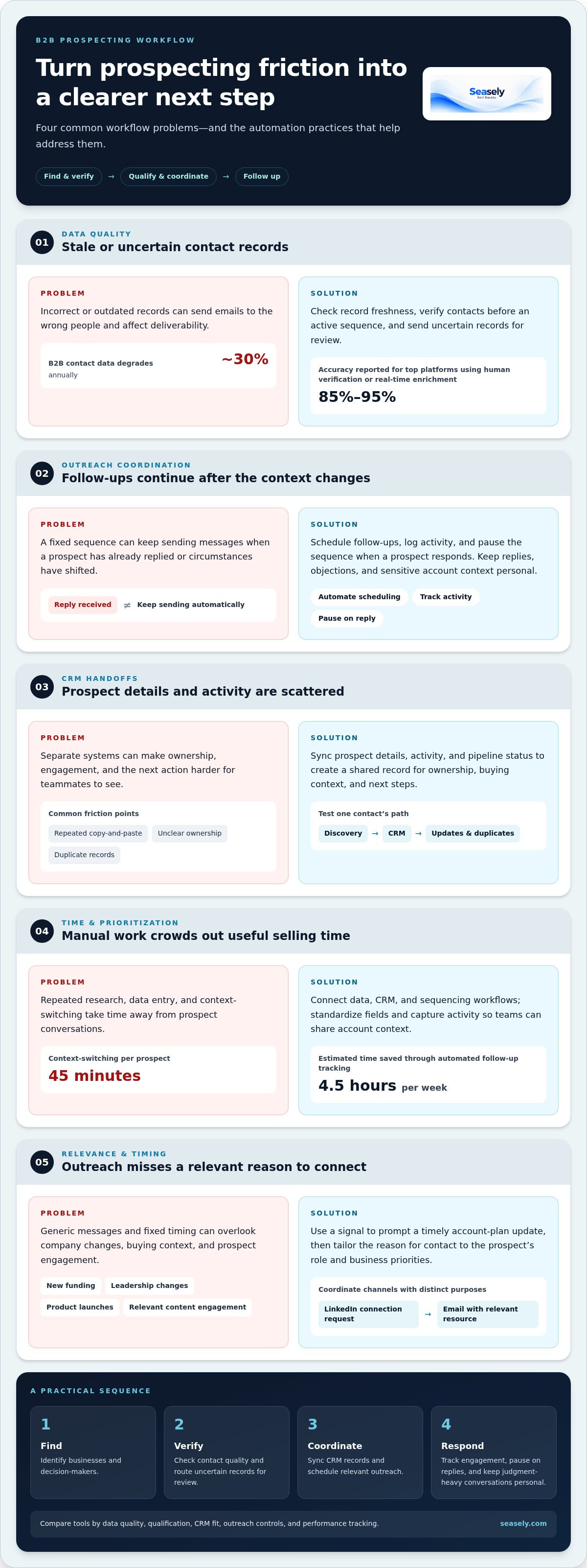
Contact-data tools identify businesses and decision-makers, then verify email addresses before outreach. Data accuracy from top platforms using human verification or real-time enrichment typically ranges from 85% to 95%. Yet B2B contact data degrades roughly 30% annually, so check when records were refreshed and how verification results appear in your workflow.
Stale or incorrect records can send emails to the wrong people and affect deliverability. Verify contacts before adding them to an active sequence, and route uncertain records for review.
Automated Follow-Ups and Data Entry
Sequencing tools schedule follow-up emails and record activity against prospect records. Unlike contact databases, they focus on executing outreach after a sales team selects its audience. For example, a sequence can pause when a prospect replies, preventing an irrelevant follow-up and making the next action clear.
How much do platforms cost? Pricing depends on the case and is given after a quote request; record volume, user seats, channels, and integrations affect the cost.
CRM Integrations and Prospect Data Syncing
CRM-connected tools sync prospect details, activity, and pipeline status across systems. Unlike standalone data or sequencing tools, they make the CRM a shared record for ownership, buying context, and next steps. Test how a sample contact moves from discovery into the CRM, including how updates and duplicates are handled.
What U.S. laws and rules apply to automated sales emails, calls, and texts? Requirements vary by channel and jurisdiction. Account for applicable privacy rules, including CCPA, and follow relevant consent, identification, and opt-out requirements. Keep suppression records current across campaign systems.
Reduced Manual Work and Data-Entry Errors
Automation can standardize fields, capture activity, and reduce repeated copy-and-paste tasks. Connecting a data platform, CRM, and sequencing tool can eliminate 45 minutes of context-switching per prospect. Shared records also help teammates see who owns an account, which emails were sent, and what action comes next.
Team collaboration improves when colleagues share a view of engagement and pipeline stage. Automated prospecting can reduce manual data entry and qualification, leaving representatives more time to sell.
| Tool option | Primary job | Key comparison criterion |
|---|---|---|
| Contact data | Find decision-makers | Coverage and freshness |
| Email verification | Check addresses | Verification method |
| Email sequencing | Schedule follow-ups | Personalization and controls |
| CRM integration | Sync prospect records | Field mapping and duplicates |
Choose the option that addresses your biggest workflow gap, then confirm it fits your CRM and team handoffs.
What is a multichannel outbound campaign?
A multichannel campaign coordinates outreach across channels, using buying signals to guide timing and message relevance. It can connect email, LinkedIn, and follow-up tracking while adapting the approach to each prospect.
Buying Signals and Company Changes
Buying signals can help sales teams prioritize outreach when a company’s needs may be changing. New funding, leadership changes, and product launches may indicate purchasing capacity or shifting priorities. Intent data adds context, such as a prospect engaging with relevant content, while a company-change alert can prompt a timely account-plan update.
Unlike a fixed sequence, signal-based outreach starts with an event. Match the event to a relevant reason for contact, then assign an owner and next step. A new executive, for example, may warrant a message about their stated business priorities rather than a generic product pitch.
Automated Outreach Sequences and Follow-Up Tracking
A sequence schedules messages and tracks follow-ups in a defined workflow. To build one, choose a target segment, set a relevant trigger, write an initial message, and schedule follow-ups with room for replies. Track opens, link clicks, website visits, and responses as engagement signals, then pause or adjust the sequence when a prospect responds.
Automate scheduling, reminders, and activity logging; keep judgment-heavy conversations personal. A sales representative should handle replies, objections, and sensitive account context directly. Automated follow-up tracking is estimated to save 4.5 hours per week, while analytics help teams see which steps prompt a response.
Personalized Outreach and Calls to Action
Personalization should reflect a prospect’s role, business needs, interests, recent achievements, or previous interactions. Use one relevant detail in the opening, then connect it to a clear business reason for reaching out. Make the call to action specific, such as asking to schedule a call or register for a webinar.
Keep the message focused. If a company has launched a new product, connect that event to a question about its current priorities. Leave out details that don’t support your reason for getting in touch. Relevance matters more than adding extra fields.
LinkedIn and Email Automation
LinkedIn and email can work in one coordinated sequence, with each channel serving a distinct purpose. For example, a sales team might send a personalized LinkedIn connection request, then use email to share a relevant resource. LinkedIn prospecting tools can identify leads by industry or job title and support personalized outreach at scale.
Review channel engagement before the next step. If a prospect replies on LinkedIn, update the workflow and stop duplicate email follow-ups. An integrated outbound sales workflow can help coordinate email activity with prospecting operations.
Automated lead identification and qualification
Automate sourcing by defining a target profile, enriching records, then scoring and routing qualified leads. Start with your ideal customer profile, or ICP, and apply consistent criteria to prioritize prospects.
Lead Enrichment and CRM Synchronization
Enrichment adds context to a lead record, while CRM synchronization keeps that context available to the team. A sourcing workflow can gather information from social profiles, public databases, and online directories, then map fields into the CRM. Enrichment improves the record; scoring evaluates its fit and priority.
Begin with the ICP. Define target industries, company characteristics, and relevant roles using historical sales data, market trends, and customer feedback. Then find matching companies and decision-makers. Map fields such as company, role, and source to corresponding CRM fields, and check for duplicates before assigning ownership.
Inbound orchestration applies similar logic to form submissions and other incoming leads. Set routing rules by territory, account ownership, or product interest so each inquiry reaches the right sales team member. For example, a lead from a target industry can go to the representative responsible for that segment. Clear routing reduces delays and makes the next action visible.
Lead Scoring and Prioritization
Lead scoring ranks prospects against criteria such as engagement, demographics, firmographics, and behavioral data. Unlike enrichment, scoring helps determine which lead to work first. A prospect matching the target company profile and engaging with relevant content may receive higher priority than a record with limited fit or activity.
AI-powered scoring can analyze these signals and update scores using real-time data. Define the criteria before enabling automated rankings, then review whether high-priority leads align with sales outcomes. Automated lead scoring is estimated to save 3.5 hours weekly; automated lead research is estimated to save 13 hours weekly.
- Source: Find companies and decision-makers that match the ICP.
- Enrich: Add relevant company, role, and engagement details.
- Score: Rank fit and behavior using defined criteria.
- Route: Assign each lead to an owner with a clear next step.
This sequence brings separate software functions into one operational workflow. Review score patterns and routing outcomes regularly. If a target segment produces poor-fit leads, refine its criteria before expanding outreach. Keep human review for unusual records or strategic accounts.
Automated prospecting can handle lead identification, initial contact, and client nurturing. Treat these as connected stages: identification surfaces potential prospects, initial contact begins outreach, and nurturing sustains engagement. Aligning each stage with the target profile and routing process helps maintain continuity from discovery through follow-up.
Lead-scoring algorithms can rank prospects using engagement level, demographic fit, and website behavior. Automated lead-scoring tools can assign scores using criteria such as engagement, demographics, firmographics, and behavioral data. Use these signals as ranking inputs, tied to the qualification criteria already defined for the workflow. Prospecting and scoring serve related but distinct purposes: automation can support finding and engaging prospects, while scoring orders prospects by specified signals. This distinction helps teams interpret a rank as prioritization, rather than treating it as the outreach itself.
What is Automated Prospecting?
Automated prospecting uses software for repeatable steps, from finding contacts to scheduling outreach. A practical workflow combines email discovery, verification, and coordinated campaigns while leaving sales conversations to human judgment.
Automated Email and LinkedIn Sequences
Email and LinkedIn sequences organize outreach into steps and schedule messages around a prospect’s profile and responses. Unlike a single email blast, a sequence can adapt after an interaction: a reply stops follow-ups, while no response can prompt another relevant message.
LinkedIn tools can find, connect with, and message prospects, including leads identified by industry or job title. Give each channel a distinct purpose. For example, use LinkedIn to make an introduction, then send an email with context that continues the same conversation.
Email Discovery and Verification
Email discovery finds a business address associated with a prospect, while verification checks whether it is deliverable. These steps support outreach readiness, but don’t replace qualification or message planning. Verify an address before a contact enters an active email sequence, and keep the result with the prospect’s record.
Contact data changes over time, so treat verification as a workflow step, not a one-time setup. For example, recheck an address when preparing a campaign after a long delay. This helps prevent an outdated record from moving straight into scheduled outreach.
Email Templates and Scheduling
Templates give campaigns a repeatable structure, but should adapt to different market segments. Personalize the recipient’s role, business need, or previous interaction, then connect that detail to one clear reason for writing. A useful call to action points to a single next step.
Scheduling tools place emails into a sequence at selected times and manage follow-ups. Use separate templates for distinct segments, such as operations leaders and finance leaders, rather than changing only the greeting. Review replies and engagement, then update the message when the campaign does not prompt meaningful responses.
Build the workflow in this order:
- Define the target profile and select relevant prospects.
- Find business email addresses and verify them before outreach.
- Choose a segment-specific template and a clear call to action.
- Schedule email and LinkedIn steps with response-based pause rules.
- Review campaign engagement and revise the next sequence.
Automate repeatable tasks, such as scheduling and activity logging, while keeping replies and account-specific decisions personal. This gives sales teams a consistent process without making every interaction sound the same.
Automation can save time on lead discovery and follow-ups compared with manual prospecting, including cold calling and manual lead generation. Tailor templates to market segments and schedule sequences thoughtfully, then review engagement to see what works.
AI-powered prospect discovery
AI-powered discovery searches company and contact information to surface prospects that match defined business criteria. Its value depends on how well a team sets those criteria, evaluates sources, and turns relevant findings into pipeline actions.
Start with a precise target profile. Specify company attributes, relevant roles, industries, and business needs, then translate them into searchable filters. For example, a team selling inventory software might prioritize manufacturers with complex stock operations and identify operations leaders as relevant contacts.
Discovery finds potential accounts and decision-makers; scoring ranks prospects already identified. AI can connect these tasks by comparing records with the target profile and flagging matches for review. Useful results explain why a company surfaced, such as a match on industry, role, and stated business need.
Source quality shapes the results. Public company pages, professional profiles, directories, and other business records can provide different signals. Check whether a prospect’s company, role, and contact details agree across sources. If a profile lists a former employer while a company database shows a current role, resolve the conflict before adding the lead to an active pipeline.
Use a controlled discovery workflow:
- Define the target account and decision-maker criteria.
- Select relevant data sources for those criteria.
- Find matching companies and associated contacts.
- Review source context and resolve conflicting records.
- Send qualified matches into the appropriate pipeline stage.
AI can reduce repetitive searching, but the team still defines relevance. A funding announcement, for example, may identify a growing company, but it doesn’t prove the business needs your solution. Pair that signal with fit criteria, such as the company’s operating model and the contact’s responsibilities. This prevents a timely event from being mistaken for buying intent.
Measure discovery by the usefulness of its records, not the size of the database. Review how often surfaced accounts match the target profile, whether decision-makers hold relevant roles, and whether representatives accept the leads. If results include too many unrelated firms, refine the source filters or profile criteria before expanding the search.
That feedback loop supports productivity: representatives can focus on evaluating qualified accounts instead of repeating broad searches. To put AI-assisted prospect discovery into an outbound workflow, explore automated prospect discovery.
Seasely: Seasely AI outbound sales platform
Seasely’s AI outbound sales platform brings lead generation and automated email sending into a B2B prospecting workflow. Turn to it when your team wants to discover prospective companies, reach decision-makers by email, and refine outbound operations in one platform.
Use the platform to support prospect discovery and execution while your team sets the target profile, reviews relevance, and guides conversations. Automatic email sending handles outreach, while ongoing optimization helps refine the workflow based on campaign engagement.
For teams comparing prospecting approaches, Seasely offers a practical next step when the priority is coordinating lead generation and email outreach. Contact Seasely to discuss your outbound workflow.
Set Your Next Prospecting Improvement in Motion
Choose one part of your prospecting workflow to improve first. You might refine the target profile, smooth the path from discovery to outreach, or make lead handoffs easier to act on. Set a clear measure of progress, such as whether the sales team can identify the next step for each qualified prospect. This keeps your evaluation practical, beyond simply adding more activity.
Sales prospecting automation works best as an operating process, not a collection of disconnected tasks. Review what happens after a lead is found, how outreach fits the prospect’s context, and where human judgment should guide the conversation. Then adjust the workflow based on what your team learns.
When you’re ready to put that approach into practice, Seasely’s AI outbound sales platform brings lead generation and automatic email sending into the workflow. Contact Seasely to discuss your prospecting and identify a useful next step for your team.
A focused improvement is a solid place to begin.
Frequently Asked Questions
What is sales prospecting automation and how does it work?
Sales prospecting automation uses software to support repeatable steps in finding and contacting potential buyers. In a platform such as Seasely, the workflow can discover and qualify B2B leads, prepare personalized emails, send through your own connected Gmail or Google Workspace mailbox, and classify replies. For example, a reply can stop further follow-ups to that contact, keeping outreach aligned with the conversation.
How do sales prospecting automation tools compare for small businesses and enterprise teams?
Small businesses often need a straightforward workflow with clear ownership and few handoffs. Enterprise teams may need consistent processes across teams, segments, and CRM records. Compare tools by user roles, data synchronization, campaign visibility, and reply management. For example, teams with several representatives should be able to see account ownership and prevent separate campaigns from contacting the same prospect.
How do you measure sales prospecting automation ROI and performance?
Measure performance across the funnel, from valid contacts to qualified opportunities and closed deals. Track opens, clicks, replies, conversion rates, and ROI, then compare results with the time and operating costs involved. Use consistent campaign segments and attribution rules to assess changes in targeting or messaging fairly. Review the numbers regularly and refine the workflow where prospects stop progressing.
What are the best sales prospecting automation tools in 2026?
The right tools fit your workflow, whether you need contact discovery, email verification, follow-up sequencing, or CRM syncing. Compare data quality, automation, collaboration, and fit with your sales team.
What U.S. laws and rules apply to automated sales emails, calls, and texts?
Requirements vary by channel and jurisdiction. Account for applicable privacy rules, including CCPA, and follow relevant consent, identification, and opt-out requirements. Keep suppression records current across campaign systems.
How much do sales prospecting automation platforms cost?
Pricing is provided after a quote request. Cost depends on record volume, user seats, channels, and integrations.


