

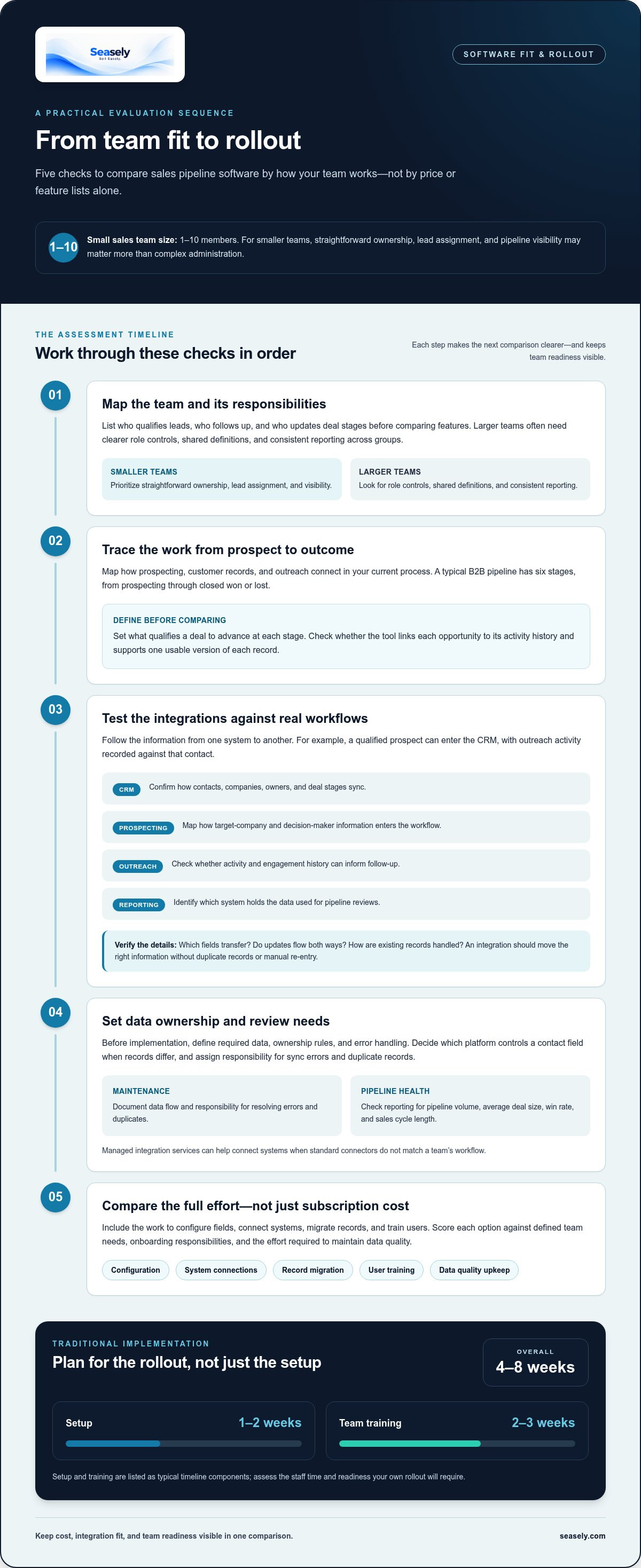
The fastest sales pipeline generation software isn’t always the fastest to put into use. Traditional implementation typically takes 4-8 weeks overall, with setup taking 1-2 weeks and team training taking 2-3 weeks.
That timeline matters because sales pipeline generation software fits only when its cost, features, and setup demands align with how your team works. Comparing options on price alone can hide important trade-offs.
This guide explains how to compare pipeline software by cost, team size, integrations, core features, and onboarding time. You’ll learn how to assess whether a platform supports your team’s work, from managing pipeline stages to generating and developing outbound leads. The goal is a practical decision: understand the rollout, assess fit, and know what to focus on before choosing a system.
Key Takeaways
- Match software complexity to your team’s operating needs; small sales teams have 1-10 members and may prioritize straightforward workflows.
- Compare how each tool supports the six stages of a typical B2B pipeline, from prospecting through closed won or lost.
- Assess reporting through pipeline volume, average deal size, win rate, and sales cycle length to understand pipeline health.
- Look for automation that reduces manual logging and updates, while keeping lead data and outreach under appropriate human review.
- Separate pipeline management from outbound lead generation, then decide whether your team needs one workflow or both.
Choosing software by team size, integrations, and budget
Start with your sales team’s structure, then map its daily work to the software. A small sales team has 1-10 members, so straightforward ownership, lead assignment, and pipeline visibility may matter more than complex administration. Larger teams often need clearer role controls, shared definitions, and consistent reporting across groups. List who qualifies leads, who follows up, and who updates deal stages before comparing features. That map makes it easier to separate essential capabilities from options your team won’t use.
Next, trace the workflows that connect prospecting to customer relationship management (CRM) and outreach. A useful integration moves the right information between systems without creating duplicate records or manual re-entry. For example, a prospecting workflow might pass a qualified contact into the CRM, then log outreach activity against that contact. Check which fields transfer, whether updates flow both ways, and how the software handles existing records. This reveals whether an integration supports your process or simply appears in a feature list.
- CRM: Confirm how contacts, companies, owners, and deal stages sync.
- Prospecting: Map how target-company and decision-maker information enters the workflow.
- Outreach: Check whether activity and engagement history can inform follow-up.
- Reporting: Identify which system holds the data used for pipeline reviews.
Managed integration services can help connect systems when standard connectors don’t match a team’s workflow. Before implementation, define the required data, ownership rules, and error handling. For example, decide which platform controls a contact’s job title when records differ. Assign responsibility for monitoring sync errors and resolving duplicates. Documenting the data flow reduces ambiguity during rollout and gives administrators a clear maintenance process.
Budget comparisons should include more than the subscription. Consider the work needed to configure fields, connect systems, migrate records, and train users. Traditional pipeline tool setup typically takes 1-2 weeks, while team training typically takes 2-3 weeks. These activities affect the time and staff effort required to reach steady use. Salesforce reports that 94% of sales leaders believe AI agents will be essential for business growth, but that view doesn’t replace a fit assessment. Compare each feature against a defined team need, such as lead qualification or reporting, and prioritize capabilities your existing workflows can adopt.
Before choosing a platform, document required integrations, essential features, and onboarding responsibilities in one comparison sheet. Score each option against those criteria, including the effort required to maintain data quality. This keeps cost, integration fit, and team readiness visible in the same decision.
Pipeline management definition and software comparison
Compare tools by how clearly they represent deals, record sales activity, and support decisions. A useful comparison distinguishes pipeline control from the broader workspace of customer records and communication.
Pipeline Management Definitions and Benefits
Sales pipeline management tracks prospects as they move through defined steps in a sales cycle. A typical B2B pipeline has six stages, from prospecting through closed won or lost. The team should define what qualifies a deal to advance at each stage. Consistent stage rules improve tracking, reveal stalled opportunities, and give managers a clearer basis for forecasting.
Pipeline Management and CRM Suites
Pipeline management focuses on deal stages, movement, and expected outcomes. A CRM suite usually covers a broader set of customer records and interactions, such as company details and contact history. Some platforms combine both functions in one workspace. Check whether each opportunity connects to its activity history and whether the team can maintain one usable version of each record.
Evaluate software against the decisions your team needs to make. Gartner reports that companies using dedicated pipeline management tools see a 28% increase in revenue growth. That figure is a reported result, not a substitute for checking how a tool fits your process. Review whether managers can inspect pipeline volume, average deal size, win rate, and sales cycle length from the same reporting view. These measures help identify whether a change reflects stronger deal quality or simply more open opportunities.
Activity management connects everyday work to deal progress. Check how the tool records calls, emails, tasks, and calendar meetings against the right contact and opportunity. For example, a representative should be able to see a scheduled meeting beside the next follow-up task, rather than searching separate records. Automation can create reminders or log routine updates, while representatives remain responsible for customer conversations. Confirm that activity tracking supports your team’s workflow.
Coaching features should help managers turn pipeline data into specific actions. A manager might review overdue follow-ups, compare stage movement, and use a one-to-one meeting to agree on the next step for a deal. The software should make that activity visible without treating every metric as a performance verdict. Gartner reports that proper sales pipeline tool implementation can improve forecasting accuracy by up to 30%. Clear definitions and consistent updates make coaching discussions more grounded.
- Stage control: Can the team define entry and exit criteria for each stage?
- Activity tracking: Do emails, tasks, and meetings attach to the right records?
- Management view: Can managers identify stalled deals and review next steps?
- Data consistency: Does the workspace prevent competing versions of contact and deal information?
Reporting, automations, and lead capture
Reporting turns lead and activity records into decisions about follow-up, routing, and forecast quality. Assess how each platform captures information and turns it into a clear next step for sales teams.
Reporting and Lead Capture
Salesforce reports that 68% of sales leaders identify improving pipeline visibility as their top priority for 2026. Check whether reports connect captured leads to their source, owner, stage, and next action. For example, a custom report could show which channels create qualified opportunities and where leads stop moving. Review the fields available at capture, then confirm that teams can adjust them without breaking existing workflows.
Lead scoring helps teams prioritize records using defined customer behaviors, such as visiting a product page, replying to outreach, or attending a meeting. Set criteria that reflect buying intent, and make the score’s inputs visible to representatives. A score should guide attention, not replace qualification. Compare how the system handles incomplete activity, duplicate records, and changes in engagement so one event doesn’t distort the forecast.
Automated Follow-Ups and Lead Nurturing
Lead nurturing uses relevant follow-ups to keep a conversation moving when a prospect isn’t ready to discuss a sale. Build workflows around clear triggers, such as a form submission or a meeting that ends without a scheduled next step. Set the message, owner, and stop condition for each trigger. Test the sequence with sample records to confirm that replies or status changes stop unnecessary follow-ups.
Routing automation assigns incoming leads using rules such as territory, account ownership, product interest, or company profile. First define the matching fields, then specify a fallback owner for records that don’t meet a rule. For example, a lead linked to an existing account can go to that account’s owner, while unmatched records enter a review queue. This makes assignment logic visible and easier to refine.
Lead enrichment adds context to a record, while buying signals help teams decide when to act. Review which fields support qualification, such as company details, role, or stated interest, and identify the source for each value. Keep sales representatives able to correct inaccurate records. Automation can also reduce administrative work: Salesforce reports that representatives can reclaim 10-15 hours weekly through automated logging and updates. Check whether those updates preserve useful context for coaching and follow-up.
- Capture: Map each required field to its source and owner.
- Score: Tie behavior signals to clear qualification actions.
- Route: Define assignment rules and a fallback review queue.
- Measure: Connect lead sources, activity, and pipeline movement in reports.
Sales pipeline software comparisons
Compare each platform against the same sales process, not just its feature list. Use a sample opportunity to trace lead entry, qualification, follow-up, stage changes, and reporting. This shows where a tool supports the work and where representatives still need manual updates. It also reveals whether the system suits a focused sales team or an enterprise with multiple groups.
Build a short evaluation scorecard before reviewing platforms. Define each criterion, then assess every option using the same workflow and sample record. Separate required capabilities from preferences. For example, automatic activity capture might be essential, while a customizable dashboard could be useful but optional.
- Process fit: Can the platform represent your sales stages and qualification rules?
- Integrations: Does it connect the CRM, prospecting, and outreach systems your team uses?
- Record quality: Can representatives find the latest account, contact, and conversation context?
- Administration: Can your team maintain fields, permissions, and reports without complex workarounds?
- Adoption: Does the daily workspace make the next action easy to identify?
Review ratings as one input, not a substitute for workflow testing. The sales software tools selected for the page each received at least four out of five stars in ratings and reviews on G2 and Capterra. Ratings can help shortlist options, but your own evaluation should focus on concrete tasks. Ask a representative to log a call, update a deal, and prepare for a customer conversation using the same sample record in each system.
Separate pipeline management from adjacent functions during the comparison. One platform may focus on deal stages and forecasting, while another combines those controls with outreach or broader account management. Neither setup is automatically better. Compare how each system handles handoffs, activity records, and duplicate information. For an enterprise team, test permissions and reporting across groups. For a smaller team, assess whether the workflow remains clear without extensive configuration.
Finally, estimate the full operating effort rather than comparing subscription labels alone. Include setup, data migration, integration maintenance, administration, and training in your assessment. Note which tasks need technical support and which sales managers can handle. A feature that removes repetitive work may be valuable, but only if it fits the team’s process and produces usable records. Choose the option that supports the required workflow with the fewest avoidable manual steps.
What are the risks and limitations of automated sales pipeline generation?
Automation can move prospect records quickly, but speed doesn’t guarantee relevance. If targeting criteria are too broad, the system may surface organizations that don’t match your intended customer profile. Representatives then spend time correcting records instead of engaging suitable prospects. Define target-account criteria first, then sample generated records against them before using them in outreach.
Incomplete or outdated data can also distort qualification. A contact’s role may have changed, or an account record may duplicate an existing customer. If scoring relies on those fields, the wrong lead may appear urgent while a better-fit prospect stays buried. Assign someone to review data, track corrections, and feed recurring errors back into the rules. This keeps automated prioritization tied to usable records.
Behavior-based scoring has limits, too. A page visit or email click can signal interest, but it doesn’t establish buying intent on its own. A prospect may be researching, forwarding information, or exploring an unrelated topic. Treat engagement signals as prompts for review, then use a relevant conversation to qualify need, timing, and decision process. Don’t turn one interaction into an automatic qualification decision.
Routing rules can create quiet bottlenecks when ownership logic has gaps. For example, a lead outside defined territories may remain unassigned, while an existing account may go to the wrong representative. Test each rule with sample records, including missing company fields and duplicate contacts. Set a visible fallback queue, then review unassigned records and routing changes as part of regular pipeline maintenance.
- Targeting: Compare generated accounts with documented customer criteria.
- Data quality: Review duplicates, outdated roles, and missing fields.
- Scoring: Combine behavioral signals with human qualification.
- Routing: Test edge cases and define an owner for unmatched records.
- Outreach: Review message relevance and pause sequences after a reply or status change.
Automated follow-ups can also miss context. A sequence may continue after a prospect replies, books a meeting, or asks to pause contact if its stop conditions aren’t set correctly. Test the full sequence with sample scenarios, including positive replies and changes in deal status. Review message quality and timing before launch, then monitor replies and opt-outs for patterns that need adjustment.
Keep a human decision point where judgment matters. Representatives should be able to correct a lead’s fit, adjust the next step, and stop an unsuitable sequence. If your outbound process needs more structured lead generation and email execution, explore an automated outbound workflow.
Seasely: Seasely AI outbound sales platform
Seasely’s AI outbound sales platform supports B2B teams that need to build and execute outbound prospecting workflows. It discovers and qualifies target companies, identifies verified decision-maker email addresses, and crafts personalized outreach messages. Automatic email sending supports execution, while lead generation helps teams develop a focused prospect list.
Consider this approach when your team needs to coordinate prospect discovery, qualification, and outreach in one outbound process. It complements pipeline management by helping create and engage prospects before opportunities move through sales stages. Review how these activities fit your qualification rules and follow-up process, then decide whether the workflow meets your needs.
Visit seasely.com to explore the platform.
Set a clear next step for your pipeline
Before changing tools, choose one part of your sales process that needs a clearer operating path. For example, define how a target account becomes a qualified prospect, who owns the next action, and what information should be ready before outreach. This gives your team a practical standard for assessing whether sales pipeline generation software supports the work rather than adding another layer to manage.
Use that standard to guide your next conversation. Describe the workflow you want to improve, the systems your team already relies on, and the points where manual effort slows execution. Those details create a more useful starting point for discussing fit than a feature list alone. Seasely’s AI outbound sales platform may be relevant when your priority is organizing outbound prospecting around your team’s process.
Contact Seasely about your pipeline to discuss your outbound workflow and next steps. A focused evaluation can help your team move forward with a clearer view of what it needs.
Frequently Asked Questions
How long does it take to get a team running?
A team can configure an initial pipeline quickly once account access and team roles are ready, but full onboarding takes longer. Traditional setup typically takes 1-2 weeks, with training taking 2-3 weeks. Broader implementation can take 4-8 weeks, depending on data migration, integrations, workflow design, and team readiness. Separate basic access from full adoption when setting a realistic launch plan.
What is sales pipeline generation software and how does it work?
Sales pipeline generation software helps teams identify prospective buyers and move suitable prospects toward active opportunities. Depending on the platform, it may combine lead discovery, qualification, outreach, and pipeline tracking. For example, a team might define target-account criteria, review matching companies, then assign qualified contacts for outreach. Determine whether a tool generates prospects, manages deals, or supports both parts of the process.
What should teams look for in software in 2026?
The best option in 2026 depends on the work your team needs the software to handle. Start by separating prospect generation from deal tracking, then compare tools against your actual workflow. A team focused on outbound prospecting may prioritize lead discovery and outreach controls. A team focused on opportunity management may need stronger stage tracking and forecasting. Test a representative workflow before judging options by feature count alone.
How do sales pipeline generation platforms compare on features and integrations?
Compare platforms by tracing one lead through your process, from discovery to follow-up and reporting. Check whether contact details, ownership, and activity move correctly between connected systems. Then test how the platform handles duplicate records, field changes, and failed syncs. A feature adds value when it supports a defined task. For example, representatives should be able to review outreach activity when planning their next customer interaction.
What factors affect software costs in the United States?
Costs in the United States vary with user access, lead or contact allowances, feature scope, integration needs, and implementation effort. Compare the full operating cost, including configuration, training, and ongoing administration, rather than looking only at a subscription. A small team with a focused workflow may need a different setup from an enterprise with multiple departments. Consider how the pricing model changes as usage and requirements grow.
Which tools offer lead sourcing, enrichment, outreach, and CRM automation?
Capabilities differ by platform, so compare each function separately rather than assuming one tool covers the entire workflow. Seasely supports B2B lead generation, target-company qualification, verified decision-maker email addresses, personalized outreach, and automatic email sending. These capabilities support outbound prospecting. CRM automation is a separate requirement, so assess it independently against your record updates, ownership rules, and reporting process.
How accurate are sales pipeline generation tools’ contact data and intent signals?
Accuracy depends on data sources, validation methods, and how recently contact details were checked. A deliverable email address doesn’t prove that the contact is the right decision-maker or has buying intent. Treat a signal, such as an email reply or product inquiry, as context for qualification rather than proof of readiness. Review a sample of records and track corrections to see how data quality affects your process.
How do you choose software for a small business or enterprise?
Choose based on workflow complexity, team structure, integration needs, and internal administration capacity. A small business with 1-10 team members may value simple ownership rules and a manageable daily workflow. An enterprise may need distinct permissions, consistent reporting across groups, and carefully defined handoffs. In either case, test a real scenario, such as routing an existing account’s new contact, before selecting a platform.


