

The most capable decision maker email finder may still be the wrong fit for your team. A large contact database won’t help if it misses the roles you need, gives little context about data confidence, or creates extra work before outreach can begin.
Manual research takes time, while guessed or outdated addresses can waste effort and put sender reputation at risk. Finding an email is only one step. You also need to assess whether the contact fits the account and understand what verification does, and doesn’t, tell you.
This guide compares individual email lookup tools, contact databases, and connected outbound platforms. You’ll learn how to assess role coverage, confidence signals, workflow automation, pricing models, and responsible-use requirements. You’ll also see how platforms such as Seasely connect target discovery and qualification with verified decision-maker email delivery and automated sending. The goal is a focused prospect list and a workflow your team can use with care, not a tool choice based on feature count alone.
Key Takeaways
- Separate account fit, role fit, address discovery, and verification to judge whether a contact is relevant and usable.
- Understand how a decision maker email finder may use databases, domain matching, or pattern recognition, and why methods differ.
- Compare manual research, pattern-based lookup, contact databases, and connected platforms by coverage, confidence signals, scale, and handoffs.
- Test tools against a sample of target accounts, tracking relevant matches, usable results, duplicates, and correction work.
- See how Seasely connects company discovery and qualification with verified decision-maker contacts and personalized automated outreach.
Why a Decision-Maker Email Finder Must Identify the Right Contact
A decision-maker email finder locates business email contacts associated with target accounts. But a discovered address is only one part of a useful prospect record. First, the account should match your target market. Then the contact’s role should relate to the purchase. Finally, the address must be found and its status assessed.
Each check answers a different question. Account fit asks whether the company belongs on your list. Role fit asks whether the person influences or participates in the buying process. Address discovery identifies a possible way to reach them. Verification assesses the address, but doesn’t establish that the contact is a buyer or that their role is still current.
A high-quality result combines a relevant role, a matched account, and a usable business address. A reachable contact isn’t automatically the budget owner, the final approver, or even a stakeholder in the purchase. Keeping these checks separate helps prevent a valid email from being mistaken for a qualified prospect.
What should count as a decision-maker?
Decision authority depends on the product, buying process, and account structure. An economic buyer may control the budget. A technical evaluator may assess requirements, a department lead may define the team’s needs, and an internal champion may coordinate the evaluation or build support. Each can matter, but they play different roles.
Map role criteria to your target customer profile before searching. For example, a company-wide software purchase may involve a budget owner, a technical reviewer, and the department that will use the tool. Define which roles you need and why. Don’t treat seniority or a familiar title as proof of authority. Sales intelligence helps teams organize information about accounts and contacts; the Sales Intelligence overview provides useful background on this category.
Why email discovery and lead qualification are different
Discovery locates a possible contact and business address. Qualification assesses whether that person and their company fit the intended sale. A tool can find an address that appears valid while returning someone outside the buying group. It can also surface a once-relevant contact whose title changed after a reorganization. The address may still work, but the prospect record is outdated.
Keep the checks distinct in your process. Confirm the account against your target criteria, compare the person’s responsibilities with the roles you mapped, then review the address status before outreach. If any check fails, correct or remove the record instead of treating a successful lookup as approval to send. This makes list review more consistent and gives your team a clearer basis for prioritizing contacts.
For a broader process that connects target accounts, qualification, and repeatable prospecting, the B2B lead generation system guide explores how these steps fit into a coordinated workflow.
How a Decision-Maker Email Finder Builds and Checks Contact Data
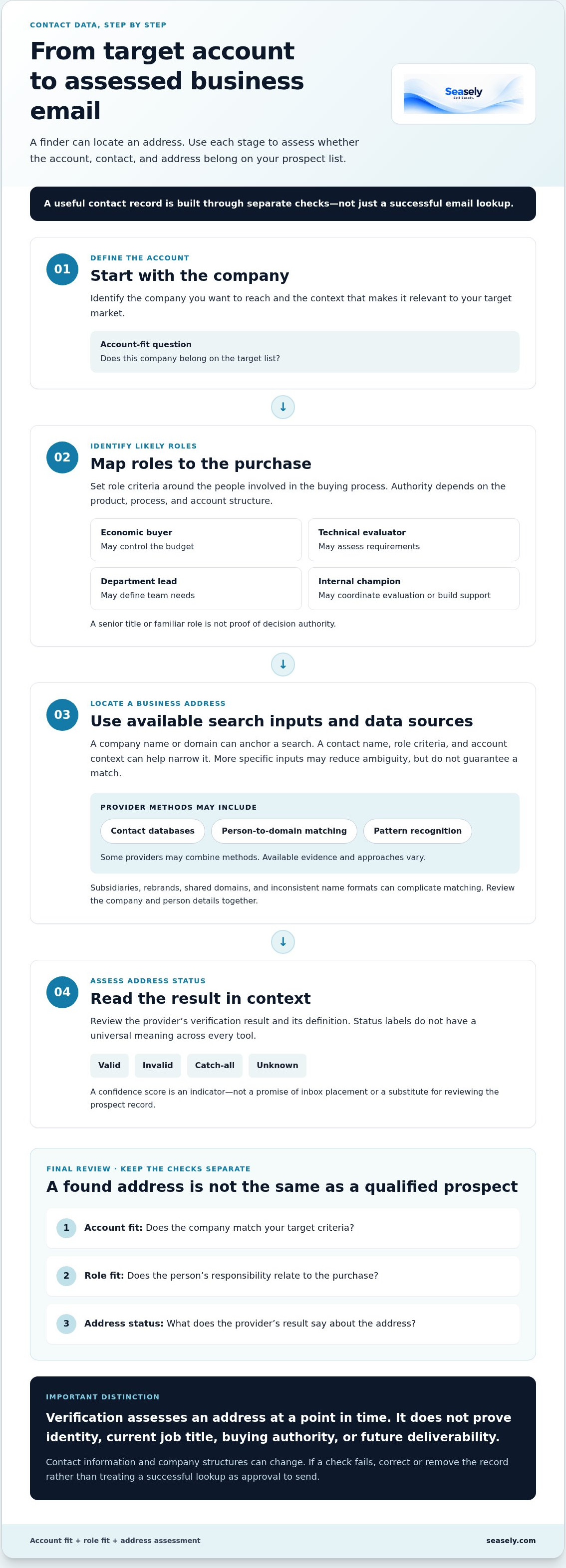
A contact record is assembled through several steps, and each answers a different question. A decision maker email finder may use company information to locate potential people, but discovery alone doesn’t establish that an address belongs to the right person or that the person fits your buying criteria.
- Define the account. Identify the company you want to reach and the context that makes it relevant.
- Identify likely roles. Set role criteria based on the purchase and the people involved.
- Locate a business address. Use the search inputs and data sources the tool supports to find a possible address.
- Assess its status. Review the tool’s verification result, then evaluate the contact and account separately.
Providers may draw on contact databases, match a person to a company domain, or use pattern recognition to generate possible addresses. Some may combine these methods. Approaches and available evidence vary, so treat each result as a record to assess, not a complete qualification decision.
Verification assesses an address at a point in time, not the prospect’s buying relevance. It doesn’t prove a person’s identity, current job title, or authority in a purchase. Nor does a status label guarantee future deliverability. Contact information and company structures can change after a result is produced, so consider when the check took place and what its status means before deciding what to do next.
What inputs help narrow a search?
A company name or domain can anchor a search; a contact name and role criteria can narrow it further. Target-account context, such as the type of company or the reason it fits your market, helps your team assess whether a returned contact belongs on the list. Specific inputs can reduce ambiguity, but they don’t guarantee a match. Subsidiaries, rebrands, shared domains, and inconsistent name formats can complicate matching, so review the company and person details together.
How to interpret verification and confidence signals
Labels such as valid, invalid, catch-all, and unknown don’t have a universal meaning across every tool. Read them according to the provider’s definitions. A confidence score is an indicator, not a promise of inbox placement or a substitute for checking the prospect record. For practical ways to assess address status, the B2B sales email verification guide explores verification techniques in more depth.
Keep address status, identity, role, and account fit as separate fields in your review process. That makes uncertainty visible and gives your team a clearer basis for correcting records before outreach. For a connected workflow, explore Seasely’s outbound platform, which brings target discovery and qualification together with verified decision-maker email delivery and automated sending.
Decision-Maker Email Finder Options Compared: Research, Patterns, and Platforms
There’s no single best way to build a prospect list. The right approach depends on whether your team already knows its target accounts, how much role context it needs, and where contact records go next. Compare the full workflow, not just the number of names a decision maker email finder can return.
| Approach | Role context | Account coverage | Verification visibility | Scale and handoffs |
|---|---|---|---|---|
| Manual research | Can be detailed when researchers review company information and roles. | Focused on selected accounts. | Usually depends on the separate checks your team performs. | Offers control, but research and record entry take time. |
| Pattern-based lookup | Uses a person and company details, but a likely address pattern doesn’t confirm role fit. | Works from known people or domains. | May require a separate status check. | Can speed up narrow searches; uncertain patterns need review. |
| Contact database | May include titles and company details, with relevance depending on the record. | Varies by provider and target market. | Depends on what status information the tool displays. | Can support broader searches, with exports or other handoffs to manage. |
| Connected outbound platform | Can link target-company discovery and qualification with contact selection. | Built around a connected prospecting workflow. | Review the status information provided before using records. | Can consolidate discovery, contact delivery, and sending, with fewer tool transitions. |
These are operating models, not guarantees of quality. Manual research gives a team control but relies on consistent processes. Pattern-based lookup can produce a plausible address that still needs checking. Database coverage varies, so a large database or an accuracy claim alone can’t establish fit for your target market. A consolidated platform may reduce handoffs, but your team still needs to review targeting and messaging.
When a focused email lookup tool may fit
A focused lookup can suit teams that already have target accounts and clear contact criteria, and mainly need to locate or assess addresses. Check how results fit into your current process: can you export the fields you use, identify duplicates, and see the address status? Separate research and sending tools may require repeated exports, imports, and record cleanup. Those handoffs add operational work and can make changes harder to track.
When a connected outbound workflow may fit
A connected workflow can bring company discovery, qualification, contact delivery, and email sending into one process. Assess whether that structure reduces manual transfers while leaving room to review account fit, contact selection, and personalized messaging. Seasely connects target discovery and qualification with verified decision-maker email delivery and automated sending. The AI outbound sales platform evaluation guide outlines a broader way to assess how those stages work together.
Choose based on the work your team needs to do, not the biggest feature list. A connected process is useful when it fits your review practices as well as your outbound workflow.
How to Evaluate a Decision-Maker Email Finder Before You Choose
Set your evaluation criteria before comparing tools. A feature list or large result count won’t tell you whether a finder can identify relevant contacts in your target market or fit the way your team works. Test it against a sample of real accounts, then compare the quality of usable records and the effort needed to prepare them for outreach.
Evaluate contact relevance, address status, workflow fit, and responsible data use separately. This checklist keeps different questions from collapsing into one score. A strong address result doesn’t make an irrelevant role suitable, and a useful contact list doesn’t by itself show that your data practices fit your requirements.
- Target-market coverage: Can the tool return relevant companies in the markets and account types you pursue?
- Role context: Does each record provide enough information to assess the person’s likely relevance?
- Status transparency: Can your team interpret the address status and identify uncertain results?
- Workflow fit: Does the output work with your current research, CRM, review, and sending steps?
What should a practical evaluation test?
Choose a representative sample from your ideal customer profile. Include different account types and the roles your team actually targets. Apply the same criteria to every tool and record relevant contact matches, usable results, duplicates, and manual corrections. Raw volume can look impressive while requiring extensive cleanup. Track unclear statuses too, so uncertainty doesn’t disappear inside an overall match count.
Keep the test consistent. For each account, note whether the company matches your target criteria, whether the contact’s role fits, and whether the address has an interpretable status. Record the time spent resolving duplicates or correcting fields. This gives your team a practical view of data quality and operating effort, rather than a comparison based only on advertised coverage.
How should teams assess workflow and responsible use?
Map where discovery, qualification, verification, CRM updates, and sending happen today. Identify each manual transfer and review step. Then assess whether the tool reduces handoffs without removing oversight of target selection or message content. Check how it handles suppressed contacts and opt-outs, and whether people can review records before they enter an outreach workflow.
Review privacy, data use, and retention in light of the jurisdictions where your team and recipients operate. Requirements can differ by location and use case. Consult current guidance for applicable rules, including GDPR or CAN-SPAM where relevant, and document how your process handles the data it collects and uses. Treat responsible use as part of tool fit, not a final checkbox after setup.
Once you’ve defined these criteria, compare tools against the same sample and workflow. If you want to connect target discovery, qualification, verified decision-maker contacts, and automated email sending in one process, explore Seasely’s outbound platform.
How Seasely Connects Decision-Maker Discovery to B2B Outreach
A decision-maker email finder is most useful when its results connect to a clear prospecting process. Seasely brings several stages together: it discovers and qualifies target companies, delivers verified decision-maker email addresses, and supports personalized, automated email sending. Teams can move from account selection toward outreach without treating contact lookup as an isolated task.
Where Seasely fits in the prospecting workflow
Company discovery and qualification give teams a starting point, helping them focus prospecting on target companies before choosing contacts. Verified decision-maker email delivery then supports outreach to people associated with those accounts. Your account and role criteria still matter: a verified address doesn’t establish that a person is the right stakeholder. Automated sending is a later workflow step, not a substitute for sound targeting or relevant messaging.
Connecting these stages can make the workflow easier to follow. Instead of managing disconnected steps for target discovery, contact delivery, and sending, teams can work within a platform designed to support outbound operations. Seasely also describes its system as continuously optimizing outbound workflows. That doesn’t remove the need to review who is being targeted or what a message says. Clear criteria and thoughtful personalization remain central to relevant outreach.
Keep expectations grounded. A connected workflow can support outbound execution, but it doesn’t guarantee replies, sales, or revenue. Results depend on factors beyond contact discovery, including the relevance of the audience and message. Assess the process by how well it supports your team’s work, not by assuming automation will produce a particular business outcome.
What to assess when moving from evaluation to implementation
Start by mapping your current process. Note where account discovery, qualification, address review, CRM updates, and sending take place. Identify the handoffs your team wants to reduce, then define baseline measures such as relevant contacts, usable records, correction effort, and campaign performance. These measures give you a practical reference point as the workflow develops.
Use the same account and role criteria throughout implementation. Decide how your team will review contact relevance and messaging before sending, and keep the measures that show whether the process is working as intended. A connected platform organizes stages, but your operating standards help keep them aligned with your target market and responsible outreach practices.
If an integrated workflow fits your evaluation criteria, explore Seasely’s AI outbound sales platform. Review how its company discovery, qualification, verified contact delivery, and personalized automated sending could fit your outbound process, then assess the workflow against your team’s priorities.
Put Your Prospecting Criteria Into Practice
Turn your evaluation criteria into a working process. Choose a defined group of target accounts, agree on the roles that matter, and decide how your team will review contact records before outreach. This gives you a practical way to see whether a decision maker email finder supports day-to-day operations, not just an isolated search.
Decide what you’ll monitor as the workflow runs: contact relevance, record usability, and how much manual effort remains. Use those observations to refine your targeting and review steps over time. The aim is a repeatable process your team can manage responsibly, with people applying judgment where it matters.
For teams looking to connect target-company discovery and qualification with verified decision-maker email delivery and personalized sending, Seasely provides an integrated outbound workflow. Explore how it could fit your process and priorities.
Explore Seasely’s AI outbound sales platform and take the next step toward a more coordinated approach to B2B outreach.
Frequently Asked Questions
Can a decision-maker email finder identify the person with final buying authority?
Not reliably from an email address or job title alone. Final authority can depend on procurement rules, budget ownership, and how the company organizes a purchase. For example, a department head may sponsor a project while finance approves spending. Use the finder to identify potential stakeholders, then compare their responsibilities with account information and map the people involved before treating anyone as the final approver.
Is a verified business email guaranteed to reach the prospect’s inbox?
No. Verification checks an address, but doesn’t promise inbox placement. Messages can still bounce or be filtered because of mailbox changes, recipient-server rules, sender reputation, or message authentication and configuration. If an email bounces, review the bounce notice and update the record before trying again. Keep sending practices and domain setup in view alongside contact data.
Can I find decision-maker emails using only a company name?
Sometimes, but a company name alone may match multiple businesses or locations. A decision maker email finder can have a clearer search target if you also provide the company’s website domain and the role you’re seeking. For example, distinguishing a parent company from a similarly named subsidiary can prevent you from reviewing contacts associated with the wrong account. Treat initial matches as candidates for review.
How much does a decision-maker email finder cost?
Pricing depends on whether a tool charges by subscription, user, or search credits. As of October 2026, Anymail Finder’s Starter plan is $29 per month for 400 credits, with a decision-maker search costing two credits. Apollo.io lists paid plans at $39 and $79 per user per month, plus a free option. Compare current plan limits and how your intended searches consume credits before estimating fit.
What happens if a verified decision-maker email later bounces?
First, review the bounce message to understand whether the address is invalid, temporarily unavailable, or blocked for another reason. If it’s a hard bounce, remove or suppress the address rather than repeatedly sending to it. Update the contact record and look for a current business address through your normal research process. A prior verification result reflects an earlier check, so don’t treat it as permanent.
Can an email finder discover contacts from LinkedIn profiles?
Some tools may accept a profile URL or use profile details as search inputs, but supported methods differ. A LinkedIn profile can help identify a person and their stated role, yet it doesn’t establish an email address or confirm buying authority. Check how the selected tool uses profile information and follow the platform’s rules. Review any resulting contact details before adding them to an outreach list.


