

What if the best email outreach automation leaves more room for human judgment, not less? Email outreach workflow automation can connect prospecting, contact checks, writing, and follow-ups, but automating every decision can make messages feel generic. The goal is to streamline handoffs while keeping targeting criteria and message quality clear.
When campaign tasks are scattered across tools and manual steps, consistent execution becomes difficult. A reliable workflow gives each stage clear inputs, checks, and outputs, so repetitive work takes less time without stripping away relevance or control.
This guide shows you how to build that workflow, from defining target companies and verifying decision-maker contacts to preparing personalized messages, scheduling sends, and reviewing performance. It also explains how to refine the process after a campaign runs. Seasely connects company discovery, qualification, contact verification, personalized outreach, sending, and campaign analysis in one outbound workflow.
Key Takeaways
- Define the inputs, actions, checks, and outputs at each stage so handoffs are consistent.
- Automate repeatable tasks, but keep human judgment over audience fit, claims, and message relevance.
- Build email outreach workflow automation around checkpoints that catch poor-fit prospects and generic messages before sending.
- Review campaign performance after each send and use what you learn to refine targeting and messaging.
- Seasely connects company discovery, qualification, contact verification, personalized outreach, and scheduled sending.
What email outreach workflow automation does, and what it should not automate
Email outreach workflow automation coordinates repeatable work from target selection through campaign review. It defines how information moves between stages, what each stage needs, and what must be checked before the next action. For example, a campaign can move from company research to qualification, contact verification, message preparation, scheduled sending, and performance review. Each handoff should have a clear purpose and output.
This is broader than an email sequence. A sequence describes the messages and timing a prospect receives. A workflow governs the process around those messages, including how prospects are selected, how contacts are checked, and how campaign results inform the next run. The overview of marketing automation in email campaigns also covers segmentation, personalization, scheduling, and analytics.
When these tasks sit in disconnected tools or informal spreadsheets, people repeatedly transfer records, recheck information, and resolve inconsistent fields. A contact may be marked ready in one place while missing context in another. A connected workflow carries defined inputs forward and makes gaps visible. It creates a more consistent process, not a shortcut around deciding whether outreach is appropriate.
Which parts of B2B email outreach are repeatable?
Research, qualification, contact verification, scheduling, and performance review can follow repeatable criteria. A team might define the company traits that qualify a prospect, the contact details required before a message is prepared, and the campaign measures to review afterward. Clear criteria make each task easier to standardize, monitor, and hand off. But a verified address alone does not prove that a person is the right audience.
For each stage, record the input, action, and output. Company details lead to a qualification decision; a qualified company moves to a contact check; a verified contact moves to message preparation. Sending produces campaign activity to review. This structure makes it easier to find where records stall or quality checks fail. Sequence design is a separate topic; this section focuses on the workflow that makes campaign execution orderly.
Where should human review remain?
People should set target criteria, approve message claims, and handle exceptions that need context. A person’s role or company details may not reveal whether they have a relevant need. A personalization detail can be accurate but still feel unrelated to the reason for contacting someone. Review at these points can catch mismatched contacts or weak relevance before a message goes out.
Process automation moves work forward; it shouldn’t make every decision on your behalf. Automate routine checks and scheduling, while routing uncertain records or messages for review. That keeps the workflow moving without treating every prospect as an automatic fit.
Automation can make execution more consistent, but it cannot guarantee replies, meetings, or revenue. Those outcomes depend on factors beyond the workflow itself, including audience fit and the value of the message. A useful measure is whether the process applies its criteria reliably and gives the team sound information to improve the next campaign.
The core components of an email outreach workflow
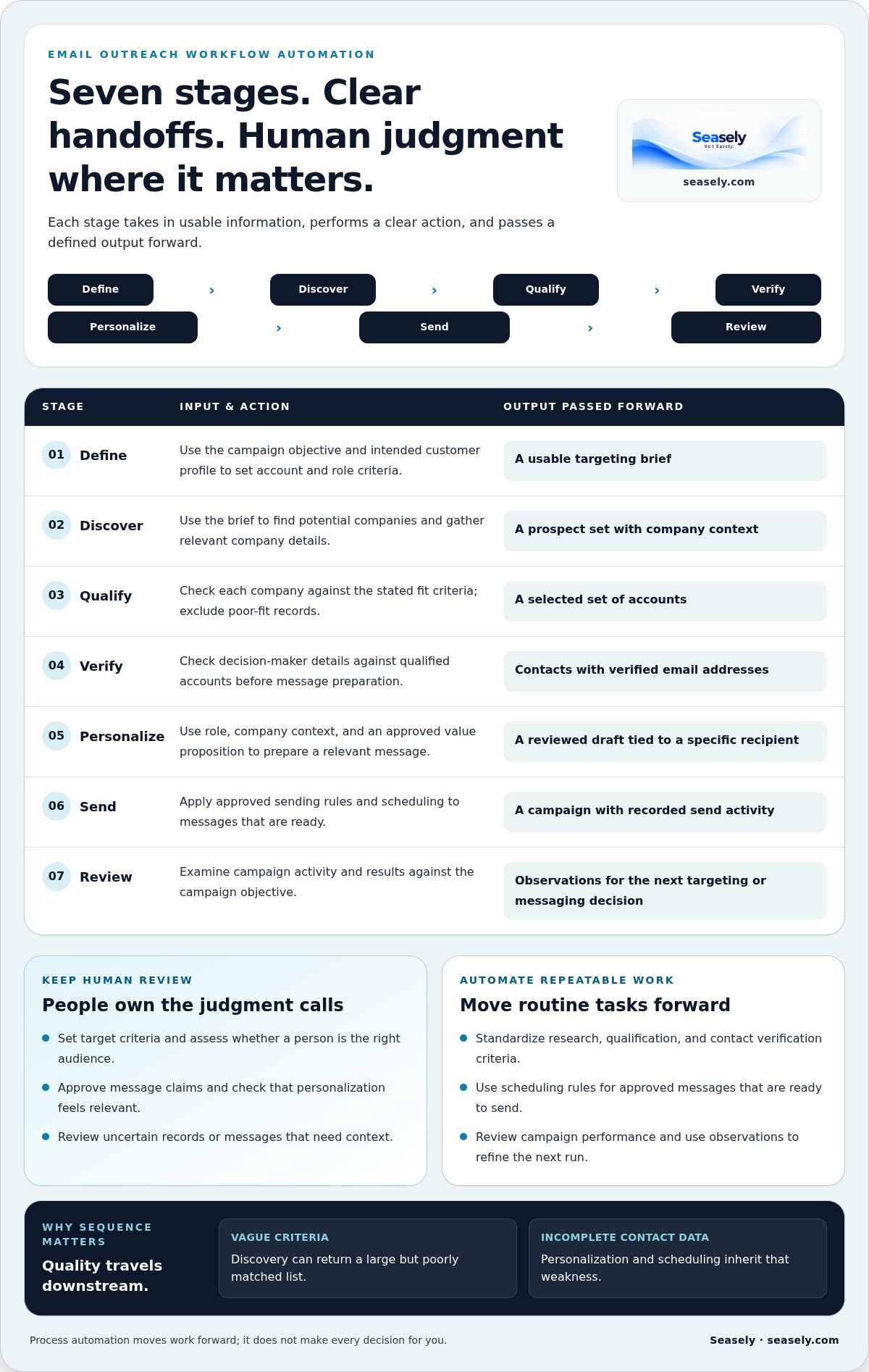
A useful workflow is a chain of explicit handoffs: define, discover, qualify, verify, personalize, send, and review. Each stage should receive usable information, perform a clear action, and pass a defined output forward. This structure makes email outreach workflow automation easier to monitor because a problem can be traced to the stage where it entered the process.
The order matters. If audience criteria are vague, discovery can return a large but poorly matched list. If contact data is incomplete, personalization and scheduling inherit that weakness. Gartner’s definition of marketing automation provides useful context for thinking about automation as coordinated activity, rather than a single sending action.
- Define: The campaign owner uses the objective and intended customer profile to set account and role criteria. The output is a usable targeting brief.
- Discover: A researcher or lead-generation system uses the brief to find potential companies. The output is a prospect set with relevant company details.
- Qualify: The sales team or qualification process checks each company against the stated fit criteria. The output is a selected set of accounts, with poor-fit records excluded.
- Verify: A contact researcher or verification process checks decision-maker details against qualified accounts. The output is a set of contacts with verified email addresses for the next step.
- Personalize: The campaign owner or messaging process uses the contact’s role, company context, and approved value proposition to prepare a relevant message. The output is a reviewed draft tied to a specific recipient.
- Send: The campaign operator applies approved sending rules and scheduling to ready messages. The output is a campaign with recorded send activity.
- Review: The campaign owner examines activity and results against the campaign objective. The output is a set of observations to inform the next targeting or messaging decision.
From target criteria to verified decision-maker contacts
Start with account attributes that reflect both the intended customer profile and campaign purpose. Depending on the offer, these might include company type, market, or a relevant business need. Qualification is not a contest to gather more records. It checks whether each account meets criteria the team set before research began. Then identify a decision-maker whose role connects to the campaign’s subject, and verify the email address before scheduling. This is a stronger handoff than sending a message simply because an address was found.
From relevant message to scheduled campaign
Use verified contact context to shape a concise message. A recipient’s role can guide the angle, while company information can help explain why the message is relevant. Keep claims aligned with what the business can support, and schedule only messages that meet the campaign’s approval rules. Each stage should pass a cleaner input forward, so the next action starts with less guesswork.
A connected platform can bring company discovery, qualification, verified contacts, personalized outreach, and scheduled sending into one process. Seasely’s outbound workflow connects these stages and analyzes campaign performance, helping teams reduce manual transfers while keeping criteria and outputs visible.
How to build email outreach workflow automation step by step
Build the process in order, with a checkpoint before each handoff. This makes it easier to locate the source of an issue: unclear targeting, incomplete contact data, an unsupported message claim, or a scheduling rule that needs adjustment. Start with a small pilot, then expand after the steps work as intended.
Set the workflow objective and audience rules
Begin with the campaign’s business purpose and intended audience. Specify which account attributes indicate fit, which roles matter, and what would disqualify a prospect. Turn those decisions into consistent qualification rules before discovering contacts. Set human approval points for changes to audience criteria and for claims made in outreach, so the workflow cannot silently broaden its scope or message.
Configure the data, message, and execution steps
Move qualified accounts to contact verification before preparing or scheduling messages. Use relevant, available company and role context for personalization; don’t fill gaps with assumptions. Set the objective, define the audience, validate the records, approve the message, schedule the send, then review the results. Follow-up timing and message logic belong to a separate sequence design layer, which teams can document in an automated email sequences guide.
- Define the objective. Choose what the campaign is intended to learn or communicate. Record the audience, purpose, and review measures.
- Set qualification rules. Turn account fit into observable criteria. Decide which conditions qualify, disqualify, or require human review.
- Discover and qualify accounts. Find potential companies, apply the rules, and pass only suitable records forward. Keep the reason for qualification visible.
- Verify decision-maker contacts. Check contact details before drafting or scheduling. Route incomplete or questionable records for review rather than treating them as ready.
- Prepare and approve messages. Use relevant context, check claims, and review the recipient and message together. Approved content becomes the input for scheduling.
- Schedule and monitor. Apply campaign rules to ready messages. Confirm that the intended records and timing carry into execution.
- Review and refine. Compare activity with the campaign objective. Identify the stage responsible for any issue, then adjust that stage before the next run.
Use this compact template to make ownership and handoffs explicit:
| Trigger | Owner | Check | Output |
|---|---|---|---|
| Campaign approved | Campaign lead | Objective and audience rules set | Targeting brief |
| Accounts discovered | Research owner | Fit criteria applied | Qualified accounts |
| Contacts selected | Contact owner | Decision-maker details verified | Ready contacts |
| Messages prepared | Campaign reviewer | Relevance and claims approved | Scheduled messages |
| Campaign activity recorded | Campaign lead | Results reviewed against objective | Changes for next run |
Test the workflow before expanding it
Run a limited pilot and inspect records at each handoff. Check that qualification is applied consistently, contact details match the intended recipient, messages render as expected, and scheduling follows approved rules. Record defects alongside the stage where they occurred. Fix that stage, then test again before increasing volume or adding automation. This keeps complexity tied to a demonstrated need.
How to keep automated outreach relevant, controlled, and measurable
Automation can apply a process consistently, but it can’t make a poor-fit audience relevant or turn generic copy into a useful message. A campaign may pass through every configured step and still miss the mark if account criteria are weak, a contact’s role is misunderstood, or personalization relies on a detail that doesn’t matter to the recipient. Controls should protect the quality of each handoff, not just keep sending on schedule.
Compare two approaches. A workflow with defined checks pauses questionable records, confirms message claims, and reviews campaign settings before execution. It requires attention at key points, but makes errors easier to catch and diagnose. A workflow that sends without review may move faster, yet an incorrect contact or irrelevant message can pass straight through. Automate routine checks and routing, while keeping people responsible for decisions that need context.
Add quality gates without creating unnecessary friction
Place a brief checkpoint before sending. Confirm audience fit, contact validity, message accuracy, recipient preferences, and campaign settings. Define pause conditions in advance, such as missing or conflicting contact data, unexpected workflow errors, or repeated signs that the audience is a poor fit. These gates focus review where it matters. A related guide to B2B email outreach mistakes can help teams identify common failure patterns to watch for.
- Audience: Does the account still match the campaign’s stated criteria?
- Contact: Is the intended decision-maker’s email address verified and relevant to the message?
- Message: Are its claims accurate, and does its context genuinely connect to the recipient?
- Execution: Are the approved recipients, message, and schedule moving forward as intended?
Recipient preferences also belong in the operating rules. Apply relevant preferences consistently and handle requests to stop outreach through a clear process. Commercial email requirements vary by recipient jurisdiction and can change. Verify the current requirements that apply to each audience before launching a campaign; don’t assume one set of rules covers every recipient.
Use performance signals to decide what to refine
Review delivery, replies, and campaign outcomes together, then interpret each signal in context. A reply shows engagement, not necessarily a qualified opportunity. An open or delivery signal alone doesn’t establish that the audience was a good fit or that the message helped move a business decision forward. Compare results with the campaign’s purpose and inspect the records and messages behind the pattern.
Measurement shows where to investigate and what to refine; it can’t guarantee what a prospect will do. Where practical, adjust one variable at a time, such as an audience rule or message angle, and document the change and its observed effect. That makes the next review more useful than changing several stages at once and guessing which change mattered.
Seasely analyzes and optimizes outbound campaign performance alongside company discovery, qualification, contact verification, personalized outreach, and scheduled sending. Explore Seasely’s outbound workflow to see how those steps connect while keeping campaign criteria and review in view.
How Seasely connects the email outreach workflow
Disconnected prospecting, contact checks, message preparation, and sending create extra transfers between people and tools. Seasely connects these stages in an AI-powered B2B outbound sales platform. It discovers and qualifies target companies, finds verified decision-maker email addresses, supports personalized outreach, schedules sending, and analyzes campaign performance. This creates a more connected operating flow, with fewer manual handoffs between those tasks.
Connect prospect discovery, qualification, and email verification
Start with campaign criteria. Seasely uses those criteria to discover and qualify target companies, then provides verified decision-maker email addresses for outreach. Connecting these steps helps teams move from an account that fits the campaign to a contact who can receive a relevant message. Keep contact verification standards clear: a verified address does not establish that the person matches the intended role. A dedicated B2B sales email verification guide can help teams define what they expect from that check.
The handoff matters. If a company qualifies but the contact doesn’t match the intended role, the record needs attention before a message is prepared. If the contact is verified, that information can move into personalized outreach rather than being copied manually between disconnected steps. Keep audience criteria visible and review whether discovered accounts and selected decision-makers still fit the campaign purpose.
Move from personalized outreach to ongoing optimization
Seasely supports personalized outreach messages and scheduled email sending. That connects message preparation with execution, while leaving teams responsible for setting criteria and reviewing message relevance. After a campaign runs, performance analysis can help identify where the workflow may need adjustment, such as targeting criteria or messaging. Optimization is an iterative process, not a promise of specific sales or revenue. Explore Seasely's outbound workflow to understand how these capabilities fit together.
To evaluate your process, trace one campaign from its initial account criteria to its performance review. Note where information is copied, where decisions wait for a person, and where records need another check. Those observations show which handoffs are routine enough to streamline and which decisions should stay under human review. A connected platform can reduce manual transfers, but clear campaign rules remain essential for relevance and oversight.
Choose a sensible first workflow to automate
Choose a repeatable campaign with a clearly defined audience, then document each manual step before automating anything. Record who owns the step, what information they need, what they check, and what they pass forward. Start with handoffs that follow stable rules; retain review for exceptions or decisions that depend on context. This gives you a practical way to assess where email outreach workflow automation can reduce repetitive work without removing useful control.
Once the process is documented, compare it with the connected discovery, qualification, verification, messaging, and sending stages. Look for duplicated entry or avoidable rechecks, then decide what to streamline first. See how Seasely supports B2B outreach.
Put your next campaign on a clearer footing
Before changing tools or expanding automation, map one current campaign from its first targeting decision to its final review. Mark each transfer, repeat check, and point where work stalls. That map gives you a practical starting point: improve one handoff, keep human review where context matters, and observe what changes. Strong email outreach workflow automation develops through deliberate iteration, not by adding more steps for their own sake.
If you’re assessing how a connected platform could support that process, Seasely combines target-company discovery and qualification with verified decision-maker email addresses, personalized outreach, scheduled sending, and campaign optimization. Compare those connected capabilities with the manual handoffs you’ve identified and the oversight your team needs.
Explore Seasely's B2B outbound workflow and identify which part of your current process is ready to move forward. A focused first step can make the next campaign easier to manage and improve.
Frequently Asked Questions
What is email outreach workflow automation?
Email outreach workflow automation coordinates repeatable campaign tasks and moves information between them according to defined rules. It can help a team track whether a prospect is researched, qualified, ready for outreach, or awaiting review. For example, a record with missing role information can be routed for a person to resolve instead of being treated as ready. The workflow organizes execution; it doesn’t determine whether every prospect deserves a message.
How do you automate a B2B email outreach workflow?
Start with one campaign and define its audience, objective, and readiness criteria. Then map how account details, contact records, message drafts, and send status move between the people or systems involved. Assign an owner to exceptions, such as a contact with conflicting job information. Test the process on a small group, note where records stall or need correction, and adjust those steps before applying the workflow more broadly.
Can email outreach be automated without making messages feel generic?
Yes, if automation uses relevant context and people review the message for fit. Personalization should explain why the recipient’s role or company makes the outreach relevant, not simply insert a name or company field. For instance, a message to a finance leader should address a business concern connected to that role. If the available information doesn’t support a useful opening, hold the message for review rather than inventing context.
What should be checked before an automated outreach campaign sends?
Confirm that each recipient fits the intended audience, contact details are accurate, and message claims and personalization are supported by available information. Check that the correct message and recipients are associated with the campaign, and that recipient preferences are respected. Commercial email requirements depend on jurisdiction, so verify current rules for the locations involved before sending. Pause the campaign if records or settings don’t match the approved plan.
How does email verification fit into an outreach workflow?
Email verification is a checkpoint between identifying a decision-maker and preparing a message for delivery. It helps teams assess whether an address is suitable to use, but it doesn’t prove that the person is the right contact or that the message is relevant. Keep contact fit and address verification as separate checks. If someone changes roles or a record becomes outdated, revisit the contact before adding it to a later campaign.
Which metrics should teams review in an automated email outreach workflow?
Review delivery status, replies, and the outcomes that match the campaign’s purpose. For example, a team seeking qualified conversations can distinguish relevant replies from responses that don’t match its target audience. Look at results alongside targeting and message changes, and note when the campaign ran. Opens alone don’t establish interest or business value. Use the combined signals to identify what needs investigation, not as proof that one change caused an outcome.
Does email outreach automation guarantee more replies or sales?
No. Automation can make recurring steps more consistent and help teams review campaign activity, but it can’t guarantee that prospects will respond, book a meeting, or buy. Results depend on factors such as audience fit, timing, and the value of the message. Set practical goals for the workflow itself, such as fewer manual corrections or clearer campaign records, then assess business outcomes separately over time.


