

The longest feature list is not always the best reason to choose an Apollo alternative. Apollo brings prospect data and outreach together, so replacing it can affect several steps in your sales workflow. Before making a change, consider whether a tool can help you find relevant prospects, identify verified contact details, and run campaigns without adding unnecessary work.
Start with your team’s actual outbound process. Which Apollo functions do you use every day, and where do you still rely on manual steps? This guide compares alternatives by prospecting needs, data fit, outreach capabilities, and workflow coverage. Use it to build a shortlist around the work your team needs done, rather than comparing features one by one.
You’ll also find a practical way to evaluate a replacement without disrupting every campaign at once, plus the trade-offs between all-in-one platforms and specialized tools. For teams seeking a connected discovery-to-outreach workflow, Seasely combines target company discovery and qualification, verified decision-maker email identification, personalized email sending, and campaign optimization. The best fit depends on which parts of your outbound process you want to keep connected.
Key Takeaways
- Identify whether your main gap is prospect data, outreach execution, usability, or the way these steps connect before choosing an Apollo alternative.
- Distinguish contact databases from prospecting tools and outbound platforms so you can compare options against the work your team needs to complete.
- Compare alternatives by target-account fit, contact verification, outreach coverage, and the trade-offs each tool brings to your workflow.
- Use a controlled pilot to test a repeatable outbound motion before moving campaigns and processes across your team.
- Consider Seasely for connected target discovery and qualification, verified decision-maker emails, personalized sending, and campaign optimization.
Why B2B Teams Look for an Apollo Alternative
Teams usually start looking because a tool no longer fits their workflow, not because they want to replace a familiar product for its own sake. They may need better-fit prospects, more confidence in contact details, a smoother way to run outreach, or fewer manual handoffs. These are different problems, so first identify which one your team needs to solve.
Look for where work slows down. Are the target companies a poor fit, or is it difficult to find the right decision-makers? Are campaigns cumbersome to execute, or is the problem limited to one setup or process? Usability matters, but frustration with a particular screen is different from a recurring operational burden. Separating these issues helps prevent a temporary campaign problem from driving a platform change.
An Apollo alternative is a tool or platform that replaces the specific job your team needs done, not simply another product with a different label. That job might be contact discovery, data verification, outreach execution, or a connected process across several stages.
Which Apollo pain points justify evaluating alternatives?
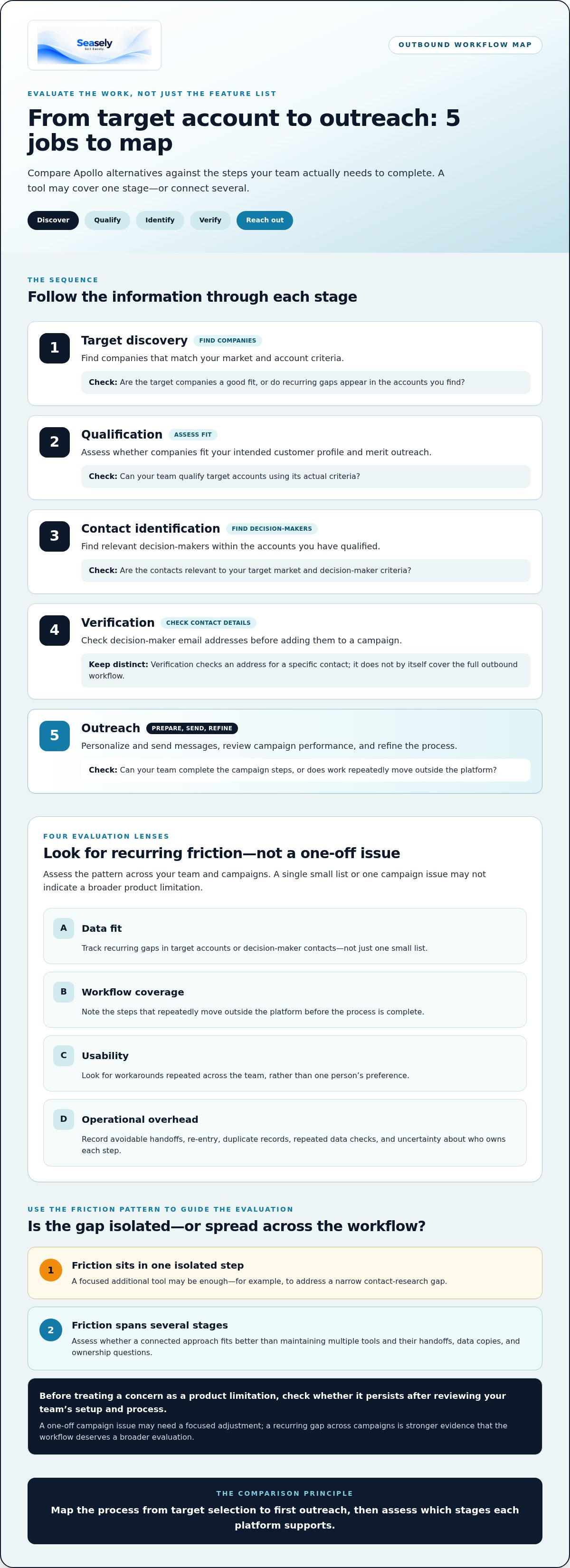
Assess four areas: data fit, workflow coverage, usability, and operational overhead. Data fit means the companies and contacts match your target market and decision-maker criteria. Workflow coverage means the tool supports the steps your team actually runs. Usability affects whether reps can complete those steps consistently. Operational overhead includes manual exports, duplicate records, and repeated data checks.
- Data fit: Track recurring gaps in target accounts or decision-maker contacts, rather than judging from one small list.
- Workflow coverage: Note where a process repeatedly moves outside the platform before it can be completed.
- Usability: Look for workarounds repeated across the team, not just one person’s preference.
- Operational overhead: Record avoidable handoffs, re-entry, and confusion about who owns each step.
Before treating a concern as a product limitation, check whether it persists after reviewing your team’s setup and process. A one-off campaign issue may need only a focused adjustment. A recurring gap across campaigns is stronger evidence that the workflow deserves a broader evaluation. Avoid relying on general claims about Apollo’s current features or limitations unless you can verify them.
When is switching more practical than adding another tool?
A separate tool can address a narrow gap, such as additional contact research. But each added system can also create another handoff, data copy, or ownership question. If prospect discovery, qualification, contact identification, and outreach already happen across disconnected tools, adding one more may extend the chain rather than simplify it. Compare the effort of maintaining those connections with the value of covering more of the workflow in one platform.
Map the process from target selection to first outreach, then mark where information changes hands or gets re-entered. If the friction sits in one isolated step, a focused addition may be enough. If it spans several stages, assess whether a connected approach better fits the team’s operating model. This AI outbound platform evaluation guide offers a fuller framework for reviewing workflow coverage.
How Apollo Alternatives Differ Across the Outbound Workflow
Outbound sales involves a sequence of operational jobs, not a single feature. A tool may help find companies but leave contact research and sending to other systems. Another may identify contacts without helping the team qualify accounts or coordinate outreach. Comparing options by category alone can hide these gaps. Map the work first, then assess which stages each platform supports.
- Target discovery: Find companies that match the team’s market and account criteria.
- Qualification: Assess whether those companies fit the intended customer profile and merit outreach.
- Contact identification: Find relevant decision-makers within qualified accounts.
- Verification: Check decision-maker email addresses before adding them to a campaign.
- Outreach: Personalize and send messages, then review campaign performance and refine the process.
Verified contact data and a complete outbound workflow are not the same thing. Verification helps establish whether an address is suitable for a specific contact; workflow coverage determines what happens from target discovery through outreach. A team using a data source may still need separate tools and processes to qualify prospects, prepare campaigns, and send messages.
What does a connected outbound workflow need to cover?
Evaluate each stage by the job it performs, not by the feature name on a product page. A contact database can provide records, while a prospecting tool may help find and organize potential buyers. An outbound execution platform focuses on putting prospects into personalized campaigns and managing the sending process. Some products span several roles; others cover only part of the path. Check current product information against your requirements before comparing options.
Contact verification has a specific place in the sequence. Identify the decision-maker and assess the email address before sending, rather than treating a large contact list as ready-to-use campaign data. The workflow should make clear who reviews that information and how it moves into outreach.
All-in-one platform or specialized tools: what changes?
An all-in-one platform can reduce handoffs between discovery, contact identification, and sending. It can also centralize workflow ownership. Specialized tools may suit a team with one narrow requirement and a need to focus on that job. The trade-off is coordination: separate tools need clear ownership and dependable data movement between them. For a broader view of the category distinction, see sales outreach software versus email automation.
As AI shapes sales and marketing workflows, the B2B Sales Predictions for 2026 from Forrester provides forward-looking context for teams reviewing how technology fits their process. The practical question is whether the system supports the work your team needs to run. Teams mapping discovery through personalized email outreach can also review Seasely’s outbound platform as a connected-workflow option.
Apollo Alternatives Compared by Team Use Case
The right shortlist depends on which part of outbound needs to change. Seasely is an AI-powered B2B outbound platform that connects target discovery and qualification with verified decision-maker email identification, personalized sending, and campaign optimization. Other options may focus more narrowly on contact data, prospect research, or outreach. The table compares potential roles, not overall rankings. Use each tool’s current product information to assess its fit for your workflow.
Which alternatives fit contact data and prospect discovery?
For data-focused tools, compare their fit with your account profile, contact relevance, and verification needs. A large database does not guarantee coverage of your market or identification of the right people. Treat use-case labels as a starting point, then test them against representative target accounts and contacts.
| Tool | Primary workflow role | Prospecting fit | Outreach fit | Key trade-off |
|---|---|---|---|---|
| Seasely | Connected discovery-to-outreach platform | Discovers and qualifies target companies; identifies verified decision-maker emails | Personalized email sending and campaign optimization | Best assessed as a connected workflow, not simply a contact database |
| SalesRobot | Prospecting and outreach, with a LinkedIn-related use case noted in available comparisons | Evaluate fit for your prospecting channels and targets | Review its current channel and execution coverage | Assess how its workflow aligns with your email requirements |
| Lead411 | Prospecting and contact research | Compare target-market relevance and contact coverage | Review the outreach steps it supports | Assess whether additional execution tools are needed |
| UpLead | Contact discovery and data | Test coverage and relevance for your account profile | Review its campaign capabilities | Data fit may not equal end-to-end workflow coverage |
| RocketReach | Contact discovery | Evaluate decision-maker identification for target accounts | Review sending and campaign functions | May require separate outreach execution |
| Lusha | Contact data lookup | Assess fit for contact discovery, including the LinkedIn-related use case often associated with it | Review its current outreach coverage | Check whether it covers more than contact lookup |
| ZoomInfo | Sales intelligence and prospect data | Consider it for deeper company intelligence and target research | Review the execution workflow your team needs | Evaluate whether its breadth matches your requirements |
| Hunter.io | Email finding | Assess its fit for finding and checking prospect email details | Review its campaign workflow coverage | A focused email role may leave other stages to separate tools |
| Snov.io | Email prospecting and outreach | Compare its prospecting scope with your target criteria | Review its current campaign capabilities | Check that its workflow covers the steps you need |
| Cognism | Sales intelligence and contact data | Evaluate its stated fit for European data and phone-verified mobile contacts | Review the outreach tools in your required workflow | Assess market fit and execution coverage for your team |
Which alternatives fit outbound execution and connected workflows?
If sending and coordination are the main gaps, compare campaign execution and how prospect information moves into outreach. A specialist tool can suit a defined requirement; a connected platform can reduce the need to coordinate separate stages. Team size can also affect the balance between specialist depth and simpler ownership, as covered in this small-team outbound software buying guide.
Seasely connects automated target discovery and qualification with verified decision-maker emails, personalized email sending, and campaign optimization. Compare that workflow with the stages your team currently manages. More information about Seasely’s outbound platform is available here.
How to Evaluate and Transition to an Apollo Alternative
A useful evaluation starts before a demo. Define what the current process must do, identify where it breaks down, and agree on how you’ll assess a replacement. Then test it with a representative outbound motion before changing active workflows. This keeps the decision grounded in evidence, not a feature checklist or a polished product walkthrough.
What should a team test before selecting a replacement?
Write down the required stages and evaluation criteria first. Specify the target-account profile, decision-maker roles, contact quality standard, and campaign steps reps need to complete. Separate requirements from preferences so the team can compare tools consistently.
- Document the current process. Map how a target account moves from discovery to outreach. Record the tools, handoffs, manual steps, owners, active sequences, and points where information is re-entered.
- Set the evaluation criteria. Define what counts as a suitable target account and a usable, verified decision-maker email. Include required workflow coverage, personalization controls, reporting needs, and clear ownership.
- Choose a representative test segment. Select accounts that reflect the team’s real market, including the roles and company types it expects to reach. A narrow but relevant sample is more useful than a large, unrelated list.
- Run the same use case in each option. Follow the process from account discovery through sending. Record target relevance, contact quality, steps completed in the platform, manual work required, and whether reps can operate the workflow as intended.
- Review the evidence and pilot in a bounded scope. Compare results against the criteria, note gaps, and assign an owner to each transition task. Start with one repeatable motion before deciding whether to expand the change.
How can teams reduce disruption during a switch?
Before changing systems, inventory the data that needs to move, active sequences, user permissions, connected processes, and the people responsible for each step. Decide what to retain, recreate, pause, or retire. Do not assume that records, integrations, settings, or campaign performance will transfer automatically. Make the transition plan explicit, and keep the pilot contained so you can observe issues before expanding it.
Assess contact quality against your team’s own standards, not just a vendor’s label. Use the guidance on B2B sales email verification practices to structure that review. During the pilot, log mismatches and missing details, then decide how those findings affect account selection and campaign readiness.
A practical evaluation should leave the team with a documented process, clear acceptance criteria, and a measured next step. If your requirements center on discovery, qualification, verified decision-maker email identification, personalized sending, and campaign optimization, Seasely’s outbound workflow covers those stages.
When Seasely Fits as an Apollo Alternative
Seasely connects target discovery and qualification with verified decision-maker email identification and personalized email outreach for B2B teams. The platform brings lead generation, contact preparation, and campaign execution into a connected outbound workflow. This is useful when your team wants to reduce the coordination required to move from a target company to an outreach campaign.
Which teams may value Seasely’s connected outbound workflow?
Seasely suits teams that need to identify target companies, assess their fit, find decision-makers, and prepare personalized email outreach as part of one process. Verified decision-maker email addresses help prepare contacts for campaigns before sending. The platform also supports campaign optimization, so teams can refine their outreach process based on their campaign needs.
This connected approach brings lead generation and email sending together, reducing the number of separate steps to coordinate. If your main requirement is a narrowly defined capability outside this workflow, compare the platform with the specific job you need done. You do not need to assume that one tool must replace every system your team uses.
Automation can support consistent execution, but it does not guarantee sales, revenue, or email deliverability outcomes. Results still depend on factors such as account relevance, message quality, and how the team manages its outbound process.
What should a buyer validate in a Seasely evaluation?
Use the requirements from your evaluation to assess Seasely stage by stage. Choose a representative outbound use case and map it through the workflow. Check whether target discovery surfaces companies that match your criteria, whether qualification supports your account-selection process, and whether identified decision-maker email addresses meet your team’s contact-quality standard.
- Discovery: Compare identified companies with the accounts your team intends to reach.
- Qualification: Confirm the process helps prioritize accounts using your actual criteria.
- Contact identification: Review whether decision-maker emails are relevant to the roles you target.
- Outreach: Assess how personalized sending fits your campaign process and who owns execution.
- Optimization: Determine how campaign optimization fits your review and refinement routine.
Then assess the workflow as a whole. Note where a handoff remains, who owns each step, and whether the process aligns with your campaign requirements. If your team already relies on specialist tools, consider how they fit the process you intend to run rather than assuming they should all be replaced. A focused evaluation can show whether Seasely’s connected approach addresses the specific gap that led you to explore an Apollo alternative.
See how Seasely fits your outbound workflow.
Turn Your Shortlist Into a Clear Next Step
Choose your next step based on the process you want your team to run, not pressure to replace a familiar tool quickly. A focused pilot can show whether a new platform fits your targeting criteria, team ownership, and campaign routine before you expand its role. Define what a useful result looks like, run a representative use case, and record what changes for the people doing the work.
For teams assessing an Apollo alternative, Seasely connects automated target-company discovery and qualification with verified decision-maker email identification, personalized email sending, and campaign optimization. Evaluate those capabilities against your requirements and campaign needs. The aim is a process your team can operate with clarity, not a promise of guaranteed sales or deliverability.
Explore Seasely’s AI-powered outbound platform and assess its fit for your next outbound motion. A measured evaluation gives your team a clear way forward.
Frequently Asked Questions
Can I replace Apollo without changing my CRM?
Often, yes, if the replacement fits the way your CRM receives and updates prospect information. Don’t assume that connections work the same across platforms. Before choosing, map the fields your team relies on, such as account owner, contact status, and campaign source. Check how records move between systems, how duplicates are handled, and where sales activity is recorded. A small test can show whether your CRM remains usable without changing your existing setup.
How should I compare Apollo alternatives if my team already has active campaigns?
Compare alternatives without using live campaigns as the first test. Select a separate prospect segment and keep its campaign owner, message, and review process clear. Record a baseline from your current campaign, such as qualified replies or meetings booked, then compare similar activity in the pilot. Avoid changing the audience and messaging at the same time as the platform, or it will be harder to tell what caused a difference.
Is a larger B2B contact database always better for outbound prospecting?
No. A large database can still have limited value if its company coverage, job titles, or contact details don’t match your target market. For example, a team selling to finance leaders at mid-sized manufacturers needs relevant accounts and accurate role information, not simply more records. Test a sample against your actual targeting criteria. Review whether contacts are current and appropriate for the intended outreach before treating database size as a useful comparison point.
What should I check before importing prospect data into a new platform?
Check that records are structured consistently and contain the fields your team needs. Review duplicates, missing company or role details, outdated records, and any internal suppression or do-not-contact lists. Preserve useful context, such as account ownership and the source of each prospect record, so reps can interpret the data. Keep a copy of the original export and test a small batch first to catch formatting or field-mapping problems.
Can an Apollo alternative verify business email addresses before outreach?
Some outbound platforms include email verification, but the checks and status labels vary. Seasely identifies verified decision-maker email addresses as part of its B2B outbound workflow. Treat verification as a contact-quality step, not a guarantee that a message will reach an inbox or receive a response. In an evaluation, compare a representative sample with your team’s target roles and review how verification information is presented before using records in outreach.
How can a team run a low-risk pilot of a new outbound platform?
Choose one audience segment and a campaign that can be evaluated without moving every active sequence. Assign an owner, define a limited scope, and agree on what the team will measure before launch. Keep the existing process available while the pilot runs, and document setup effort, data issues, and rep feedback alongside campaign results. At the end, decide whether to expand, adjust, or stop based on the agreed criteria rather than first impressions.
Does switching outbound platforms guarantee better response rates?
No. A platform change alone can’t guarantee better response rates. Results can also depend on audience relevance, message content, timing, and how consistently the team runs its process. To assess a change fairly, compare similar audiences and messages, and note any other differences in execution. Use the findings to refine the workflow. A useful evaluation identifies whether the platform helps the team execute its intended approach, without treating a particular response outcome as assured.


