

A lead list is useful only when follow-up has a clear next step. Automated lead generation and email sending connects prospect discovery or sign-up with relevant follow-up, so contacts can enter a nurture sequence without each email being sent manually. Email automation can personalize messages with subscriber names and track opens, clicks, and campaign performance.
That process still depends on good targeting and useful communication. Automation coordinates outreach, but each sequence should reflect what a prospect is likely to need next. Use its performance to guide ongoing adjustments.
This article explains how email automation supports lead generation, nurturing, and performance measurement. It also covers AI-assisted prospecting and contact enrichment, along with practical steps for connecting them into a consistent workflow. You’ll see how automated email can scale outreach while keeping messages relevant and follow-up organized.
Key Takeaways
- Personalize outreach across email and LinkedIn by matching each message to the prospect’s role, context, and likely needs.
- Measure opens, clicks, and other engagement signals to identify what to refine in your campaigns.
- Build nurture sequences around prospect actions, then follow with useful information that supports the next step.
- Use AI-assisted prospecting to discover target companies and enrich contact records before outreach begins.
- Connect lead capture, follow-up, and performance review into one repeatable workflow so outreach can scale with better coordination.
1. What Is Email Automation for Lead Generation?
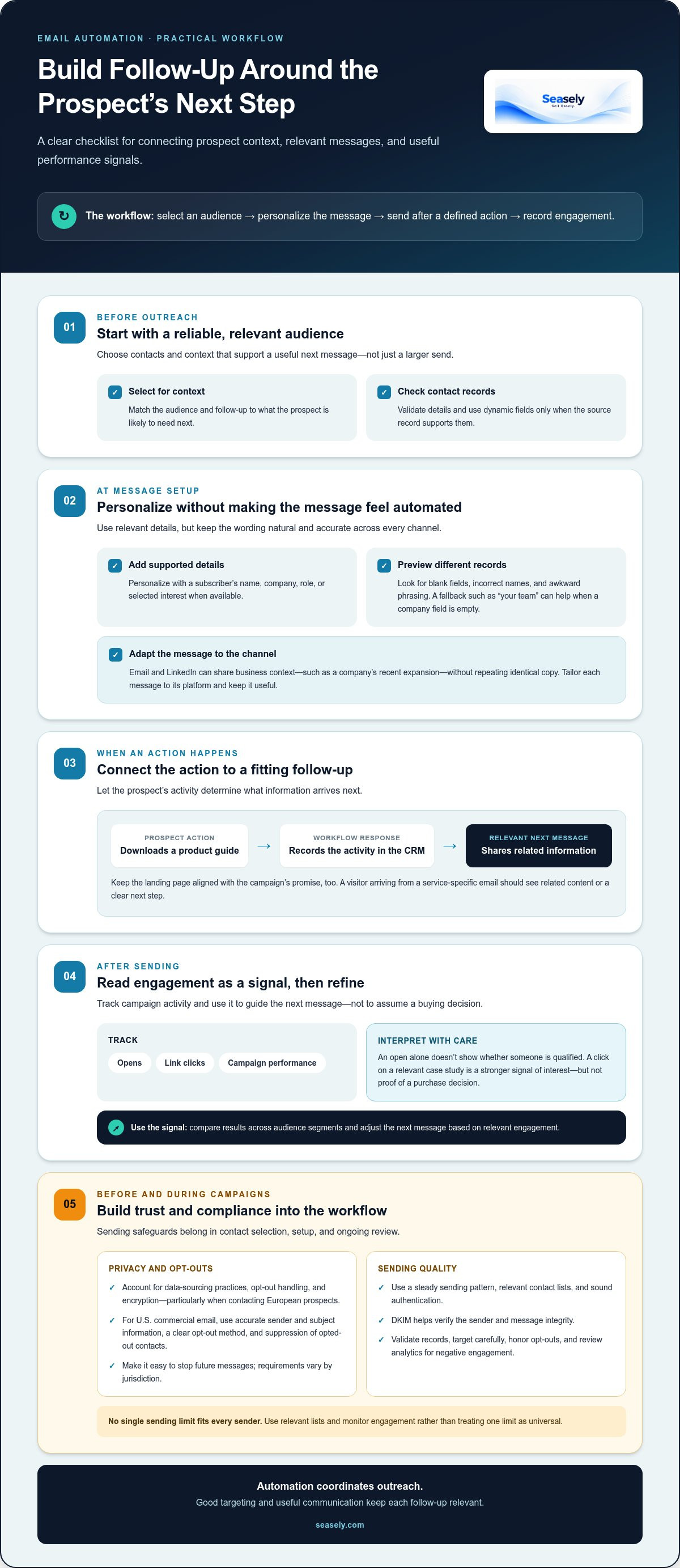
Email automation for lead generation connects prospect information to timely, relevant follow-up. A workflow can select an audience, personalize a message, send it after a defined action, and record engagement. For example, someone who downloads a product guide can receive a related email rather than a generic campaign. Automated lead generation and email sending works best when each step reflects the prospect’s context.
Personalization can coordinate email and LinkedIn without sending identical copy on both channels. Start with shared business context, such as a company’s recent expansion, then tailor the message to each platform. An email might explain a relevant use case, while a LinkedIn note opens a brief conversation. Keep both messages accurate and useful, without repeating the same pitch.
Dynamic fields add specific details, such as a subscriber’s name, company, role, or selected interest. Use them only when the source record supports the information. Before launching a campaign, preview messages for different records and look for blank fields, incorrect names, and awkward phrasing. A fallback such as “your team” can keep an email from feeling unfinished when the company field is empty.
Personalized website experiences can continue the same conversation. If a visitor arrives from a campaign about a particular service, show related content or a clear next step. Keep the experience aligned with the email’s promise. A mismatch between the message and landing page can interrupt engagement and make results harder to assess.
Email analytics show which messages earn attention and which next steps attract interest. Track opens, link clicks, and campaign performance, then compare results across audience segments. An open alone doesn’t show whether someone is qualified; a click on a relevant case study is a stronger signal of interest. Use that signal to adjust the next message, not to assume a purchase decision.
For GDPR and other privacy laws, automated campaigns should account for data-sourcing practices, opt-out handling, and encryption, particularly when contacting European prospects. Build these checks into contact selection and workflow setup, and make it easy to stop future messages. Requirements vary by jurisdiction, so don’t treat one campaign setting as a universal legal rule.
There’s no single sending limit that suits every sender. Use a steady sending pattern, relevant contact lists, and sound authentication. The National Institute of Standards and Technology (NIST) explains that DKIM helps verify the sender and message integrity. NIST also notes that unsolicited bulk email consumes inbox storage, bandwidth, and users’ time. Reduce risk by validating records, targeting carefully, honoring opt-outs, and reviewing analytics for negative engagement.
2. Email marketing ROI and lead generation performance
Email performance needs to connect campaign activity with sales outcomes. Industry comparisons describe email marketing as 40 times better at generating leads than social media marketing, and report an average return of $38 for each $1 spent. Treat these as broad benchmarks, not forecasts for a specific campaign. Audience fit, message relevance, conversion tracking, and sales follow-up all affect the result.
Measure the funnel in stages. A marketing-qualified lead has shown relevant interest, while a sales-qualified lead has also met the team’s criteria for sales follow-up. Track how contacts move from campaign engagement to qualified conversations and closed business. Then compare revenue attributed to those outcomes with campaign costs. This provides more useful insight than opens or clicks alone.
Email marketing automation supports lead generation by connecting audience actions to follow-up. For example, a contact who requests a product guide can enter a workflow that shares related information, then routes stronger buying signals to sales. A CRM holds contact records and sales activity; marketing automation software manages campaign rules and engagement data. Connecting the systems helps reduce duplicate records and keep funnel reporting consistent.
There are hundreds of email marketing software options, so the best tool in 2026 depends on the workflow. Compare audience management, personalization, analytics, CRM connections, and the ability to coordinate outreach. Choose a platform that supports the campaign’s actual sales process rather than selecting features the team won’t use.
Compared with an agency, a platform gives an internal team direct control over campaign setup and ongoing changes. An agency can manage execution, while an in-house system offers greater operational control but requires internal ownership of the software, data, and optimization.
For U.S. commercial email, CAN-SPAM-related controls should include accurate sender and subject information, a clear opt-out method, and suppression of opted-out contacts. Separate marketing messages from transactional communications, and build opt-out handling into the campaign workflow.
Platform costs vary with contact volume, features, integrations, and implementation needs. For a tailored platform service, pricing depends on the requirements and is provided after a quote request. Assess these cost drivers alongside the time needed to operate the system.
Email and SMS automation can support different moments in the funnel. Use email for detailed information, such as a product explanation, and reserve SMS for situations where a concise, timely message suits the contact’s expectations and permissions.
3. Nurture emails and relationship building
A nurture sequence connects a prospect’s action to a useful next message. For example, after someone downloads a product guide, record the activity in the CRM and assign a relevant follow-up. The record should show the contact’s source, selected interest, and current sales stage. This gives marketing and sales a shared view, so the next interaction reflects what the person has already explored.
Build the sequence around clear steps, not repeated sales requests. A basic lead-nurturing workflow can contain 3 or 4 emails. The first can deliver the requested resource, the next can explain a related problem, and a later message can offer a practical example or invite a reply. Each email should have one purpose. That makes it easier to connect the message to the prospect’s current decision.
Use behavior to determine timing. For example, a drip campaign can send a follow-up email two days after a lead clicks a link in the first email. A click on a case study may signal interest in evidence, while a click on product details may call for a different explanation. Set the trigger, choose the matching message, and record the response in the CRM.
Regular contact helps keep the relationship active between sales conversations. The guide recommends emailing subscribers regularly, at least once a week, with useful information rather than a string of product pitches. After an initial sales email sequence, continue with relevant advice, answers to common questions, or updates tied to the subscriber’s interests. A dynamic workflow can change its next message when a contact clicks, replies, or stops engaging.
CRM-based lead capture makes nurturing easier to manage. When a form submission creates or updates a record, the team can segment contacts by source, topic, and sales stage. Review those fields before launching a sequence. If a contact has already spoken with sales, suppress an introductory message and send material that supports the ongoing conversation instead.
Email and SMS can serve different roles in a coordinated nurture plan. Use email for a detailed comparison or guide, and a concise text for a timely reminder when the contact expects that channel. Keep the sequence consistent across both channels and avoid duplicate prompts. This helps each interaction feel connected rather than like a separate campaign.
Re-engagement should respond to a meaningful signal. If a previously active contact stops clicking, pause the usual sequence and send a concise message offering a relevant resource or asking whether their priorities have changed. If they respond, update the CRM and route the conversation appropriately. If they remain inactive, stop the sequence rather than repeating the same appeal.
4. AI prospecting and contact enrichment
AI prospecting helps teams turn a broad market into a focused list of potential buyers. Begin by defining the target company profile, including factors such as industry, location, and business need. Then use those criteria to identify companies and relevant decision-makers. Review matches before outreach: a strong fit depends on whether the prospect’s role and organization align with the offer, not simply whether a record exists.
Contact enrichment adds useful context to a lead record. It can organize details such as a person’s role, company, and publicly available business information. Treat each field as a working input: check that the contact still holds the listed position and that the company remains relevant. Remove duplicates and flag missing details before a sequence starts. Clean records help prevent mistaken personalization and make campaign results easier to interpret.
Social listening can reveal buying context before an email is drafted. For example, a team might notice a company discussing a new market launch or hiring plans. Record the observation, connect it to a business need, and use it to shape a concise opening message. Don’t present an unverified post as fact. A relevant reference should add context, not make the prospect feel monitored.
Social media prospecting can support that research. Use professional profiles and company updates to understand roles, priorities, and recent announcements. Then tailor the email to one relevant detail. Keep the message focused on the recipient’s business context rather than copying their profile into the outreach.
Connect prospecting with lead capture by defining what moves a record into active follow-up. A relevant signal might be a product inquiry, a content download, or a reply to an outreach message. Store the source and signal in the CRM, then assign a suitable next step. This keeps a cold prospect distinct from someone who has shown direct interest and helps sales prioritize conversations.
Use AI to assist with research and message preparation, with clear review points. Check company fit, contact details, and every personalized sentence before sending. A generated message can sound specific while relying on an outdated role or incorrect assumption. Human review catches those gaps and keeps the email sequence grounded in information the team can explain.
Finally, monitor the quality of prospecting, not just list growth. Compare which sources produce replies, qualified conversations, and useful sales insights. If social media signals generate irrelevant contacts, refine the target criteria or change the source. If a message earns engagement but not suitable conversations, adjust its audience or next step. This feedback loop connects prospect discovery to business outcomes.
5. Automated email lead generation
Automated email lead generation connects a defined audience, a useful offer, and planned follow-up. Start by choosing a lead source, such as a sign-up form or prospect list, then set the action that starts an email sequence. The system can deliver the right message and record engagement, while the team reviews whether the leads match its target market.
A lead generator can be a checklist, report, or other resource that solves a specific problem. When someone submits a lead capture form, email software can automatically deliver the resource. Sending it by email also creates a clear follow-up point, rather than redirecting the new subscriber immediately after form submission.
Build the first campaign around a small set of top-of-funnel messages. A practical starting structure is 2-4 emails: introduce the problem, share a useful resource, explain a relevant approach, and offer a logical next step. Each email should support the same lead generation process, not repeat the same pitch. Review the sequence before launch to catch gaps and confusing transitions.
Automation tools can scale execution. For example, contacting 500 leads can take the effort otherwise required to contact five, because the platform handles repetitive sending steps. That scale makes targeting and message quality more important, not less. Start with a relevant contact list, whether generated or purchased, and define which records should enter each campaign.
Triggers connect behavior with timely follow-up. If a prospect visits a pricing page three times in one hour, an automated alert or email can prompt a sales review. A trigger should indicate a useful next action, not simply generate more messages. Set rules for what happens after a reply, conversion, or opt-out, so the workflow responds to changes in contact status.
An automated lead generator can bring in leads around the clock, but ongoing review still matters. Check whether form submissions create complete records, emails reach the intended audience, and sales teams can act on resulting interest. If a campaign attracts poor-fit contacts, revise its offer or targeting before increasing its reach.
Choose an automation tool based on the full workflow: lead capture, contact organization, email campaigns, and performance review. Test the process with a small internal submission first. Confirm that the resource arrives, the right follow-up starts, and engagement appears in the reporting view. This test can reveal broken handoffs before a campaign runs at scale.
Use automated email outreach to connect prospect discovery with a structured follow-up process. Then review campaign performance and refine the audience, trigger, or message based on the response.
Seasely: Seasely AI outbound sales platform
Seasely is an AI-powered outbound sales platform for B2B teams that need to coordinate prospect discovery and email follow-up. It discovers and qualifies target companies, identifies verified decision-maker email addresses, and supports personalized outreach with automatic email sending.
Turn to Seasely when prospect research, contact enrichment, and campaign execution need to work together. The platform brings lead generation and email outreach into one process, while ongoing optimization helps refine the workflow. It supports execution, not guaranteed sales outcomes; targeting and follow-up still matter.
To explore how Seasely can fit your outbound workflow, contact Seasely.
Put your next workflow into motion
Choose one part of your sales process that needs clearer ownership. Map what happens from the first prospect signal to the next meaningful sales conversation. Decide who reviews the workflow, which outcomes matter, and how the team will use those insights to refine its approach.
That operating plan gives automated lead generation and email sending a practical purpose: fewer disconnected tasks and a more deliberate path from prospecting to follow-up. Start with a process your team can assess consistently, then build on what the review reveals. Focus on relevant conversations, not activity for its own sake.
If you’re ready to explore how Seasely can support your B2B outbound workflow, contact Seasely to discuss your needs. A clear conversation about your process can help define a useful next step. Move forward with a workflow your team can understand, manage, and improve.
Frequently Asked Questions
What Is Email Automation for Lead Generation?
Email automation for lead generation uses predefined rules to send relevant emails after a prospect’s action or status change. For example, a request for a pricing discussion can trigger a confirmation, while a general newsletter sign-up receives introductory information. The trigger and intended outcome set each message apart: it supports a next step toward a sales conversation rather than sending the same update to every contact.
What is automated lead generation and how does it work?
Automated lead generation uses software to identify potential buyers, organize contact information, and initiate appropriate outreach. A workflow for automated lead generation and email sending might define a target account profile, match companies and decision-makers to it, then place suitable contacts into a reviewed outreach sequence. Set rules for replies and disqualifying signals, so a prospect who opts out or proves unsuitable doesn’t continue through the same process.
How can businesses find and verify high-quality leads automatically?
Set clear qualification criteria before collecting contacts, such as company type, relevant role, and fit with the product’s use case. An automation system can compare prospect records with those criteria and flag incomplete or conflicting details. For example, move a decision-maker at a target company forward, but hold a record with no role information for review. Periodic sampling helps catch stale or mismatched records before they affect outreach.
What are the best practices for personalized automated sales emails?
Use personalization to show the recipient why a message is relevant. Reference a verified business detail, connect it to a specific challenge, and offer one clear next step. Limit dynamic fields to reliable information, and review sample messages with missing or unusual values. Set separate paths for replies, unsubscribes, and nonresponses, so each contact receives appropriate follow-up instead of an unchanged sequence.
How do you measure the ROI of automated lead generation and email campaigns?
Compare attributable campaign revenue with the full campaign cost, then examine which stages produced qualified opportunities. Include relevant software, campaign production, and staff time in the cost calculation. Define how leads will be attributed before launch, and use the same method across campaigns. Opens and clicks can help diagnose engagement, but accepted leads and resulting sales provide stronger evidence of business value.
What are the best automated lead generation and email outreach tools in 2026?
The best platform depends on the workflow. Compare audience management, personalization, analytics, CRM connections, and outreach coordination. Review data-sourcing, opt-out handling, and encryption practices as well.


