

The strongest case for sales automation may start with a follow-up that never gets sent. Sales automation uses software to manage repeatable tasks, such as tracking leads and sending email follow-ups, so opportunities move through a consistent process. When justifying sales automation to leadership, connect that process to practical outcomes: timely outreach, cleaner records, and clear visibility into what happens next.
Manual follow-up can seem manageable until leads are scattered across spreadsheets, inboxes, and personal reminders. Leadership needs a clear view of how automation fits existing sales work, not another tool without a defined purpose.
This article explains how sales automation works and how to present its value to leadership. It covers how CRM integration and reliable data support useful workflows, why automated follow-ups matter, and which measures can show whether a process is working. The goal is a grounded business case, not an assumption that automation alone will improve results.
Key Takeaways
- Frame automation as a way to make repeatable sales work more consistent, then assess its impact through activity, conversion, and sales-cycle measures.
- Connect CRM workflows to clean, deduplicated records so teams can route leads reliably and trust the activity they use to make decisions.
- Use automated email follow-ups to keep outreach moving, while matching the sequence to prospect behavior and the sales process.
- Build a realistic cost case around software, implementation, integrations, and ongoing workflow needs rather than relying on a single headline price.
What is sales automation?
Sales automation uses software to manage repeatable tasks across the sales process. It can organize leads, record activity, trigger follow-ups, and prepare reports. Representatives can spend less time entering the same contact details and more time engaging qualified prospects. The goal is consistent execution, not replacing strategic decisions or customer conversations.
Time savings depend on the tasks automated and the quality of the workflow. Sales professionals estimate that automation tools save around 2 hours and 15 minutes daily. Reported productivity increases range from 14.5% to 20%, while reports suggest automation can reduce human errors by 20%. Treat these figures as context, then measure your own team’s time spent on admin, follow-up completion, and qualified opportunities.
Automation can also improve how representatives pick their next opportunity. For example, lead scoring can combine web activity with CRM history to rank prospects for attention. A representative can use that signal to prioritize outreach, while retaining judgment for unusual cases. AI-enabled sales representatives spend 25% more time selling, according to the market facts, but the operational value still depends on relevant data and useful workflows.
To compare automation with manual processes, map the tasks each option handles, then assess how well each fits business goals, integration needs, scalability, customization, and reporting. A spreadsheet may work for a small, stable process. Automation becomes more relevant when recurring tasks or changing lead volumes make manual tracking difficult.
Leadership should consider data gaps, duplicate contacts, and workflows that assume every buyer follows the same path. AI processes also need monitoring for bias and model drift. Clean records, exception reports, and human review of complex cases can help manage these risks.
Address employee resistance by involving representatives in workflow design and explaining how automation affects daily tasks. Provide clear documentation and regular training, then start with a small pilot and review the results with the team. This makes the change practical and gives leaders evidence to guide wider adoption.
CRM integration and data quality
CRM integration connects the system that captures a lead with the records sales teams use to manage it. For example, a form submission can create or update a contact and pass its source, owner, and status into the CRM. The result is a consistent activity trail that helps teams review engagement and pipeline insights in one place.
Integration is useful only when contact data is dependable. When representatives manage leads manually, two people may contact the same prospect. A deduplication process can compare records using consistent identifiers, flag likely matches, and send uncertain cases for review. Standardize fields such as company name, role, and lead source so records stay useful as the organization grows.
Automated CRM entry can capture details from forms or campaigns and update records when a defined event occurs. Before enabling updates, decide which system owns each field. For example, a campaign may provide the lead source while a representative updates deal status. Clear ownership prevents conflicting edits and makes reporting more reliable.
Measure the effect against a baseline. One implementation goal is reducing manual data-entry time per representative by 1.5 hours per week within 3 months. Compare time spent entering records before and after the workflow, then review duplicate rates and missing fields. Training, naming conventions, and exception queues help teams identify errors and resolve them without letting faulty records spread.
Keep complex cases under human review. An incomplete contact or uncertain match should enter an exception queue, not trigger an assumed update. This control matters because automation can fail when records are incomplete or duplicates remain. If CRM data also drives prospect outreach, automated email sending can fit into a defined follow-up workflow, while the CRM remains the reference for contact activity and status.
Automated email follow-ups
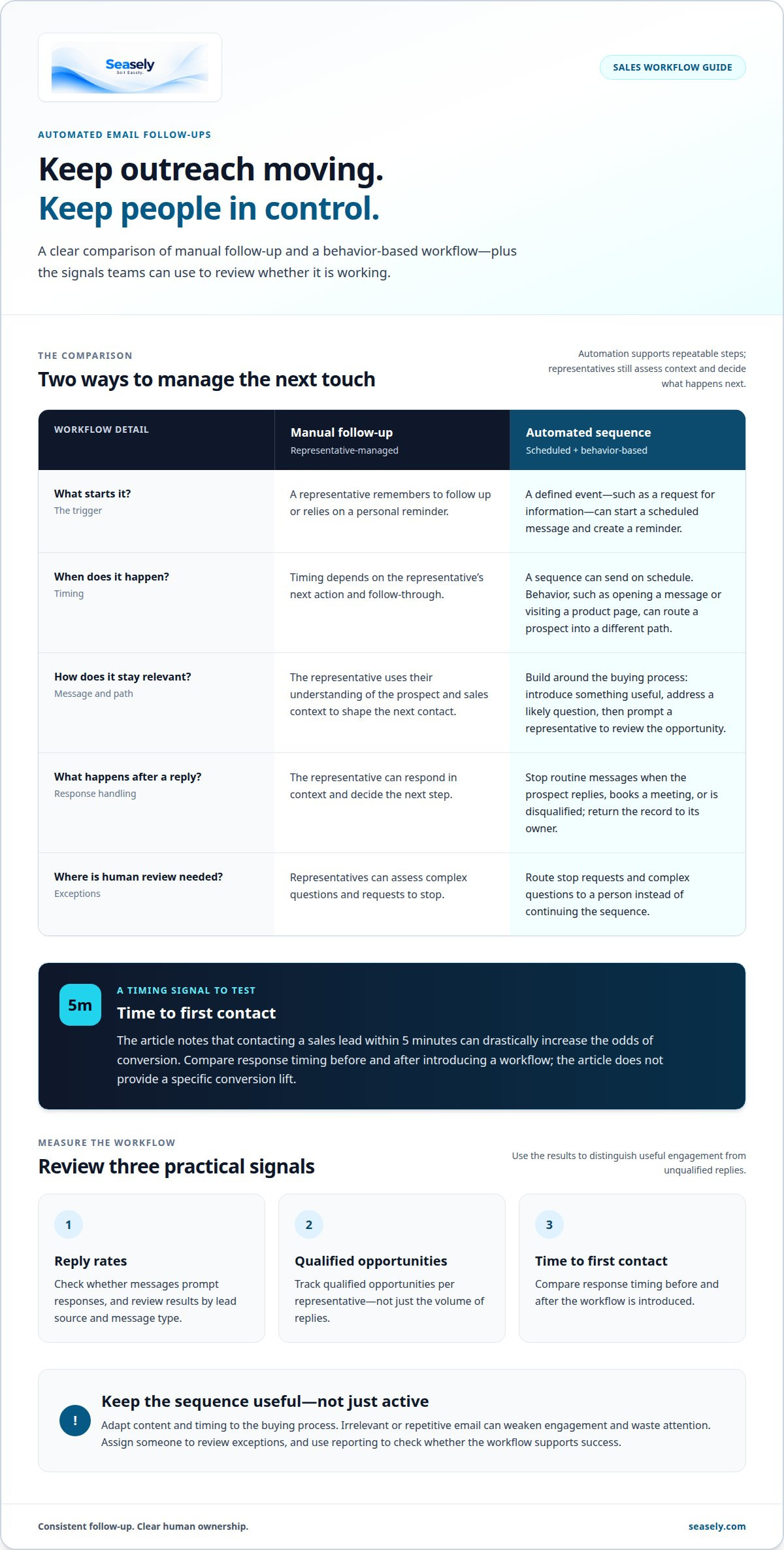
A scheduled follow-up reduces reliance on a representative’s memory. For example, after a prospect requests information, a sequence can send a relevant message, create a reminder, and stop when the prospect replies. This makes outreach more consistent while leaving representatives responsible for understanding the context and deciding what to do next.
Behavior-based timing can make follow-up more relevant. A prospect who opens a message or visits a product page may enter a different path from someone who has not engaged. Tie each trigger to a clear sales action. A reply, meeting booking, or disqualification should stop routine messages and return the record to its owner.
Build the sequence around the buying process, not a fixed number of messages. A practical workflow might start with a useful introduction, follow with an answer to a likely question, then prompt a representative to review the opportunity. Adapting content and timing matters more than sending more messages. Irrelevant or repetitive email can weaken engagement and waste attention.
Use reporting to test whether the workflow supports success. Track reply rates, qualified opportunities per representative, and time to first contact. Contacting a sales lead within 5 minutes can drastically increase the odds of conversion, so compare response timing before and after introducing a workflow. Review results by lead source and message type to distinguish useful engagement from unqualified replies.
Assign someone to review exceptions, such as a request to stop or a complex question. A seamless workflow routes that signal to a person instead of continuing the sequence. For leadership, connect operational impact to time saved, follow-up completion, and qualified opportunities. A controlled pilot can show whether automated follow-ups improve execution in your sales process.
What is the typical cost of sales automation software and implementation?
There is no single typical cost for every sales team. Software pricing varies by provider and is usually given after a quote request. Common cost drivers include user access, selected features, data volume, and integration needs. Implementation may also involve process mapping, CRM configuration, data cleanup, testing, and team training.
Separate recurring software fees from setup and operating costs. For example, a team adopting automated follow-ups may need to configure triggers, prepare message templates, connect CRM fields, and assign workflow ownership. A broader rollout may also require deduplication, exception handling, and reporting changes. Listing these tasks makes the scope clear before leadership compares options.
Estimate value from a baseline, not a sales forecast. Record how much time representatives spend on manual data entry and routine follow-ups, then estimate which tasks the proposed workflow could handle. Add measurable outcomes such as follow-up completion, qualified opportunities, and time to first contact. State assumptions clearly, and do not treat projected revenue as guaranteed savings.
A controlled pilot can make the estimate more precise. Choose a defined workflow, document setup work, and track the same operational measures before and after launch. Include internal effort from sales operations, CRM administration, and training, not just vendor fees. If the pilot reveals duplicate records or unclear ownership, account for cleanup and governance in any wider rollout plan.
For leadership, compare the total operating cost with the value of time recovered and process consistency. Review scalability, integration requirements, support needs, and the cost of maintaining data quality. These factors shape the case more than a headline subscription figure. Explore an outbound sales workflow to consider how automation scope fits your team’s process.
Seasely: Seasely AI outbound sales platform
Seasely provides an AI-powered outbound sales platform for B2B teams that need to structure prospecting and outreach. It discovers and qualifies target companies, then delivers verified decision-maker email addresses for lead generation. Automatic Email sending supports personalized outreach to prospective clients, helping teams run follow-ups through a more organized process.
Consider Seasely when your case for automation centers on outbound lead generation and consistent email execution. The platform is designed to manage B2B outbound sales operations, with optimization across the workflow. Teams can assess its fit against their target companies, outreach process, and operational priorities, then define how they’ll evaluate activity and results.
Contact Seasely to discuss whether its outbound sales platform fits your team’s workflow.
Turn the case into a decision
A credible case for justifying sales automation to leadership should make the decision easy to assess. Set out the business problem, the workflow in scope, its owner, and the evidence that will guide the next review. This shifts the discussion from software features to operating priorities.
Keep the first decision focused. Leadership can agree on what the team will test, who will review exceptions, and what findings would support expanding or changing the approach. A clear review point also gives representatives a defined way to share feedback, keeping adoption grounded in real sales work.
Choose a next step that fits your team’s outbound priorities. Contact Seasely to discuss sales automation and how its platform may fit your workflow. A measured decision gives your team room to learn and move forward with clarity.
Frequently Asked Questions
What business case metrics justify sales automation to leadership?
Use measures that show both operational change and commercial relevance. Track completed sales activities, qualified opportunities, conversion by stage, and sales-cycle length. Segment results by lead source or team so a strong channel does not hide weaker performance elsewhere. Add a quality measure, such as the share of automated leads accepted by sales, to show whether more activity is producing useful opportunities.
How do you calculate ROI and payback period for sales automation?
Compare measured benefits with the full cost of software, implementation, and ongoing operations. A basic ROI calculation is net benefit divided by total cost, expressed as a percentage. Estimate payback by dividing upfront costs by expected monthly net benefit. Use actual time and conversion data where available, and label forecasts as assumptions rather than results.
How much time can sales automation save sales teams?
The amount depends on which tasks the workflow takes over and how often representatives perform them. One market estimate says a salesperson spends 70% of their time on non-selling activities, including administration and data entry. That isn’t a promise that automation will recover all that time. Compare task-level time logs before and after launch to establish your team’s actual change.
How does sales automation affect revenue, conversion rates, and sales productivity?
Automation may improve follow-up consistency and free up time for customer conversations, but it does not guarantee higher revenue. Track conversion by stage alongside response activity and qualified pipeline. Compare similar periods and lead sources, and account for changes in pricing, demand, or sales staffing. This helps distinguish workflow effects from other factors influencing results.
What steps should you use to build a sales automation proposal for executives?
Build the proposal around a specific business problem and a decision executives can assess. State the workflow, affected roles, expected costs, baseline measures, and review criteria. Include data-quality risks, training needs, and responsibility for ongoing changes. End with a clear request, such as approval to test a defined workflow before considering a wider rollout.
How can you run a pilot to prove sales automation value?
Choose a contained workflow and a pilot group whose work reflects the wider team’s process. Record baseline performance, define success measures, and document exceptions before launch. During the pilot, review results with participating representatives and note issues such as inaccurate records or messages that need manual intervention. Set a decision point to continue, adjust, or stop based on observed results.


