

The best email outreach software fits your full workflow, not just your sending volume. For automated prospect outreach, compare how each option handles prospect research, AI personalization, campaign execution, and extra costs.
It’s easy to focus on the monthly subscription and overlook the work a tool leaves to your team. Compare options by prospect data, automation, pricing, and extras that affect total cost. Consider where AI can reduce repetitive tasks and where human review still matters.
Use these criteria to narrow your choices by the work you need covered, the control you want, and the costs that matter. Then assess each option against the same practical requirements.
Key Takeaways
- Compare prospect research by how well each tool helps identify and qualify relevant decision-makers.
- Map email, LinkedIn, calls, SMS, and WhatsApp steps to the channels your outreach process actually uses.
- Assess subscription tiers alongside data, integrations, and other add-ons to understand the full cost structure.
- Identify repetitive sales tasks AI can handle, then consider whether Seasely’s lead generation and automatic email sending fit your workflow.
AI-assisted lead generation and prospect research
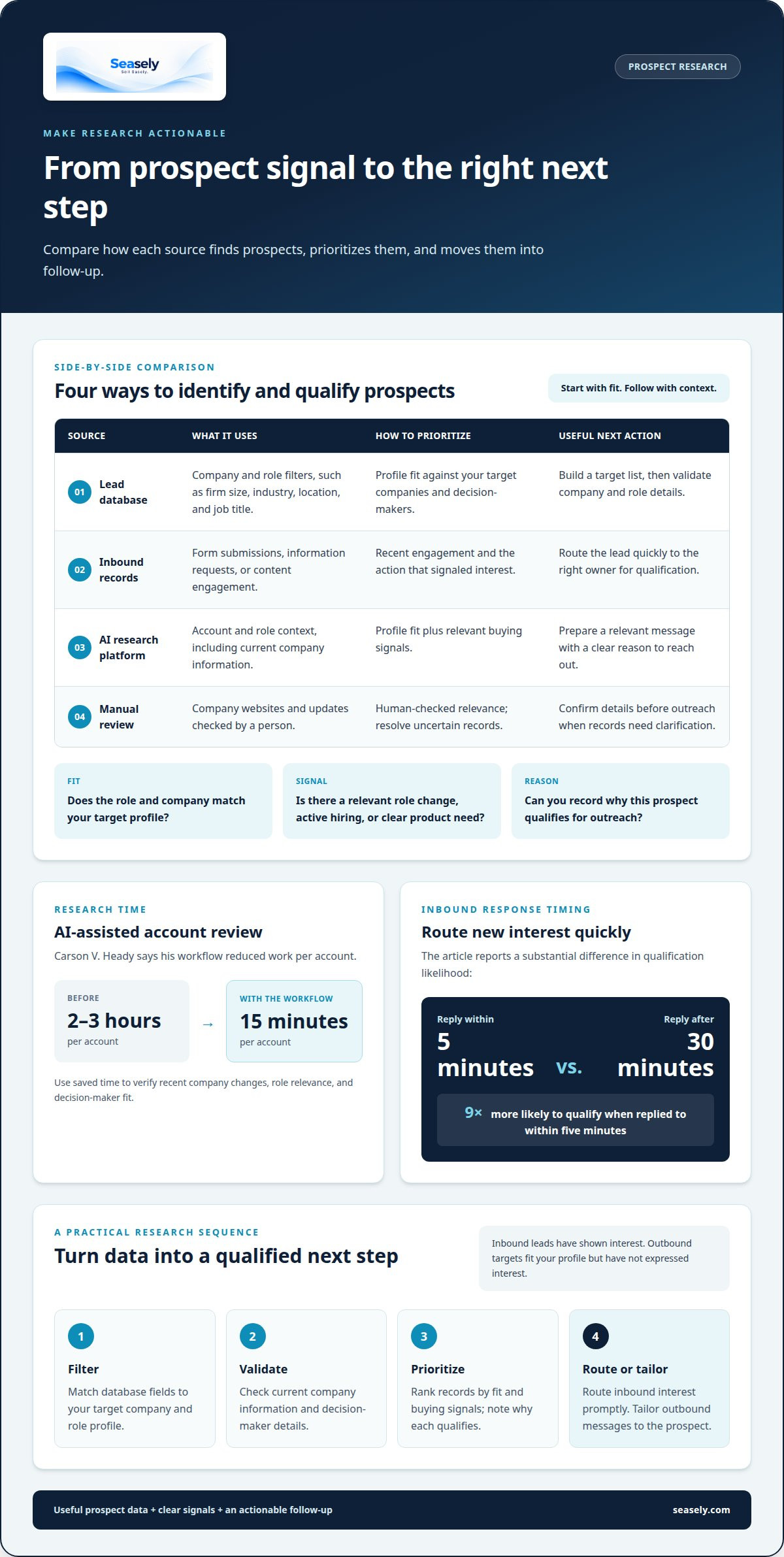
Start by defining the companies, roles, and buying conditions that fit your offer. A lead database can filter by firm size, industry, location, and job title. Treat those fields as a starting point, then validate each prospect against current company information before reaching out.
AI-assisted research can shorten account review. Carson V. Heady says his workflow reduced work per account from 2-3 hours to 15 minutes. Use that saved time to check recent company changes, role relevance, and whether a decision-maker matches your target. An automated prospect outreach platform is useful when it connects those research steps to practical actions, rather than producing names alone.
Distinguish inbound signals from outbound targets. An inbound lead has taken an action, such as requesting information or responding to content. An outbound target fits your profile but hasn’t expressed interest. Prioritize signals such as a relevant role change, active hiring, or a clear product need, and record why each prospect qualifies.
| Option | Data source | Prioritization | Useful next action |
|---|---|---|---|
| Lead database | Company and role filters | Profile fit | Build a target list |
| Inbound records | Form or content actions | Recent engagement | Route for qualification |
| AI research platform | Account and role context | Fit plus buying signals | Prepare relevant sending |
| Manual review | Company website and updates | Human-checked relevance | Resolve uncertain records |
Choose a tool that combines useful prospect data and signals with a clear next step for follow-up.
For inbound leads, response timing matters: replying within five minutes makes a lead nine times more likely to qualify than replying after 30 minutes. Set a routing rule so new requests reach the right owner quickly. For outbound prospects, qualify before sending by checking role, company fit, and a specific reason to start a conversation.
Use this sequence to keep research actionable:
- Filter the database to match your target profile.
- Validate company and decision-maker details.
- Rank records by fit and buying signals.
- Route inbound interest, then tailor outbound messages.
What Is the Best Email Outreach Software?
Choose outreach software based on the channels it coordinates, its controls, and the manual follow-up it removes. Compare each option against your campaign workflow, not its feature count.
Multichannel Outreach Sequences
A multichannel sequence coordinates email, LinkedIn, calls, SMS, and WhatsApp around one target. Email supports detailed messages and scheduled follow-ups, while LinkedIn adds professional context. Calls enable direct conversation; SMS and WhatsApp suit concise messages when those channels fit your audience. Compare how each platform schedules actions and records engagement across channels, rather than treating every touch as interchangeable.
Email Deliverability and Verification
Email deliverability depends in part on sending practices and valid recipient addresses. Verify addresses before a campaign, then monitor delivery outcomes and remove invalid records. New domains need a 30-day warmup before launching client campaigns. The recommended sending limit is no more than 30 emails per inbox per day. Mailbox rotation can distribute sending, but it doesn't replace verification or a measured sending plan.
Personalized Campaigns and Follow-Ups
Personalized campaigns use relevant details, such as a prospect’s role or company activity, to shape each message. A typical automated sales cadence uses three to five emails spaced two to three days apart. Set follow-ups to stop when someone replies, then route that engagement for review. Build a path for the 95% of prospects who do not reply, instead of repeating the same message without context.
Templates and Messaging Consistency
Templates give a team a consistent structure for each campaign, while leaving room to adapt the opening and value point. Keep shared language for the offer and next step; personalize the details that make a message relevant. AI outreach agents can personalize 500 emails a day, but volume alone doesn't ensure a useful message. Review samples for accuracy, tone, and a clear action before sending.
Outreach tool pricing and add-on costs
Compare outreach software by total workflow cost, not just its subscription label. A free plan can help test basic sequences, but check limits on users, emails, contacts, and integrations. For example, a team might reach its contact cap before its sending limit. Record each plan’s included features and limits before comparing options.
Agency outreach tools call for a different cost check. Agencies may run separate campaigns for multiple clients, so review how plans handle client workspaces, user access, and reporting. Check whether prospect data, address verification, or additional sending capacity costs extra. These add-ons can change the operating cost even when the core plan seems suitable.
Enterprise teams should assess how pricing scales with seats, data volume, and workflow requirements. A per-user plan affects the budget differently from one tied to contact records or email volume. Check how upgrades work as a pipeline grows and whether unused capacity rolls forward. Compare plans against expected use, not an assumed future maximum.
Build a simple comparison before choosing a plan. Include the base subscription, required add-ons, and limits that could interrupt a campaign. Estimate the work each option covers, including personalized sequences, data preparation, and follow-up tracking. A lower entry tier may mean more manual work or extra tools; an assistant feature can reduce repetitive steps but may still require review.
- List the users, contacts, and emails your current workflow requires.
- Separate included features from paid add-ons.
- Note limits that could affect campaigns or client accounts.
- Compare the full workflow against your pipeline needs.
For your own budget, total cost depends on the selected workflow and its requirements, and is provided after a quote request. Relevant factors include sending needs, lead generation, and the level of automation required.
AI-powered outreach and repetitive task automation
How does automated prospect outreach compare with manual outreach? AI can handle repetitive research, personalization, sending, and reply-routing tasks, while people set strategy and review decisions that require judgment. Manual outreach gives sales teams closer control, but limits how many accounts one person can research and contact.
AI can automate roughly 80% of a sales outreach workflow, from prospecting to reply handling. It can reclaim one-fifth of a sales team’s time by reducing repetitive tasks. A single agent can handle prospecting volume equivalent to three to five full-time SDRs. This gives sales teams more capacity to assess buying context and qualified conversations within an automated prospect outreach workflow.
Use agents for repeatable tasks, not unchecked decisions. Set up a workflow to identify target accounts, gather relevant context, draft personalized messages, and pause for review where accuracy matters. Then let the system send approved sequences and route replies. This keeps AI agents aligned with team standards while preserving human oversight for complex objections or unusual buying signals.
What U.S. laws and regulations apply to automated outreach, including CAN-SPAM and TCPA? CAN-SPAM and TCPA are relevant U.S. frameworks to consider, and requirements depend on the channel and message. Map email, calls, and texts separately, then review the applicable requirements before activating each workflow.
How can you measure the ROI and success of outreach automation? Compare operating costs and staff time with qualified leads, meetings, pipeline contribution, and closed revenue. Track campaigns consistently to see which actions move prospects forward, rather than relying on sends alone. These measures help teams refine automated prospect outreach around business outcomes.
- Measure time spent on research, personalization, and follow-up.
- Track qualified replies and meetings by campaign.
- Review pipeline and revenue alongside total operating costs.
For a workflow that combines prospecting and automatic sending, explore an AI outbound sales workflow.
Seasely: Seasely AI outbound sales platform
Seasely is an AI-powered outbound sales platform for B2B teams that need prospect research and outreach in one workflow. It discovers and qualifies target companies, delivers verified decision-maker email addresses, and crafts personalized outreach messages.
Use it when your team wants to coordinate lead generation with automatic email sending, rather than managing each step separately. The platform also supports optimizing the outbound process, helping teams organize prospecting and sending around their target audience. It focuses on outbound sales operations, not inbox rental or standalone email hosting.
Start a free trial at seasely.com to explore Seasely’s automated prospect outreach workflow.
Turn Your Outreach Plan Into a Working System
Start by defining what you want a better outbound workflow to change. Identify where your team loses time, which handoffs cause delays, and what makes a prospect worth pursuing. Use those priorities to assess whether a tool supports how your team actually works.
For automated prospect outreach, clarify who reviews messages, what counts as a qualified reply, and how the team will refine its messaging. A tool should support those decisions, not replace them. Clear checkpoints also make it easier to spot friction and adjust the process without rebuilding every campaign.
If you want to explore how an AI outbound sales platform could fit your workflow, contact Seasely to discuss outreach. A focused conversation can help you map your priorities to a practical next step. Build the system deliberately, then improve it as your team learns.
Frequently Asked Questions
How Can AI Improve Outreach Performance?
AI can improve outreach by adapting follow-up actions to prospect responses, not just automating sends. Seasely classifies replies, including interest, meeting requests, questions, objections, and unsubscribes, then stops follow-ups for that contact. This helps sales teams focus human attention on relevant conversations. Review classifications and campaign results regularly to refine messaging and qualification criteria.
How quickly can agencies see results using AI for outreach?
Agencies may see their first qualified replies within 3-5 days after a 30-day warmup period. Treat early replies as an initial signal, then assess their quality and relevance to your target customer. A reply alone doesn’t show whether outreach is producing useful conversations. Track whether prospects progress to meetings or pipeline opportunities, and refine targeting when replies miss the intended audience.
What are AI outreach tools?
AI outreach tools support prospecting and communication tasks such as researching accounts, drafting personalized messages, scheduling follow-ups, and organizing replies. Some focus on one step, while platforms combine several stages in a workflow. For example, a team can use AI to prepare a draft, review it for accuracy, and route a reply for human follow-up.
Which AI outreach tool should you choose?
Choose a tool based on your sales process, required oversight, and existing systems. A B2B team using Gmail or Google Workspace can consider Seasely, which sends from the team’s own connected mailbox. Seasely’s website states that those are the supported mailbox options. If your workflow depends on another provider, select a tool that supports that setup rather than assuming mailbox compatibility.
What is automated prospect outreach and how does it work?
Automated prospect outreach uses software to coordinate prospecting and follow-up with less manual work. A team defines its target, reviews suitable prospects, and prepares campaign messaging. The system can then schedule outreach and organize responses for next steps. For example, a sales team might route a prospect’s question to a representative instead of continuing a generic sequence.
What tools are best for automating prospect outreach?
The best-fit tools depend on whether you need prospect discovery, message creation, sending, or reply management. Compare how clearly each tool handles those tasks and where human review fits. For example, Seasely combines outreach workflows with reply classification and pauses follow-ups after a response. That can suit B2B teams seeking an integrated process, while teams with different needs may prioritize specific capabilities.


