

Cold email works best as a relevant introduction, not a volume play. It’s an unsolicited message to a prospective customer with whom you don’t already have a relationship. To optimize cold email campaigns, focus on the fit between your offer and the recipient, then use replies and conversions to refine each step.
A low reply rate can point to several issues: your audience may be too broad, your message may not make its value clear, or your sequence may need adjusting. Sending more emails won’t fix a weak fit.
This guide explains how to define your ideal customer profile, research prospects, and write outreach that gives them a clear reason to respond. You’ll also learn which open, reply, bounce, and conversion metrics to track, and how outreach software can support consistent execution as campaigns grow. The goal is a practical process you can measure and improve, from prospect selection through follow-up.
Key Takeaways
- Define your ideal customer profile around clear company and decision-maker traits, then prioritize prospects whose needs align with your offer.
- Make each message relevant and concise, with a clear reason for reaching out and a straightforward next step.
- Track replies, bounces, opens, and conversions together to identify where your campaign needs refinement.
- Use outreach software to coordinate lead generation, email sending, and ongoing campaign improvements as your process scales.
1. What is cold email?
Cold email is an unsolicited message to a prospect without an existing relationship. In B2B outreach, it introduces a relevant problem, explains why the recipient may care, and offers a low-friction next step. Unlike a newsletter, it addresses a specific prospect rather than an opted-in audience. To optimize cold email campaigns, start with relevance, then build a measured sequence.
For U.S. commercial cold email, CAN-SPAM requires honoring opt-out requests within 10 business days. According to the European Union, GDPR non-compliance can result in fines of up to 4% of global annual revenue. The European Union states that GDPR non-compliance risks fines up to €20 million.
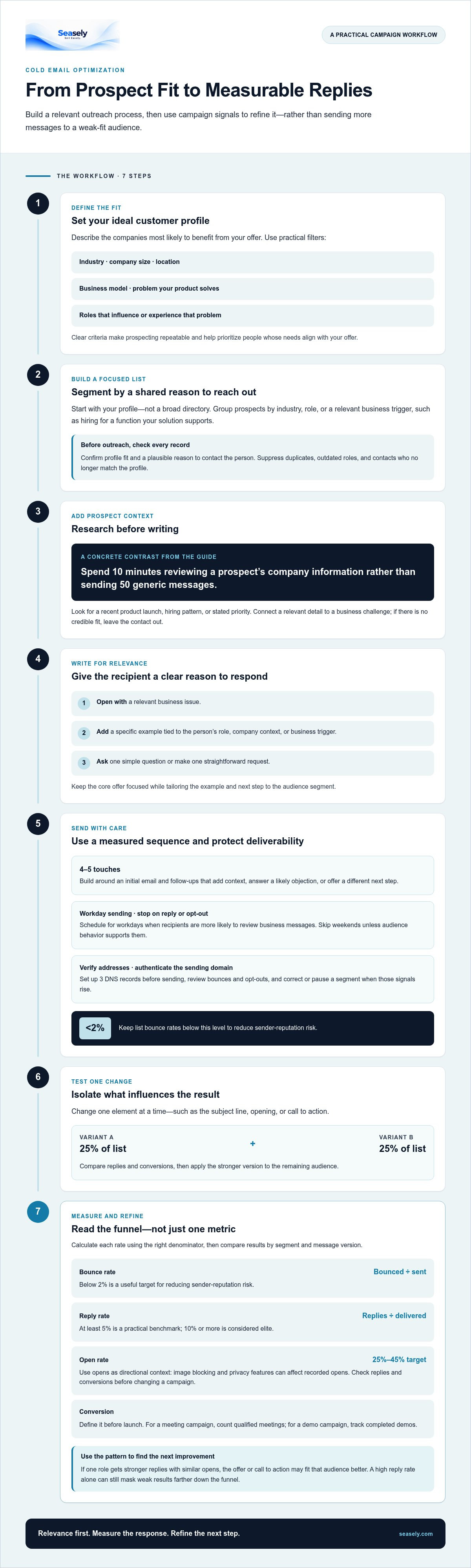
Effective writing makes the recipient’s reason to respond clear. Focus the opening on a relevant business issue, use a specific example, and make one simple request. For instance, ask whether improving a manual reporting process is a current priority instead of requesting a lengthy introductory call.
Build a sequence around an initial email and follow-ups that add value. Each follow-up should add context, answer a likely objection, or offer a different next step. Keep the sequence to four to five touches, and stop when a prospect replies or opts out. Schedule sends for workdays when recipients are more likely to review business messages; skip weekends unless audience behavior supports them.
Deliverability starts with accurate addresses and authenticated sending domains. Set up three DNS records before sending, and keep list bounce rates below 2% to reduce sender-reputation risk. Review bounces and opt-outs regularly, then pause or correct a segment when those signals rise.
Personalize at scale using verified prospect details and consistent message fields. Use a person’s role, company context, or a relevant business trigger to shape the opening, while keeping the core offer and next step focused. Remove records with missing or mismatched details before starting a sequence.
For A/B tests, change one element at a time, such as the subject line, opening, or call to action. Send each variant to 25% of the campaign list, then compare replies and conversions before applying the stronger version to the remaining audience. A clear test isolates which message change influenced the result.
2. Defining an ideal customer profile and targeting prospects
An ideal customer profile describes the companies most likely to benefit from your offer. Define it with practical filters: industry, company size, location, business model, and the problem your product solves. Then identify the roles that influence that problem. For example, a workflow tool might target operations leaders at firms still coordinating projects through spreadsheets. Clear criteria make prospecting repeatable.
Build your first list from those criteria, not a broad directory. Segment prospects by industry, role, or a shared business trigger, such as hiring for a function your solution supports. Keep each segment focused enough for one relevant message. Before reaching out, check that every record matches your profile and that you have a plausible reason to contact that person.
Research adds context that filters alone cannot provide. Spend ten minutes reviewing a prospect’s company information rather than sending 50 generic messages. Look for a recent product launch, hiring pattern, or stated priority, then connect that detail to a clear business challenge. If the research reveals no credible fit, leave the contact out instead of forcing a personalized opening.
Create separate segments when the same offer solves different problems. A finance leader may care about reporting accuracy, while an operations manager may prioritize handoff delays. Keep the underlying value proposition consistent, but tailor the example and call to action to each role. Track each contact’s segment and source so replies can help you assess list quality.
Remove a prospect from follow-up sequences as soon as they reply, opt out, or no longer match the profile. Also suppress duplicate contacts and records with outdated roles; otherwise, separate segments can create repeated outreach. Review exclusions before each send, especially after a prospect changes jobs or a company’s circumstances shift. If prospect discovery needs a structured workflow, explore B2B prospecting workflows.
3. Tracking reply, bounce, open, and conversion rates
Track each campaign from delivery through the outcome that matters. Calculate bounce rate from bounced messages against sent messages, and reply rate from replies against delivered messages. A bounce rate below 2% is a useful target for reducing sender-reputation risk. A cold email reply rate of at least 5% is a practical benchmark, while 10% or more is considered elite.
Open rates can help identify subject-line or audience problems, but they need context. A 25% to 45% range is a target for cold email campaigns. Treat opens as directional, not definitive: image blocking and privacy features can affect whether an open is recorded. Compare the result with replies and conversions before changing a campaign.
Define conversion before launch. If your campaign aims to book meetings, count qualified meetings rather than every positive response. If it aims to generate product demos, track completed demos. Tying the metric to your goal prevents a high reply rate from masking weak results further down the funnel.
Open and click tracking commonly rely on a tracking pixel or rewritten link. A click can indicate interest, but security scanners may also open links automatically. Treat click data as one signal, then check whether the prospect replied or completed the intended action. A custom tracking domain can align tracked links with your sending domain, but it does not replace accurate reporting or sound list practices.
Review metrics by segment and message version, not only as campaign-wide totals. If one role has stronger replies but similar opens, the offer or call to action may fit that audience better. If bounces rise above the 2% target, pause sends and investigate address quality. Record changes and compare the next campaign against the same definitions. This disciplined review helps teams optimize cold email campaigns using evidence rather than opens alone.
4. Choosing outreach software and scaling campaigns
Choose outreach software by mapping it to the work your team needs to coordinate. For example, a B2B workflow may need prospect discovery, qualification, message personalization, sending, and response tracking in one process. Check whether each step has clear controls, including suppression for opt-outs and replies. A tool should make the workflow visible, not just increase sending volume.
Purchased email lists can contain outdated addresses and poor-fit prospects, increasing the risk of bounces or complaints. Automated cold email software can amplify these problems when targeting, message relevance, and sending controls are poor. Automation supports consistent execution, but it can’t replace careful audience selection or appropriate oversight.
Before scaling, run a focused campaign and review results by segment. Confirm that records match your ideal customer profile, messages use accurate context, and replies and opt-outs update the workflow. Then change one factor at a time, such as list criteria or follow-up timing. This makes it easier to identify why performance changes.
Increase sending volume gradually rather than moving from a small test to broad outreach at once. A recommended warmup approach increases volume over six to 12 weeks. During that period, monitor delivery signals and pause expansion if bounces rise or recipient responses weaken. Scale only the segments and messages that remain relevant and perform consistently.
Assess operational fit alongside features. A small team may prioritize a simple review queue and clear campaign reporting, while a larger team may need shared workflows and consistent suppression rules. Either way, decide who reviews replies and updates prospect records. That handoff helps prevent sequences from continuing after a prospect responds.
If coordinated outbound execution is the bottleneck, streamline automated email outreach with a workflow built around targeted prospects and measured campaign activity.
Seasely: Seasely AI outbound sales platform
Seasely brings lead generation and automatic email sending into an AI-powered outbound sales platform for B2B teams. It discovers and qualifies target companies, delivers verified decision-maker email addresses, and crafts personalized outreach messages. This can help teams coordinate prospecting and outreach when manual handoffs make campaign execution harder to manage.
Use it to support a structured outbound workflow, then review campaign activity and refine your targeting and messaging. Seasely focuses on the operational process, not guaranteed sales or revenue outcomes.
Visit seasely.com to learn more about Seasely.
Make the next campaign more deliberate
Cold outreach is easier to manage when each campaign has a clear owner, a defined objective, and a documented decision path. Before the next launch, note what your team wants to learn and how that learning will shape the next campaign. This keeps changes purposeful and prevents separate efforts from becoming disconnected routines.
As you optimize cold email campaigns, make the process easy for the whole team to follow. Record why you selected a segment, which messaging approach you used, and what decision you made after reviewing the results. This context helps new team members understand the system and gives experienced operators a consistent basis for improvement.
When execution starts to compete with prospect research and campaign review, consider whether a more coordinated workflow would help. Seasely can be a next step for B2B teams looking to structure outbound operations. Contact Seasely to discuss your campaigns, then decide whether its platform fits your workflow.
Small, well-reasoned improvements build a clearer process over time. Keep the next step focused and use what your team learns to guide the next campaign.
Frequently Asked Questions
What is cold email?
Cold email is a one-to-one business message sent to someone who hasn’t requested it, with the aim of starting a relevant conversation. For example, a software firm might contact an operations director about a workflow issue related to that person’s role. Unlike a newsletter, the message is specific to the prospect. Tailor the reason for contacting them and honor opt-outs to distinguish targeted outreach from untargeted bulk messaging.
How do you build and verify a high-quality cold email list?
Start with companies that match your target profile, then confirm each contact’s role and relevance using current company information. Verify each email address before adding it to a sequence, and remove duplicates and contacts who have opted out. Record the source and context for each prospect. A job posting, for example, may point to a relevant business priority, but the contact’s role still needs to fit.
What cold email open, reply, and conversion rates are considered good?
A useful benchmark is an open rate of 25% to 45%, with a reply rate of at least 5%; 10% or more is considered elite. Conversion rates depend on the campaign’s goal, so define the intended action before sending. A campaign seeking qualified meetings should count meetings that fit your criteria, not every positive reply. Compare results by audience segment to see where performance differs.
How many cold emails should you send per day, and how should you ramp up volume?
A recommended post-warmup cap is 30 emails per inbox per day. Increase volume gradually over six to 12 weeks, watching bounce and delivery signals as you scale. Keep the audience relevant and pause expansion if list quality weakens. Treat the daily cap as a limit, not a quota: sending fewer messages is the better choice when your team can’t maintain targeting quality or manage replies promptly.
What is the best cadence and number of follow-ups for a cold email campaign?
Plan two to three follow-ups after the initial message, keeping the full sequence to four or five touches. Give each follow-up a distinct purpose, such as adding useful context or offering a simpler way to respond. Don’t repeat the same note. Stop the sequence as soon as someone replies or opts out, and adjust timing based on recipient responses rather than relying on a fixed schedule alone.
Which cold email tools are best, and how much do they cost?
The best tool fits your workflow, from prospect discovery and personalization to sending and reply management. For example, Seasely supports B2B outreach through a user’s own connected Gmail or Google Workspace mailbox. Costs depend on the selected workflow and lead volume, and are provided after a quote request. Compare lead capacity, automation, reporting, and sending setup before choosing a plan.


