

The most personalized email isn’t automatically the most effective. For AI email personalization, use merge tags for reliable contact details, dynamic content for audience-specific variations, and AI-written lines when a message needs more context. Have a sales representative review, edit, and approve AI-generated drafts before sending.
Each method balances control, relevance, and setup differently. A name in a subject line may feel personal, but it cannot replace a useful message that reflects the recipient’s needs. The right approach depends on the quality of your data and how much each campaign message needs to vary.
This guide compares merge tags, dynamic content, AI-written lines, and two hybrid approaches. You’ll learn where each method fits, what to consider before choosing, and how to assess opens, replies, and campaign performance without relying on opens alone. The aim is to match personalization to your workflow and refine it using results that reflect meaningful engagement.
Key Takeaways
- Match each personalization method to the data you can trust and the amount of message variation your campaign needs.
- Use relevant, appropriately sourced prospect data, and keep sensitive details out of AI prompts unless they’re needed.
- Test one campaign variable at a time, then use engagement and performance data to refine your approach.
- Treat open rates as one signal, not a verdict; compare them with replies and other meaningful campaign outcomes.
Email Personalization Software: Merge Tags, Dynamic Content or AI-Written Lines?
Choose a method based on which information you can trust and how much each message needs to change. Platform costs depend on features, usage, and contact volume, so compare the pricing model with your workflow before selecting a tool.
Merge-Tag Personalization
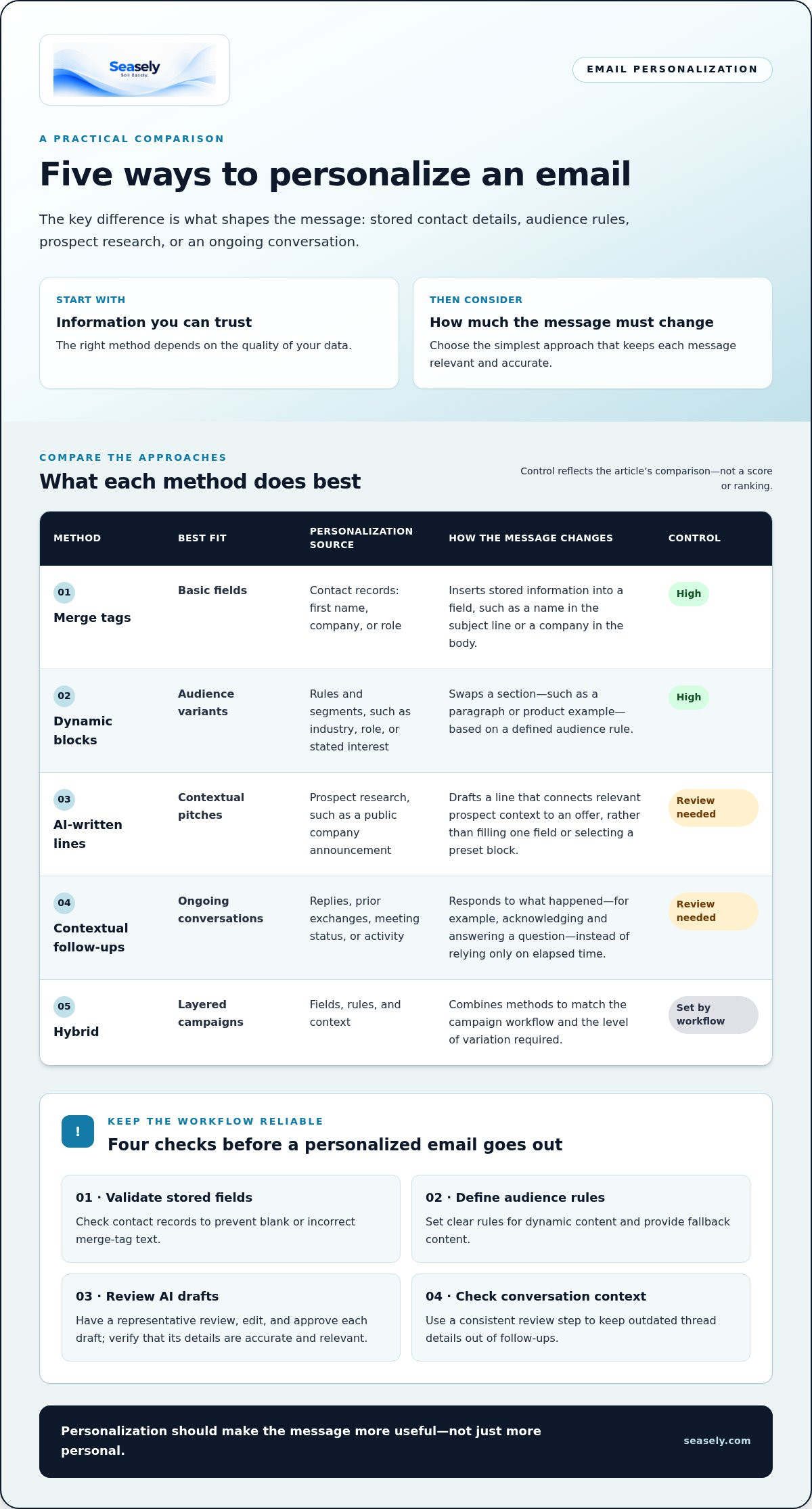
Merge tags insert stored information, such as a recipient’s first name, company, or role. They work well for consistent details, but depend on accurate records and do not interpret a prospect’s situation. For example, a subject line might use a first name while the body includes a company field. Validate fields before sending to avoid blank or incorrect text.
Dynamic Content Blocks
Dynamic content swaps an email section according to a defined audience rule, such as industry, role, or stated interest. Unlike a merge tag, it can change a full paragraph, product example, or call to action. A technology prospect might see a technical use case, while a finance prospect sees an operational one. Set clear rules and provide fallback content.
AI-Written Lines and Contextual Pitches
AI-generated lines can connect prospect research with a relevant pitch instead of simply filling one field or selecting a preset block. A representative might use a public company announcement or a relevant detail from a LinkedIn profile to link the prospect’s context to an offer. Review, edit, and approve each AI-generated draft before sending, and verify that its details are accurate and relevant.
Context-Aware Follow-Ups
A context-aware follow-up uses the prior exchange, meeting status, or prospect’s response to shape the next message. Unlike a fixed sequence, its content responds to what happened, not just how much time has passed. For example, acknowledge and directly answer a question the recipient raised. Use a consistent review step to keep outdated thread details out of outreach.
| Option | Best fit | Personalization source | Control |
|---|---|---|---|
| Merge tags | Basic fields | Contact records | High |
| Dynamic blocks | Audience variants | Rules and segments | High |
| AI-written lines | Contextual pitches | Prospect research | Review needed |
| Contextual follow-ups | Ongoing conversations | Replies and activity | Review needed |
| Hybrid | Layered campaigns | Fields, rules, context | Set by workflow |
Choose the simplest method that keeps each recipient’s message relevant and accurate.
Cold Email AI: Are the 5 Best Personalization Tools Effective or Creepy?
AI email personalization uses prospect data to shape an email’s wording, timing, or audience. Depending on the platform, it may use email activity, website behavior, company details, and social profiles to generate or send tailored content.
Audience Segmentation
Segmentation groups prospects with shared attributes so each group receives more relevant marketing. A platform might group companies by industry, role, or recent website activity, then select a dynamic message or template for each group. Data may come from a CRM, campaign interactions, company records, or public profiles such as LinkedIn. Tie each segment to a clear business reason. For example, a role-based segment can receive a role-relevant use case instead of a generic message.
Privacy and Consent
Make sure data access matches the purpose of the outreach. Use publicly available or properly consented data for personalization, and limit each prompt to details needed for the message. For U.S. cold email campaigns, the CAN-SPAM Act is a compliance consideration. When collecting and using data under GDPR, follow its requirements and conduct regular audits. Practical safeguards include documenting data sources, restricting access, and removing irrelevant personal details before sending information to an AI platform.
How AI Personalization Works
Unlike a fixed template, AI can use several data points to draft a contextual line. For example, it could connect a prospect’s company focus with a relevant business use case instead of inserting only a name. A controlled workflow has three steps: select relevant records, generate a draft, then review its claims and tone before sending. Keep a human approval step, especially when details come from a LinkedIn profile or past interaction. The platform can handle repeatable drafting, but the sender remains responsible for relevance and accuracy.
Campaign performance metrics and optimization
Measure personalized campaigns by connecting email engagement to qualified opportunities and outcomes. To assess ROI, compare the value attributed to campaign results with campaign costs, using a consistent attribution window and a clear comparison group.
Performance Measurement
Track delivery, clicks, replies, meetings, and qualified opportunities together. Opens can add context, but they’re an unreliable standalone measure: Apple Mail Privacy Protection downloads remote content in the background, regardless of recipient engagement. In field experiments, Sahni, Wheeler, and Chintagunta reported email opens rising from 9.05% to 10.80%, a 20% lift. Treat that result as one study, not a target for every campaign.
For campaign analytics, compare the personalized version with a suitable control group over the same measurement window. Then track the path from subject line to reply or meeting. If opens rise but replies do not, inspect the email content and offer. If clicks rise but qualified opportunities do not, review what happens after the click. Base ROI on business outcomes, not a single engagement metric.
Optimization Approaches
Change one variable at a time, such as the subject line, opening sentence, or call to action. Keep the audience and other email content consistent during the test. This helps isolate which edit influenced the result and gives the writing team a useful finding for the next campaign. Avoid changing several elements together, or you will not know which change mattered.
Monitor performance across comparable audience segments and review results after each campaign. Aguirre, Mahr, Grewal, de Ruyter, and Wetzels reported click-through rising from 0.017% to 0.077%, then falling to 0.032% as personalization intensified. The pattern is a useful reminder: more personalization isn’t automatically better. Ask whether each added detail helps the recipient act, and use engagement data to refine AI suggestions faster. Record the test, audience, and outcome so future campaigns can build on evidence rather than guesswork.
Open and response rates for personalized emails
Use opens to assess subject-line appeal and replies to assess message relevance. Examples include event-based outreach and segmented emails that adapt content to a recipient’s needs.
Open Rates
Open rates show whether a message was opened, but they don’t establish that the recipient read it. HubSpot reports that personalized subject lines are 26% more likely to be opened. Results can vary: Defau and Zauner’s replication found 56.9% opens for first-name subject lines versus 58.5% for the control, a non-significant decrease. Over 50% of emails are opened on mobile, so make the subject line and message easy to scan on small screens.
Response Rates
Response rates show whether personalization prompted a recipient to reply, making them a stronger signal of conversation than opens alone. Multi-point personalization is stated to increase reply rates by 142%, while referencing a specific event in a subject line can produce 2-3x the replies of name-only personalization. Focus on one relevant detail and a clear question, rather than adding personal references without a useful reason.
Engagement-Focused Campaign Examples
For an event-based campaign, an AI tool can connect a recent company announcement to a concise, relevant question. For a segmented campaign, a personalization tool can tailor the message and call to action to the recipient’s role. Review each version manually, then compare opens, clicks, and responses across the same audience. Keep emails readable on mobile.
Use automated email sending to put reviewed outreach into a consistent campaign workflow.
Seasely: Seasely AI outbound sales platform
Seasely’s AI outbound sales platform supports B2B teams that want to bring lead generation and email outreach into a coordinated workflow. It can help identify and qualify target companies, find decision-maker email addresses, and manage automatic email sending. Turn to the platform when your team needs a more structured way to move from prospect discovery to personalized outreach, rather than handling each step manually.
Personalization still depends on sound campaign choices. Define your audience, use relevant prospect context, and review generated messages before sending. Then use campaign performance to guide what to refine. Seasely’s focus on optimizing everything supports an ongoing process of adjusting outbound activity around the workflow and its results.
To discuss how Seasely fits your outbound process, visit seasely.com.
Turn Your Next Campaign into a Learning Loop
Make your next step a controlled campaign plan. Choose one audience, define what a useful response looks like, and record a baseline before changing your message. This gives your team a practical reference for deciding whether AI email personalization is improving the conversation, not just changing the copy.
Then assign clear ownership for each step: who validates prospect details, who approves generated messages, and who reviews results. A consistent workflow helps sales teams keep personalization relevant as outreach scales. Seasely brings lead generation and automatic email sending together in its AI outbound sales platform, giving B2B teams a way to coordinate prospect discovery and campaign execution.
When you’re ready to discuss how that workflow could fit your outreach, contact Seasely about email personalization. Start with one campaign, learn from the response, and build the next iteration with greater clarity.
Frequently Asked Questions
What Are Cold Email Artificial Intelligence Services?
Cold email AI services are software tools that help B2B teams identify prospects, draft tailored outreach, schedule sending, and organize replies. A typical workflow starts with a target company profile, uses relevant business context to shape a message, then routes the draft for review. Some platforms combine prospect discovery and sending; others focus on writing or analytics. The useful distinction is whether a system supports one task or a broader campaign workflow.
What Data Is Needed for Personalized Email Outreach?
Useful inputs include a recipient’s role and company, firmographic details, relevant website behavior, past email interactions, and appropriate social-profile information. An AI email personalization workflow should start with reliable business context that supports a clear message, such as the company’s industry and the prospect’s responsibilities. Add historical or behavioral signals only when they help tailor the outreach. Irrelevant details add noise and can make a message feel intrusive.
Which Tools Support AI Email Personalization in 2026?
The right tool in 2026 depends on the workflow your team needs, not a universal ranking. Compare whether platforms support audience segmentation, prospect research, draft review, campaign sending, reply management, and performance analytics. For example, a team focused on copy generation may prioritize approval controls, while a team managing outreach end to end may need prospect discovery and campaign tracking in one workflow. Assess the fit against your current process.
How Does AI Email Personalization Compare with Rule-Based Personalization?
Rule-based personalization selects content using conditions set in advance, such as industry or job role. AI can use several contextual inputs to generate more varied messages, but its output needs review for accuracy and relevance. A rule-based template offers predictable wording, while an AI draft can adapt more freely. Teams can combine both by using rules to define audience groups and AI to draft messages within approved boundaries.
How Much Can Personalized Email Campaigns Increase Open Rates and Conversions?
One reported comparison puts personalized email response rates 29% higher than generic bulk email. That figure isn’t a conversion forecast: opens, replies, qualified opportunities, and sales outcomes measure different stages. To assess your own campaign, compare a personalized group with a relevant control, then track qualified responses and conversions using the same attribution method. Keep audience, offer, and timing consistent so the comparison remains useful. AI email personalization is best evaluated against those campaign-specific outcomes.
What Privacy Laws Apply to AI Email Personalization in the United States?
For U.S. cold email campaigns, the CAN-SPAM Act is a key compliance consideration. The data used to personalize messages also matters: use publicly available or properly consented information, and limit AI prompts to relevant details. Document where prospect data came from and how it informs the message. If campaigns involve people or data subject to other privacy requirements, account for those obligations as part of the data-handling process.


