

A useful sales prospect list connects the right companies with the people who can make or influence buying decisions. Automated prospect list building creates that list through a repeatable workflow: define your ideal customer profile, discover matching companies, identify relevant contacts, qualify and verify their details, then prepare them for sales outreach.
It’s easy to start with a broad industry or job-title search, but a large list isn’t automatically useful. Company fit, contact accuracy, timing, and clear qualification rules determine whether records support relevant outreach or simply add noise to your pipeline.
This guide explains how to define your target market, find and qualify prospects, and prepare records for outreach. You’ll also learn how to connect the steps in an automated workflow, keep information current, and use sales outcomes to refine future lists. The goal is a practical system your team can maintain, not a one-off spreadsheet that quickly goes stale.
Key Takeaways
- Define your ideal customer profile, then qualify companies using firmographic, demographic, and technographic signals.
- Find relevant decision-makers by matching contact roles to account fit, and keep records useful with validation and enrichment.
- Build a repeatable workflow that discovers prospects, applies qualification rules, exports records, and learns from sales outcomes.
- Compare prospecting tools by how they handle data discovery, enrichment, export, and outreach within your sales process.
What is a sales prospect list?
A sales prospect list organizes target companies and relevant contacts for a B2B pipeline. Automated prospect list building turns research, qualification, and record creation into repeatable steps.
In the U.S., CAN-SPAM is a key law governing commercial email, while privacy laws may govern how personal data is collected and used. Apply the relevant rules based on the recipient’s location, the data source, and your outreach method.
Tool costs depend on record volume, user seats, enrichment depth, and integrations. Pricing depends on the case and is given after a quote request.
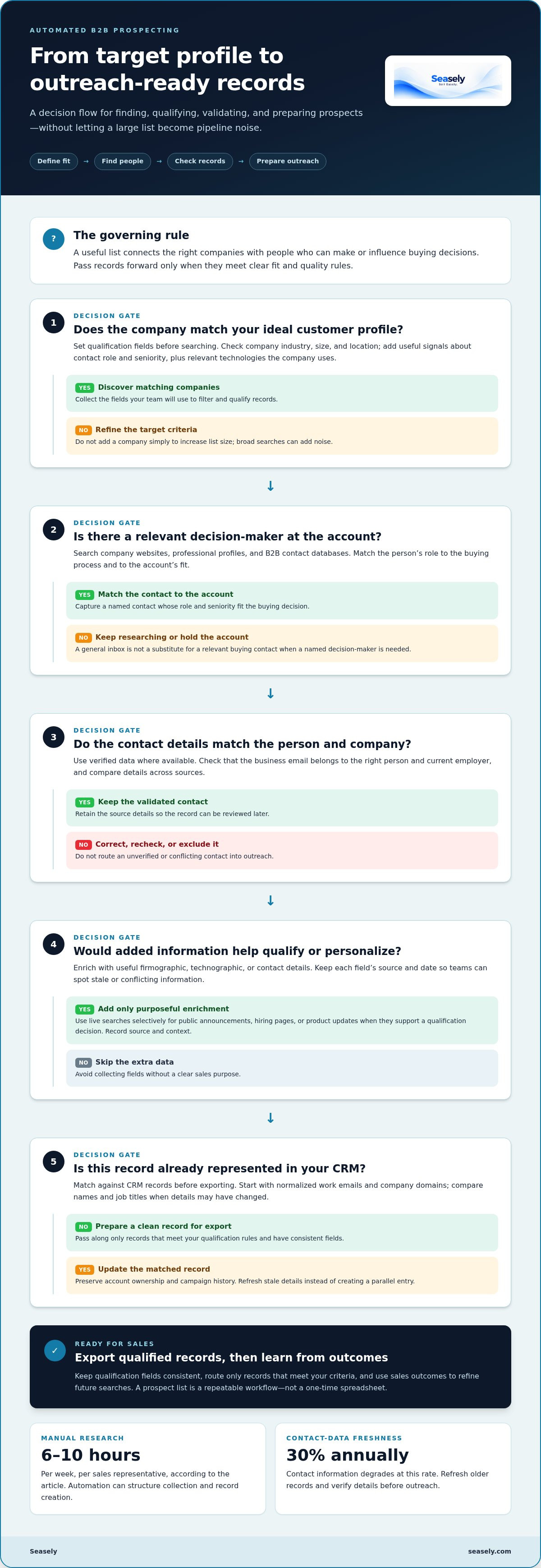
- Set your qualification fields. Define an ideal customer profile before searching. Use firmographic data such as industry, company size, and location. Add demographic details, including a contact’s role and seniority. Technographic signals show which software a company uses. For example, a team selling analytics software might prioritize companies already using cloud data platforms.
- Automate research and data entry. Manual research can take 6-10 hours per week per sales representative. Set software to collect matching companies, capture relevant fields, and create structured records. Review how each source supports its details. Keep fields consistent so sales representatives can filter records and move qualified prospects into the pipeline.
- Find and validate contact details. Search company websites, professional profiles such as LinkedIn, and B2B contact databases for relevant decision-makers. Match each contact to the account and buying role. Use verified contact data where available, then check that emails correspond to the right person and company before outreach.
- Enrich each record. Enrichment providers can add firmographic, technographic, and contact details to prospect records. Select fields that help assess fit or personalize outreach, rather than collecting data without a sales purpose. Keep the source and date attached to each field so teams can identify stale or conflicting details.
- Use live searches selectively. A real-time deep-web search can surface public company announcements, hiring pages, or product updates that indicate a relevant change. Add findings only when they support a qualification decision. Record the source and context, then route the enriched prospect through the same review rules as database results.
Will I find prospects in my market?
Start with your target accounts, then compare database coverage against their industries, locations, and roles. Contact availability depends on how closely your filters match the data sources.
-
Find prospects’ contact information
Search company websites, professional profiles, and B2B databases for named decision-makers. Match each person’s role to the buying process, then compare details across sources. For a target account, a finance leader may be more relevant than its general inbox. Validate the business email and current employer before adding the record to outreach campaigns. Contact information degrades at a rate of 30% annually, so refresh older records.
-
Choose between building and buying lists
Build a list when your market calls for precise filters or account-specific research. This gives your sales team control over sources, fields, and qualification rules. A purchased list may provide broad initial coverage, but its records may not match your ideal customer profile. Before using any list, assess sample records for role relevance, recency, and contact detail quality. Apply the same criteria whether you build or buy.
-
Assess database size and accuracy
Compare database coverage with your actual market, not its headline record count. For example, test whether Reply People Finder contains the industries, regions, and decision-maker roles your team targets. Contact-data accuracy for top prospecting platforms using human verification or real-time enrichment typically reaches 85-95%. Treat that range as a benchmark, then check a sample against company sites and professional profiles.
-
Skip contacts already in a CRM
Match new records against your CRM before exporting them to Salesforce or another system. Start with normalized work emails and company domains, then compare names and job titles to catch duplicates whose details have changed. Preserve account ownership and campaign history on each matched record. This helps prevent duplicate outreach and lets sales reps update stale records rather than create parallel entries.
Automated B2B prospect list building workflows
Create a connected process, not a one-time export. Each stage should pass qualified records forward, while sales outcomes help improve the next search.
-
Map the list-building workflow
Start with an ideal customer profile, then define discovery, qualification, enrichment, deduplication, and export. Include buyer intent and fit signals instead of relying only on static industry or job-title filters. For example, a software company expanding its sales team may be a stronger prospect than another company with the same industry label. Configure integrations to pass along only records that meet your criteria.
-
Compare prospecting automation tools
Compare tools by the workflow stages they cover: company discovery, contact data, enrichment, CRM sync, and outreach. Check how each tool handles sources, duplicate records, and field updates. A platform focused on contact discovery may need separate software for analytics or email campaigns. Gartner projects generative AI will reduce prospecting time by over 50% by 2026, but tool fit still depends on your process.
- Set qualification and refresh rules. Use a consistent score to route records. One suggested model assigns 40% to profile fit, 30% to active research and engagement, 20% to buying triggers, and 10% to relationship depth. Schedule enrichment daily or weekly so role changes and company updates can refresh records before sales reps act. Keep rules visible so teams can explain why a prospect entered the pipeline.
- Close the feedback loop. Feed meetings booked, disqualifications, and closed deals into the workflow. Review those outcomes in analytics and adjust the profile, source mix, or scoring rules. For example, if qualified accounts rarely convert after a particular trigger, reduce its weight. Track revenue outcomes alongside list quality, but don’t treat record volume alone as proof that workflows are working.
What tools automate prospect list building, and how do they compare?
Compare tools by the work they handle, the data they use, and how records move into sales outreach. A focused set of tools can be easier to manage than overlapping platforms.
- Choose a discovery tool for coverage. Prospect databases search company and contact records using filters such as role, industry, and location. Compare their coverage in your target market, not only total record counts. A database is useful when you need a starting pool of accounts. It may need enrichment or validation before records are ready for outreach.
- Use enrichment software to add context. Enrichment providers fill gaps in company or contact records. Clay, for example, can add firmographic, technographic, and contact details. Compare tools by the fields they can supply and how clearly they identify data sources. Avoid paying for fields your qualification process won’t use.
- Evaluate workflow automation separately. Workflow tools connect discovery, qualification, enrichment, and CRM updates. Check whether they support your existing integrations and duplicate-handling rules. A database may offer broad search, while a workflow tool focuses on moving selected records between systems. Map one target-account search through each product to expose gaps.
- Assess outreach and measurement features. An outreach platform can connect qualified records to email campaigns. Compare how it handles personalization, sending controls, and campaign reporting. Use deliverability and reply rates as operating measures: the page’s benchmarks are 98% or higher for deliverability and 8-12% for replies. Read those figures as targets, not promised results.
- Run a controlled tool test. Select a small group of sales reps and test one workflow for 30 days before a company-wide launch. Track record relevance, data accuracy, duplicate rates, and time spent fixing records. Compare results against your current process, then keep only tools that improve a defined stage.
Streamline prospect discovery and email outreach with a connected outbound workflow.
Seasely: Seasely AI outbound sales platform
Seasely brings prospect discovery and outbound activity into an AI-powered platform for B2B teams. Its lead generation supports the task of finding potential buyers, while Automatic Email sending helps teams move from qualified prospects to outreach. The platform also focuses on optimizing sales operations, making it a relevant next step when research, list management, and email execution need a more connected process.
Use automated prospect list building when you want to reduce manual handoffs between finding prospects and starting outreach. Define the companies and decision-makers you want to reach, then use a platform to support the outbound workflow. Keep qualification criteria clear and review sales outcomes to guide ongoing improvements.
To discuss how Seasely could fit your outbound workflow, contact Seasely.
Make Prospecting a Repeatable Operating Process
Make prospecting a routine with clear ownership. Assign someone to review list quality, gather sales-team feedback, and update targeting as the market shifts. This keeps automated prospect list building connected to real buying patterns, rather than fixed filters that no longer match your goals.
Choose a practical next step: refine your target profile, map the handoffs between research and outreach, or explore a platform that brings those activities together. Seasely’s AI outbound sales platform combines lead generation with Automatic Email sending to support B2B prospecting and outreach execution.
Start with the part of your process that needs the most structure, then build from there. Contact Seasely to discuss your prospecting needs and identify a suitable next step for your workflow.
Frequently Asked Questions
How do I get started?
Begin with one narrow market segment and a clear reason to contact it. Choose a customer profile based on existing wins, then define exclusions, such as company types your team cannot serve. Link each required field to a decision: account fit, contact relevance, or outreach context. Build a small test batch, review the records with sales, and adjust the filters before connecting the process to campaigns.
How to evolve your prospecting playbook?
Treat each campaign outcome as input for improving your playbook, not as a verdict on the entire market. Tag replies, meetings, disqualifications, and accounts that don’t respond with consistent reasons. Compare patterns by segment and message. Strong meeting activity in one industry may warrant more research there, while repeated role mismatches suggest tighter contact criteria. Change one rule at a time and record why, so you can see which adjustment affected results.
How do you build an automated prospect list step by step?
Build a gated sequence: define the account profile, discover companies, identify relevant people, enrich missing fields, validate records, remove CRM matches, then export approved contacts. Set a stop condition at every stage. For example, exclude a record from outreach if its company domain conflicts with its email address or its role falls outside the buying group. Send exceptions for human review rather than automatically passing incomplete records forward.
What data sources can automated prospecting tools use?
Automated tools may use public company websites, professional profiles, hiring pages, press releases, business directories, and licensed contact databases. Your CRM and first-party forms can add account history and consent context. Choose sources based on the field: company sites for products and locations, job postings for hiring signals, and contact databases for work details. Keep a source label and capture date with each field.
How accurate and up to date are automated prospect lists?
Record accuracy varies by field, source, and how recently a person or company has changed. A company domain or public role page may remain useful even after an email address changes, so assess each field separately. Flag bounced addresses, changed job titles, duplicate domains, and records without source dates for review. Before a campaign, validate fields that affect routing and message relevance. Refresh records after a reply, bounce, or account change.
How can you verify and enrich automated prospect data?
Verify a record by checking the person, role, and employer against the email domain, company website, and a current professional profile. Enrich only the fields needed for a decision, such as company technology, team growth, or a relevant business trigger. Store the source and date beside each added value, and distinguish observed facts from estimates. Review uncertain records manually before export, especially when sources disagree or an address appears to be shared.


