

Prospecting doesn’t have to start with hours of manual research. Sales prospecting emails introduce a relevant offer or idea to a potential buyer. Email outreach without manual prospecting uses a repeatable process to find suitable prospects, prepare relevant messages, and send them efficiently. Automation handles routine steps, while clear targeting and useful personalization keep outreach focused.
It’s reasonable to be wary of a system that sends generic emails to a large list. The goal is to reduce repetitive prospecting work without losing relevance or control. A well-built workflow filters poor-fit leads, checks contact details, and gives you a chance to review messages before they’re sent.
This guide walks through how to define your ideal customer profile, build and validate a prospect list, select and adapt email templates, and schedule outreach. You’ll also learn what to track, how to use the results to refine your process, and where automated prospecting can support a B2B sales workflow. The steps are designed to make outreach more consistent without treating every prospect as the same.
Key Takeaways
- Define your ideal customer profile before building a list so you can prioritize relevant accounts and decision-makers.
- Use verified contact details and prospect-specific context to make outreach more relevant and reduce avoidable workflow errors.
- Adapt a concise email template to the prospect’s needs, then set a consistent follow-up schedule.
- Track replies, bounces, and campaign topics to identify what needs refining.
- Use automation for repeatable prospecting tasks while keeping the ability to review messages and remove poor-fit leads.
Cold email templates
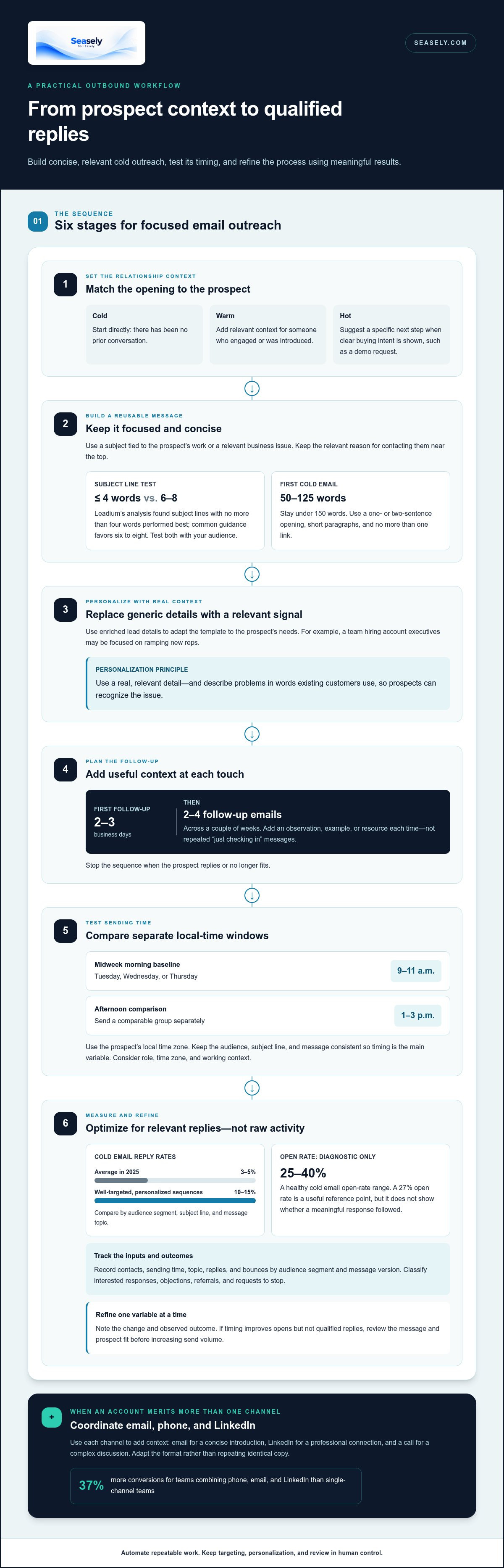
- Match the message to the prospect’s relationship with you. A cold email starts without a prior conversation; a warm prospect has engaged with your business or received an introduction. A hot prospect has shown clear buying intent, such as requesting a demonstration. Introduce yourself directly in cold outreach, add relevant context for warm contacts, and suggest a specific next step for hot leads.
- Build a reusable structure, then personalize key details. Keep the subject line focused on the prospect’s work or a relevant business issue. Leadium’s analysis found that subject lines with no more than four words performed best, while common guidance favors six to eight. Test both lengths with your audience rather than treating either as a universal rule.
- Keep the first cold email concise. Aim for 50-125 words and stay under 150. Limit the opening to one or two sentences, then use short paragraphs of one or two sentences. Include one link at most. A few seconds may decide whether the reader continues, so put the relevant reason for contacting them near the top.
- Use enriched lead details to make each template specific. For example: “Hi Alex, I noticed your team is hiring account executives. If ramping new reps is a current priority, I can share how teams structure outbound follow-up. Would a brief conversation be useful?” Replace the hiring signal with a real, relevant detail. Anthony Natoli recommends using existing customers’ words to describe problems prospects may recognize.
- Set a follow-up sequence before sending the first message. If there’s no reply, send the first follow-up within 2-3 business days. Then plan 2-4 follow-up emails across a couple of weeks, adding a useful observation, example, or resource each time. Avoid sending “just checking in” repeatedly. Stop the sequence when the prospect replies or no longer fits.
- Use email alongside calling and social selling when the account merits more than one channel. A follow-up plan might pair an email with a relevant LinkedIn connection request or a call. Teams combining phone, email, and LinkedIn see 37% more conversions than single-channel teams. Keep each touch consistent, but adapt its format to the channel and prospect.
- Measure replies against the audience and message, not opens alone. The average cold email reply rate was roughly 3-5% in 2025; well-targeted, personalized sequences achieve 10-15%. Compare results by audience segment, subject line, and message topic. If replies stay low, refine the prospect fit or opening before increasing send volume. Positive replies and qualified conversations matter more than raw activity.
Email timing and performance measurement
- Start with a controlled sending window. Schedule a test for Tuesday, Wednesday, or Thursday, between 9 and 11 a.m. in the prospect’s local time zone. Midweek mornings provide a practical baseline, not a fixed rule. Keep audience, subject line, and message consistent so timing is the main variable.
- Test an afternoon slot separately. Send a comparable group between 1 and 3 p.m. locally, then compare replies and qualified conversations. Don’t combine morning and afternoon results into one total. A sales team can use the comparison to identify a better starting window for each audience segment.
- Consider the prospect’s working context when scheduling. A message to an operations leader may land differently from one sent to a founder managing a busy inbox. Use account research to identify the person’s time zone, role, and business priorities. Schedule with that context in mind, then record the chosen window for later analysis.
- Choose channels based on the account and message. Email works well for a concise introduction; LinkedIn can support a professional connection, while a phone call may suit a complex discussion. Coordinate the sequence so each contact adds context. Don’t send identical copy across channels or repeat the same request.
- Track campaign inputs and outcomes. Record contacts, sending time, topic, replies, and bounces, grouped by audience segment and message version. This helps you see whether changes to timing, targeting, or copy align with changes in results.
- Use open rates as a diagnostic, not the final measure. A healthy cold email open rate is 25-40%. If opens fall below that range, review the subject line, sender identity, and audience fit. A 27% open rate is a useful reference point, but it doesn’t show whether the message generated a meaningful response.
- Prioritize replies and qualified next steps when assessing growth. Compare positive replies with total delivered emails, then review whether those replies lead to relevant conversations. Distinguish interested responses from objections, referrals, and requests to stop. This classification helps the team refine its message without treating every reply equally.
- Review results regularly and change one variable at a time. For example, compare two sending windows while keeping the audience and copy stable. Note the change, its date, and the observed outcome. If timing improves opens but not qualified replies, investigate the message and prospect fit before expanding the campaign.
Building an ideal customer profile and prospect list
Define your target account and buyer criteria before searching for contacts. A focused process keeps each prospect relevant to your sales strategy.
Build an Ideal Customer Profile
- Describe the companies most likely to benefit from your offer. Set criteria such as industry, business model, growth stage, and the problem your product addresses. For example, a B2B team selling workflow software might prioritize firms with distributed sales teams and complex handoffs. Use evidence from successful customer relationships to sharpen the profile.
- Specify which roles feel the problem and can act on it. A sales operations leader may own process changes, while a revenue executive may approve them. Separate decision-makers from users and influencers. Start with five priority accounts, then identify 2 to 5 suitable prospects within each. Avoid broad criteria that capture companies without a clear reason to connect.
Create a Prospect List
- Build a list of accounts that match your profile, then filter out poor fits before drafting templates. Record each company, contact, role, and the reason it belongs. A hiring signal, new market entry, or stated operational challenge can provide useful context. Use signals to prioritize prospects, then connect them to a real business need before reaching out.
- Keep the list manageable enough to review and personalize. Researching each account can take 30-60 minutes across multiple sources, while account intelligence platforms can reduce research to under 5 minutes. Use the saved time to assess fit and add context, not simply to expand volume. For selected accounts, identify three contacts when different roles may influence the decision.
Find and Verify Business Email Addresses
- Use a prospecting workflow that matches target companies to your profile, identifies relevant decision-makers, and finds their business email addresses. Review the company and person details together. A correct address for an unrelated role still makes for a poor prospect. Verify addresses before sending to reduce avoidable bounces and keep your list usable.
- Set a review gate before contacts enter an outbound sequence. Remove people who no longer fit, correct outdated roles, and retain the reason each prospect qualified. Check that the email, company, and personalization details align. This makes attention and follow-up more precise, and gives you a clearer basis for interpreting response rates as the list changes.
Definition and purpose of email prospecting
- Sales prospecting is the process of identifying potential buyers and starting a relevant business conversation. Email prospecting uses a direct message to connect with someone who hasn’t expressed buying intent. For example, a sales representative might contact an operations leader about a process challenge related to that person’s role. The goal is a useful next conversation, not an immediate sale.
- Distinguish prospecting from general promotion by naming a specific recipient and reason for reaching out. A newsletter speaks to an existing audience; a prospecting email addresses one person’s likely needs. Use the company, role, and relevant business context to explain your approach. Without that context, the message reads as generic, even if it describes a legitimate product.
- Use the first message to test relevance, not force a decision. Identify one pain point, explain how it relates to the buyer’s work, and offer a simple next step. For example, ask whether improving handoffs between sales and operations is a current priority. A clear question helps buyers respond with interest, a correction, or a better contact.
- Choose email based on the buying situation. Cold email suits busy professionals, initial outreach, and low-touch products because recipients can read and reply on their own schedule. A phone conversation may fit a complex product or high-value opportunity that needs immediate discussion. Match the channel to the decision’s complexity instead of sending every prospect the same sequence.
- Understand whether prospects are cold, warm, or hot before choosing your message. A cold contact has no prior relationship; a warm contact may know your business through an introduction or earlier interaction. A hot prospect has shown direct interest, such as asking about a product. Match your opening to that history, since an unexplained sales pitch can break trust.
- Set a practical objective for each campaign. A prospecting sequence can aim to confirm a challenge, identify the right decision-maker, or schedule a meeting. Don’t measure success only by revenue attributed to one email. Track whether the message creates qualified conversations, reveals objections, or helps your team prioritize accounts for the next step.
- Use buyer preferences to support, not replace, sound targeting. A RAIN Group survey found that 80 percent of buyers prefer communicating with sellers via email. That finding makes email a credible channel, but it doesn’t make every recipient a fit. The clearest takeaway: prospecting works when a defined buyer, a relevant reason, and a low-friction next step meet in one message.
How do automated prospecting platforms find and verify business email addresses?
- Start by defining the account criteria the platform should use. Add industry, company type, buyer role, and the business problem your offer addresses. For example, specify B2B software firms and operations leaders responsible for sales workflows. Clear inputs help the system focus discovery on target companies instead of returning a broad, unfiltered contact pool.
- Use the platform to discover companies that match your criteria. Review each company profile before looking for individual contacts. Check whether its products, market, and business context align with your target. Remove poor-fit accounts early. This keeps irrelevant companies out of contact discovery and prevents a matching job title from being mistaken for a suitable prospect.
- Identify decision-makers within each selected company. Compare each person’s role with the problem you aim to solve. A revenue leader may own sales outcomes, while an operations manager may handle workflow changes. Distinguish the likely buyer from the user and influencer. That role context makes an email more relevant than a company name alone.
- Add useful account context before drafting messages. Capture a relevant business signal, such as a hiring initiative or a change in company priorities. Then connect that signal to a plausible challenge for the contact. The signal helps prioritize outreach; the context explains why the message may matter to that person.
- Find business email addresses for selected contacts. Review each address alongside the contact’s name, role, and company. An address associated with a former employee or unrelated department, for example, won’t support a relevant introduction. Keep contact data tied to its account record so updates and corrections are easy to follow.
- Verify email addresses before adding contacts to a sending sequence. Automated prospecting workflows should check addresses before sending to reduce bounces and keep campaigns cleaner. Treat verification as a quality-control step, then review the associated contact details. An address can be deliverable and still belong to the wrong person or an account outside your target.
- Review the assembled list before activating outreach. Remove poor fits, correct mismatched roles, and check personalization details for accuracy. Keep leads, drafts, validation results, replies, and activity logs together where possible. A single workflow view makes it easier to catch a stale address or incorrect company match before sending.
- Keep the list current as company and contact details change. Add bounces and replies to the prospect record, then update or suppress contacts as appropriate. Compare list quality across account segments, not just total contact volume. This feedback loop helps future discovery find better-fit prospects and gives each sending decision a clearer basis.
Seasely: Seasely AI outbound sales platform
Seasely’s AI outbound sales platform supports B2B teams that want to reduce manual prospecting work. It discovers and qualifies target companies, identifies decision-makers, and delivers verified business email addresses. Automatic email sending helps teams run outreach from a more consistent workflow, with personalized messages for prospective clients.
Turn to Seasely when list building, contact research, and campaign execution take time away from sales conversations. The platform combines lead generation and outreach in one workflow, helping teams manage outbound tasks and refine their process. It supports the work without promising a particular sales result.
Visit seasely.com to explore how Seasely can support your outbound process.
Make your next outreach cycle more deliberate
Treat outreach as an operating process, not a one-off campaign. Choose a clear audience, define what a useful response looks like, and use each cycle to improve your decisions. That gives email outreach without manual prospecting a practical purpose: less repetitive work, with attention still focused on relevant buyers.
When prospect research and campaign execution are difficult to coordinate, Seasely’s AI outbound sales platform brings lead generation and automatic email sending into one workflow. It helps teams make prospecting more consistent while keeping the focus on fit and message relevance.
Decide which part of your current process consumes the most effort, then assess whether a more connected workflow would help. Contact Seasely to discuss your outreach and consider how an automated approach could fit your sales process. Build the system around clear priorities, refine it as you learn, and move forward with a process your team can sustain.
Frequently Asked Questions
How long should a first cold email be?
A first cold email should usually be 50-125 words. Give it one job: start a relevant conversation. Use a brief opening, one clear reason for contacting the recipient, and a simple next step. Before sending, remove background details that don’t help the recipient decide whether to respond. Read the message aloud once; any sentence that doesn’t support its purpose can go.
How do you personalize outreach without spending hours on research?
Use a small set of reliable details instead of researching every aspect of an account. Confirm the person’s role, the company’s business, and one relevant signal, such as a current hiring focus. Organize prospects by similar needs, then adapt the message to each group. Don’t insert a detail just because it’s available; it should explain why the outreach matters to that person.
How many follow-ups should a prospecting sequence include?
Plan 2-4 follow-up emails over a couple of weeks, adjusting the sequence when a prospect responds. That means the initial email plus follow-ups can make 3-5 email touches. Give each message a distinct purpose, such as adding context or offering a useful resource. Stop sending when the person replies, opts out, or no longer fits the target criteria.
What Is Sales Outreach, Exactly?
Sales outreach is the process of contacting potential buyers to start a business conversation. It can include email, phone calls, or professional social channels. Prospecting means finding and qualifying potential buyers; outreach is how a sales team approaches them. For example, a rep may identify a relevant account, then contact its operations leader with a focused question.
What tools automate lead generation and email outreach without manual prospecting?
Look for a B2B platform that combines target discovery, lead qualification, verified decision-maker contacts, personalized messages, and campaign sending. Seasely’s AI outbound sales platform brings these steps into one workflow. It sends through your own connected Gmail inbox or Google Workspace mailbox. That setup can reduce repetitive list-building and execution work while leaving teams responsible for choosing their audience and reviewing campaign performance.
What are the best email outreach automation tools for small businesses?
The best tool depends on how your team currently finds leads and manages outreach. A small B2B team may value one workflow for account discovery, contact qualification, personalization, and sending over separate systems that require manual handoffs. Check that the process fits your sales model and that sending uses a mailbox your team connects. Prioritize clear campaign controls and useful performance reporting.
How can AI personalize cold emails at scale without manual research?
AI can use prospect and company information to draft a distinct opening and follow-up sequence for each lead. A useful workflow connects a verified detail to the recipient’s likely business concern instead of simply swapping names into generic copy. Seasely creates personalized outreach and checks messages before sending. Messages that fail the check are held for review, giving teams a chance to correct weak or mismatched context.
How can businesses measure the results and ROI of automated email outreach?
Track delivered messages, replies, positive responses, meetings, and opportunities by campaign and audience. Calculate ROI by comparing attributable returns with campaign costs, using consistent attribution rules across campaigns. Separate estimated metrics from recorded outcomes; Seasely labels estimated numbers in its analytics view. Review the full path from reply to opportunity, since a high response count alone doesn’t show whether outreach is generating qualified business conversations.


