

The biggest prospecting list isn’t always the most useful. AI sales prospecting tools discover and qualify target companies, enrich contact records, and help teams prioritize prospects based on fit and available signals. A useful comparison looks beyond lead volume to data quality, CRM fit, prioritization, and support for your team’s workflow.
These tools can reduce manual research, but their value depends on what they help your team act on. This guide explains how AI prospecting works and how to compare tools for discovery, CRM data, prioritization, automation, and team fit. It also offers a practical way to match a tool’s capabilities to your sales process.
Key Takeaways
- Enrich CRM records with relevant company and contact context so sales-qualified leads are easier to identify and prioritize.
- Compare tools by how they handle automation, CRM integration, usability, analytics, customization, and support.
- Assess how AI discovers prospects and ranks them using fit and available signals, rather than judging a tool by lead volume alone.
- For B2B teams looking to automate prospect discovery and outreach, Seasely combines lead generation, email sending, and sales workflow optimization.
Enriched CRM data and sales-qualified leads
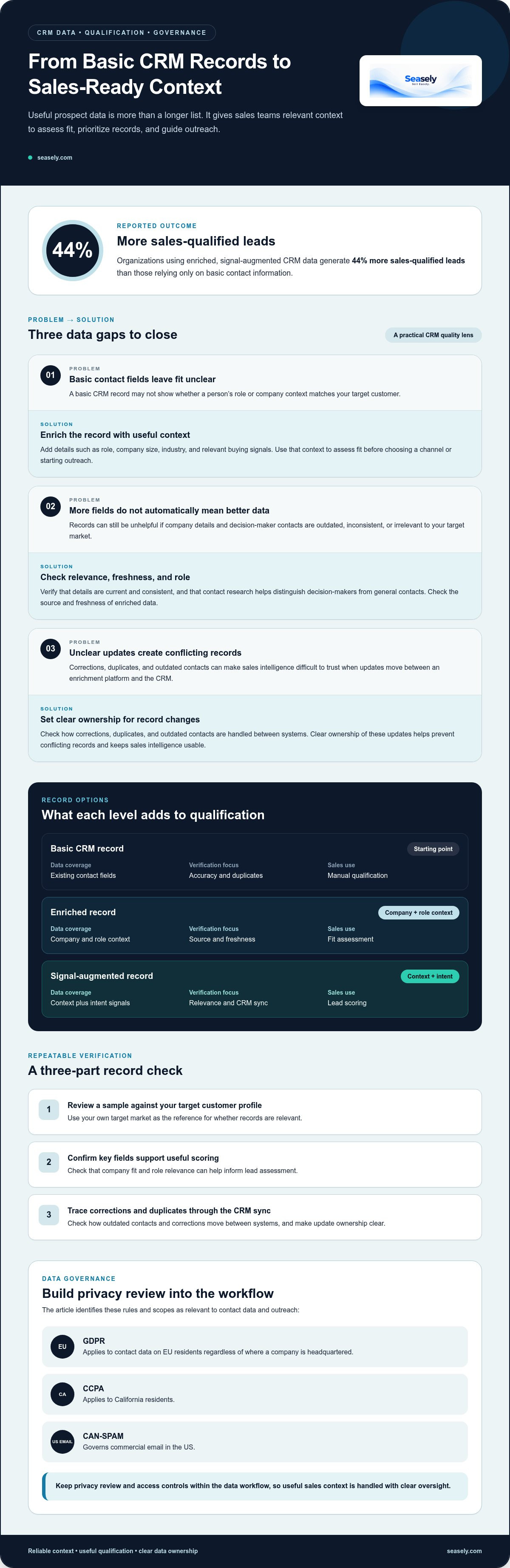
Enriched CRM data adds useful context to basic company and contact records. A record can include a person’s role, company size, industry, and relevant buying signals. These details help a sales team assess fit before choosing a channel or starting outreach. Organizations using enriched, signal-augmented CRM data generate 44% more sales-qualified leads than those relying only on basic contact information.
Quality depends on more than the number of fields. Compare platforms by checking whether company details and decision-maker contacts are current, consistent, and relevant to your target market. Contact research should also help distinguish decision-makers from general contacts. For example, a rep can review job role and company context before assigning a lead score. Tools such as Apollo may be part of an evaluation, but assess their records and workflows against your own criteria.
Use a repeatable verification process. First, review a sample of records against your target customer profile. Then confirm that key fields support useful scoring, such as company fit and role relevance. Finally, check how corrections, duplicates, and outdated contacts move between the enrichment platform and your CRM. Clear ownership of these updates helps prevent conflicting records and keeps sales intelligence usable.
Data governance matters when records support outreach. The European Union identifies GDPR as applying to contact data on EU residents regardless of where a company is headquartered. California Legislative Information identifies CCPA as applying to California residents. The Federal Trade Commission identifies CAN-SPAM as governing commercial email in the US. Build privacy review and access controls into your data workflow.
| Record option | Data coverage | Verification focus | Sales use |
|---|---|---|---|
| Basic CRM record | Existing contact fields | Accuracy and duplicates | Manual qualification |
| Enriched record | Company and role context | Source and freshness | Fit assessment |
| Signal-augmented record | Context plus intent signals | Relevance and CRM sync | Lead scoring |
Choose a tool that adds reliable context, connects cleanly to your CRM, and supports your team’s privacy process.
Evaluation criteria: automation, integration, usability, analytics, customization, and support
Leading tools differ in workflow coverage, CRM connections, reporting, and data quality. Compare the same sample accounts and fields across platforms to assess accuracy consistently.
For solo founders or teams with 1-2 reps, start with the narrowest product that addresses the main bottleneck. Teams with 3-10 reps can compare consolidated multichannel products with separate data, email, and LinkedIn tools. Teams with 10-50 reps should include permissions, CRM synchronization, reporting, support, and pricing changes. Enterprise teams with 50+ reps should assess security, procurement, data-processing terms, administration, implementation, and renewal conditions.
Outbound Workflow Automation
Evaluate a Clay-based workflow by how it connects account inputs, enrichment steps, and outbound actions. Map the process from target-account selection to a CRM update, then identify where someone must review or correct a record. This shows whether automation reduces manual handoffs or simply shifts them between tools.
Compare customization and usability together. Flexible workflows can accommodate different signals and account rules, but they also need clear controls that reps can maintain. Review how the platform records each step, handles missing fields, and reports workflow outcomes.
CRM Integration and Automation
CRM integration determines whether enriched account data and campaign activity reach the sales team’s working records. Evaluate field mapping, synchronization direction, duplicate handling, and permission controls. Then test a sample workflow: update an account, trigger an action, and confirm that the CRM reflects the change accurately.
For AI SDR agents, assess which campaign tasks they execute and which require human review. Analytics should make statuses and handoffs visible, while support should help resolve workflow issues. A simple, reliable sync can matter more than a long feature list.
Personalized Outreach Automation
Outreach automation varies in how it uses enrichment and signals to tailor messages. Compare whether personalization reflects relevant account context or merely inserts a contact field. Review the editing controls, approval steps, and reporting available for each campaign.
Check how easily teams can adjust messaging for different accounts and channels. Good usability lets reps inspect the context behind a message before it goes out. Choose a platform whose automation, CRM handling, and reporting match your team’s actual workflow.
What is AI sales prospecting?
AI sales prospecting applies machine learning and automation to identify potential buyers, assess fit, and guide outreach. A typical workflow combines company and contact data with intent signals, then ranks accounts for a sales representative. Predictive prospecting strategies have been associated with an 18% rise in conversion rates. The practical value comes from directing attention toward prospects whose context aligns with the offer, not simply producing a longer list.
Prioritization can inform an AI-assisted sequence. For example, a team can group accounts by industry and role, then tailor an opening message to a relevant business signal. A representative reviews the context, chooses an action, and adjusts the next step based on engagement. AI can help draft and organize outreach, while human review keeps each conversation aligned with the account and sales workflow.
For US businesses in 2026, the best fit depends on whether the main need is prospect discovery, CRM-led workflow, or coordinated outreach. Compare tools using the same target account and task: check data relevance, prioritization logic, personalization controls, and how activity connects to the sales process. Enterprise teams may prioritize workflow governance and reporting, while smaller teams may value a focused setup that is easier to operate.
Compare HubSpot and Outreach by testing the same sequence scenario in each. Track how each handles account context, message personalization, rep review, and engagement visibility. For LinkedIn or another channel, map the actions the workflow supports and where a person must take over. This makes the comparison about execution, not labels such as “AI-powered.”
Popular platforms structure pricing and plans around factors such as seats, data access, automation, and integrations. Pricing varies by requirements, which shape the cost provided after a quote request.
AI-powered prospect discovery and prioritization
AI discovery combines account data, fit criteria, and buying signals to surface prospects. A prospecting tool can search a database, identify matching companies, and rank them against a target profile. Predictive prospecting has helped one industrial manufacturer identify 10,000 potential customers. That demonstrates discovery’s reach, but volume alone doesn’t show which accounts belong in the pipeline.
Prioritization turns results into an ordered work queue. Define the characteristics of a strong account, such as industry, company profile, and relevant intent. Then compare the tool’s rankings with your sales team’s decisions. Build your AI sales prospecting tools comparison around identical account criteria to see whether each tool ranks the same prospects consistently.
Use a small evaluation workflow. First, select a representative group of target accounts. Next, inspect the evidence behind each score, including company fit and available signals. Then check whether decision-maker details are verified and whether duplicates appear. Finally, connect priority accounts to the CRM and track how reps act on the recommendations.
Measure quality beyond database volume. Compare how many discovered accounts match your target profile, how many verified contacts are usable, and whether sales accepts the suggested order. If a platform uses credits, track how credit consumption relates to usable records. Keep account criteria consistent across tools so differences reflect discovery and ranking, not inconsistent inputs.
Pipeline activity can inform refinement: identify which account attributes lead to productive conversations, then adjust scoring rules. Treat revenue as a downstream outcome, not a substitute for reviewing lead quality. Use the AI sales prospecting tools comparison to check whether rankings show useful evidence and help the team act on relevant signals. To put these steps into an outbound workflow, explore automated lead discovery.
Seasely: Seasely AI outbound sales platform
Seasely brings lead generation and outbound email into an AI-powered platform for B2B teams. It discovers and qualifies target companies, then delivers verified decision-maker email addresses for prospecting. Automatic email sending and personalized outreach messages support the next step, while optimization helps teams refine their outbound workflow.
Consider Seasely when your team wants to connect prospect discovery with email outreach in one process. It can support a workflow that starts with identifying relevant companies and continues through reaching prospective clients. The platform focuses on outbound sales operations, not inbox or email hosting.
To discuss whether Seasely fits your prospecting workflow, contact Seasely.
Turn your evaluation into a focused pilot
Make your next step a practical test. Choose a target customer segment, define what makes an account worth pursuing, and run the same workflow through your shortlisted tools. Record where each tool saves manual work, where sales representatives need to intervene, and which outputs they actually use. This gives your team evidence tied to its own process, rather than a feature list detached from daily work.
A useful comparison of AI sales prospecting tools should lead to a decision your team can act on. Keep your AI sales prospecting tools comparison grounded in the workflow your team needs to improve. Use the results to shape a focused AI sales prospecting tools comparison, with clear criteria and an owner for the evaluation. If discovery and outbound execution are the operational gaps you want to address, discuss your priorities with Seasely. Contact Seasely to discuss your prospecting needs.
Start with the workflow that creates the most friction, then refine it. A clear test can make tool selection a steady, manageable improvement.
Frequently Asked Questions
What are AI prospecting tools?
AI prospecting tools help sales teams identify and assess potential business buyers using data and automated analysis. For example, a team targeting manufacturers can define a company profile, find matching accounts, and review suggested contacts before outreach. The key distinction is how a tool supports decisions: does it provide relevant evidence for choosing the next account, or simply generate more names?
Which tools provide the best B2B contact and company data coverage in the United States?
Choose the tool that returns the most usable matches for your specific US target market. Test a representative sample of companies and roles, then compare missing fields, duplicates, and contact relevance against your own records. A broad database may still have gaps in a particular industry or region. Judge coverage by fit and record quality, not the size of a provider’s advertised database.
How do AI prospecting tools find, qualify, and prioritize leads?
These tools combine company and contact information with selection criteria, then help rank prospects for review. A practical test is to define an ideal account, inspect why several companies match, and check whether suggested contacts hold relevant roles. Your team can then compare rankings with its own qualification decisions. This makes it easier to spot weak criteria, stale records, or scores that don’t help reps choose an action.
What CRM and sales engagement integrations do AI prospecting tools support?
Integration options vary by platform, so evaluate the actual data flow rather than relying on a logo list. Check whether account fields, contact details, ownership, and activity move into the systems your team uses. For example, test how a corrected job title syncs and whether duplicate records appear. Seasely sends outreach from your own connected Gmail inbox or Google Workspace mailbox, connected via Google OAuth.
How do users rate leading AI sales prospecting tools for ease of use and ROI?
User ratings alone don’t establish whether a tool fits your process. Compare ease of use through representative tasks, such as finding an account, reviewing its context, and preparing an outreach step. Assess ROI against your own baseline: time spent on research, records accepted by reps, and follow-up work completed. A short, consistent evaluation gives teams a more relevant basis for choosing than a standalone rating.
What privacy and compliance risks apply to AI sales prospecting in the United States?
Key risks include using inaccurate contact records, exposing data to people without a business need, and sending commercial email without suitable review. The Federal Trade Commission identifies CAN-SPAM as governing commercial email in the US. California Legislative Information identifies CCPA as applying to California residents. Control data access, maintain a clear process for corrections and opt-outs, and review outreach practices for the contacts you target.


