

Your primary domain shouldn’t carry every cold-email risk. To protect domain reputation in cold email, separate outbound campaigns from your main domain, which you can reserve for customer support, internal communication, and partner or vendor email. A separate domain creates a clearer boundary, but still needs sound authentication, careful sending, and ongoing monitoring.
That separation matters, but it doesn’t replace good sending practices. Authentication records help receiving providers verify messages, while list quality, complaint rates, and sending patterns also affect reputation. If performance slips, respond to the signals you see and the severity of the problem.
This guide explains how SPF, DKIM, and DMARC support domain protection, what to assess in cold-email automation tools, and why recovery timelines vary. It also covers practical safeguards for your primary domain, so you can build outbound workflows without treating deliverability as an afterthought.
Key Takeaways
- Align SPF, DKIM, and DMARC on your sending domain so receiving providers can authenticate your messages.
- Track bounces, spam complaints, and domain health in your sending workflow, then respond to warning signals before scaling.
- Recover reputation gradually by reducing volume, prioritizing engaged recipients, and allowing performance to stabilize.
- Keep cold outreach separate from your primary domain to protect essential business email and maintain clearer reputation boundaries.
SPF, DKIM, and DMARC authentication
Email authentication connects a sending domain to the messages providers receive. SPF, DKIM, and DMARC check different aspects of sender identity, so configure them before increasing campaign volume.
Authentication and Sender Legitimacy
Email authentication uses domain-level checks to help providers verify who sent a message. SPF identifies authorized sending infrastructure, DKIM adds a cryptographic signature, and DMARC sets a policy for messages that fail alignment. These checks matter because conflicting identity signals can lead providers to flag legitimate outreach. A separate sending domain also keeps cold-email authentication apart from your primary domain’s configuration.
SPF and DKIM Setup
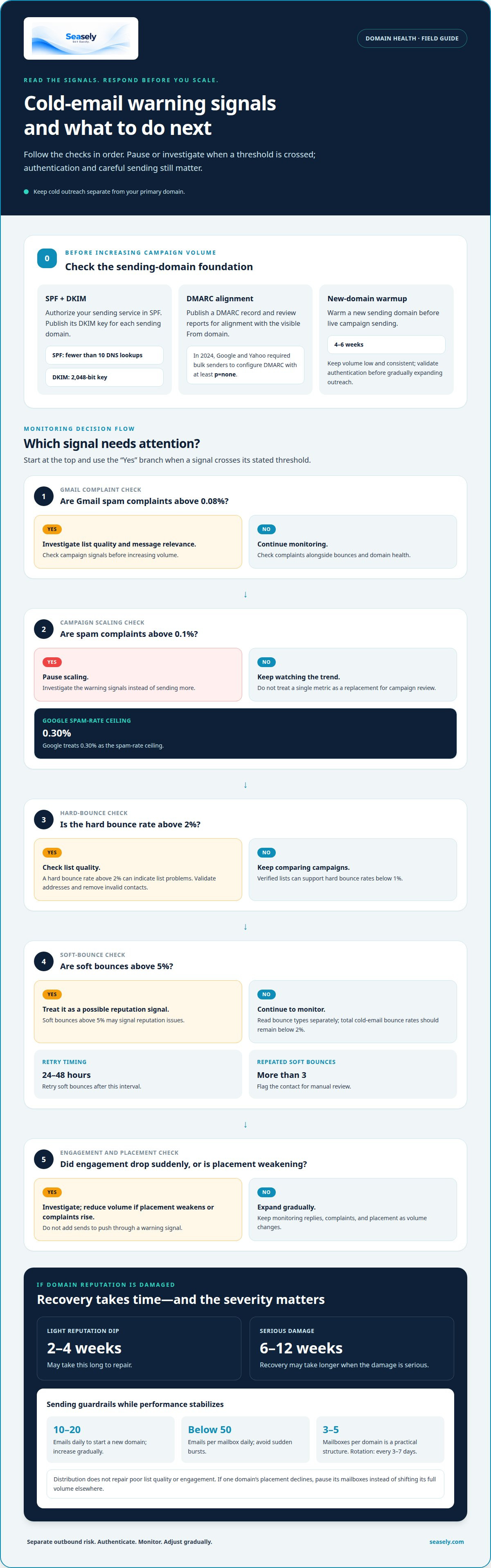
SPF and DKIM are DNS records that help receiving providers authenticate messages. Add your sending service to the SPF record, then publish the DKIM key it provides for the domain. Keep SPF below 10 DNS lookups, and configure DKIM with a 2,048-bit key for each sending domain. Review the records whenever sending infrastructure changes. A mismatch between the configured domain and the service sending mail can undermine authentication.
DMARC connects those checks to a policy for handling messages that fail authentication. In 2024, Google and Yahoo required bulk senders to configure DMARC with at least the p=none policy. Google also requires senders exceeding 5,000 emails per day to Gmail addresses to authenticate with DKIM and DMARC. Start by publishing a DMARC record, then review reports to see whether SPF and DKIM align with the visible From domain.
Authentication is only one part of a safe launch. Warm a new sending domain for 4-6 weeks before live campaign sending, while keeping volume consistent and low. RFC 6376 describes the DKIM signing standard, which supports message verification; it does not replace correct DNS configuration or careful sending. Validate SPF, DKIM, and DMARC first, then monitor results as you gradually expand outreach.
How Do the Top Cold Email Automation Tools Compare on Deliverability?
Compare tools by the signals they track, how quickly they surface problems, and how clearly they support list controls. If you want to protect domain reputation in cold email, make monitoring part of campaign operations rather than an occasional review.
Deliverability and Domain Health Monitoring
Deliverability monitoring tracks bounces, spam complaints, and domain health across campaigns. Google Postmaster Tools and email-service-provider analytics can surface reputation changes. Pause scaling when spam complaints exceed 0.1%, and investigate sudden engagement drops. Google treats 0.30% as the spam-rate ceiling. Tools are more useful when they connect campaign-level signals with sending-domain trends.
Read bounce types separately. A hard bounce rate above 2% can indicate list problems, while soft bounces above 5% may signal reputation issues. Retry soft bounces after 24-48 hours; flag a contact for manual review after more than 3 soft bounces. For Gmail, investigate list quality and message relevance when complaints exceed 0.08%. These checks help protect domain reputation during cold email outreach by making problems visible early.
List Verification and Bounce Control
List verification checks whether recipient addresses appear usable before a campaign sends. It can reduce hard bounces and help clarify whether weak engagement reflects poor targeting or delivery problems. Verified lists can support hard bounce rates below 1%, while total cold-email bounce rates should remain below 2%. Treat these figures as monitoring thresholds, not substitutes for reviewing each campaign’s results.
Build verification into the sending workflow: validate addresses before launch, remove invalid contacts, then compare bounce rates by campaign and domain. Avoid purchased lists, which can trigger complaints from recipients who didn’t expect outreach. SMTP rejection codes 550 and 551 can indicate invalid recipients. A consistent review process helps teams choose the right response instead of scaling through warning signals.
Costs of Verification and Deliverability Tools
Costs depend on verification volume, monitoring scope, and campaign features; pricing is provided after a quote request. Compare the operational fit: verification addresses list quality, while monitoring tracks campaign and domain signals. To protect your domain reputation in cold email, keep these controls visible in one workflow. Teams can also explore email workflow automation alongside them.
How Long Does It Take to Recover a Damaged Domain Reputation?
A light reputation dip may take 2 to 4 weeks to repair; serious damage can take 6 to 12 weeks. Start a new domain at 10-20 emails daily, then increase volume gradually while monitoring replies, complaints, and placement.
Mailbox Sending Limits and Throttling
A per-mailbox sending limit caps daily volume from one inbox, while throttling slows delivery when providers detect risk. Keep daily sending below 50 emails per mailbox, and avoid sudden bursts. For a new domain, start with a low, consistent sending volume and increase it gradually. If placement weakens or complaint rates rise, reduce volume instead of adding sends. A steady pattern gives providers time to assess the sending history.
Multi-Domain Sending and Inbox Rotation
Multi-domain sending spreads outreach across separate domains and mailboxes rather than concentrating every message in one place. A practical structure uses 3-to-5 mailboxes per domain. Rotate mailboxes every 3-7 days, while monitoring each domain’s bounce and complaint rates. Distribution does not repair poor list quality or engagement. If one domain shows declining placement, pause its mailboxes instead of shifting its full volume elsewhere.
Warmup Duration and Sending Ramp
Warmup builds a sending history through consistent, low-volume outreach before a domain carries full campaign volume. Allow at least 4 weeks before live campaigns, and increase volume by 10-20% each week. Keep messages consistent rather than sending in unpredictable bursts. During recovery, prioritize engaged recipients for 2 to 3 weeks. This measured ramp helps distinguish a temporary delivery issue from a continuing reputation problem.
Sending Volume and Engagement Practices
Engagement and complaint rates should guide whether volume increases, holds steady, or falls. Monitor inbox placement alongside replies; weak engagement is a reason to pause scaling. A light reputation dip may need 2 to 4 weeks, while a burned domain may take 8 to 12 weeks and may never recover. Dedicated IPs become justified at 100,000 or more emails monthly, but they still require careful volume management.
Protecting primary-domain reputation and deliverability
Keep your primary domain focused on customer support, internal communication, and partner or vendor messages. Use a separate domain or subdomain for cold outreach to create a clearer boundary around campaign activity. This separation limits exposure, but doesn’t make outreach risk-free. A separate sending domain still needs accurate records, controlled volume, and consistent monitoring to build a reliable history.
For consistent or scalable outreach, use a dedicated domain. A business sending fewer than 10 cold emails per day may use its established domain if that domain already has a strong reputation. For 0-500 daily sends, a cold-email subdomain is one recommended structure. Keep cold campaigns off the primary domain, and don’t use it as a backup when a separate sender’s inbox placement falls.
Before production campaigns, warm a new sending domain for 4-6 weeks and aim for inbox placement above 90% in placement tests. Test domain variations with DNS time-to-live values between 300 and 3,600 seconds. These shorter settings help changes propagate during testing. A list of 1,000 valid addresses can still be risky if sent from a new domain or delivered in one burst.
Track bounce rates and spam complaints by sending domain, not just across the full campaign. If one domain’s metrics worsen, pause its outreach while keeping customer-service email on your primary domain. Authentication records support sender checks, but they can’t erase a poor sending history or prevent filtering. Keep campaign volume consistent, review placement trends, and don’t move a struggling campaign to your main domain.
Build a more controlled outbound workflow with campaign planning and sending automation.
Seasely: Seasely AI outbound sales platform
Seasely brings lead generation and automatic email sending into an AI outbound sales platform for B2B teams. It can help teams coordinate prospect discovery, personalized outreach, and ongoing optimization within their outbound workflow.
Use automation when you’re ready to operationalize outreach with domain safeguards, authentication, and monitoring in place. Keep sending limits and reputation checks in your campaign process. Automation can support execution, but disciplined sending remains essential.
Visit seasely.com to explore how Seasely can fit your outbound workflow.
Build Deliverability Into Your Outbound Workflow
Domain protection is an ongoing discipline, not a one-time setup task. Treat each campaign as a feedback loop: review performance, identify emerging risks, and adjust before a small issue spreads across your sending infrastructure. This helps protect your domain reputation during cold-email outreach while keeping business-critical communication separate.
Make reputation safeguards part of how your team plans and runs outbound campaigns. Assign responsibility for reviewing deliverability signals, responding to changes, and deciding when to pause sending. Clear ownership turns monitoring into an operational control rather than a report that goes unread.
For support with your outbound workflow, contact Seasely about cold email. A steady process gives your team a stronger foundation for responsible outreach and continued improvement.
Frequently Asked Questions
What Does "Domain Reputation Protection" Actually Mean?
Domain reputation protection means managing sending practices so providers continue to treat your messages as legitimate. It involves separating outbound activity from essential business email, maintaining authentication, and responding to delivery problems. For example, if a campaign starts generating unusual bounces, pause it and investigate the affected list before sending again. Protection is an ongoing process, not a one-time setting.
Do you need a dedicated domain?
A separate domain is a sensible safeguard for regular or scalable cold outreach because it keeps campaign activity apart from customer and internal email. Choose a domain recipients can clearly associate with your business, rather than an unrelated name that may seem unfamiliar. Keep its purpose consistent. It still needs its own authentication, monitoring, and careful sending practices.
How Should Email Warmup Actually Work?
Warmup can help establish a steady sending history before a domain handles planned campaign volume. Start with genuine, relevant messages to engaged recipients, then increase volume gradually only while delivery signals remain stable. Avoid sudden bursts, and don’t treat a calendar schedule as permission to scale regardless of results. If complaints rise or inbox placement falls, hold or reduce volume while you investigate.
How many emails per day can you safely send per mailbox?
Keep daily sending below 50 emails per mailbox as a cautious operating limit. That figure is not a universal safe allowance: domain age, recipient engagement, list quality, and recent delivery results all affect risk. Also assess the combined pattern across mailboxes and domains. Splitting a large campaign among inboxes doesn’t make poor targeting or abrupt volume increases safe.
What Are the Red Flags That a Cold Email Tool Will Hurt Your Deliverability?
Watch for tools that hide bounce and complaint data, treat every bounce the same, or make it difficult to stop sending to problem addresses. Automatic scaling without regard to domain health or engagement is another warning sign. Before relying on automation, confirm that your workflow lets you review performance by campaign and suppress contacts who should no longer receive messages.
What is domain reputation in cold email and how is it measured?
Domain reputation is the assessment providers form from a domain’s sending history and recipient responses. It isn’t a universal score that every provider displays. Evaluate signals together, including inbox placement, bounce patterns, spam complaints, and changes in engagement. A healthy open rate alone doesn’t prove strong reputation, so compare trends over time and across receiving providers.


